
Automatically Open Contact URL on Incoming Calls
The Cloud Voice App can tie into a web-based business application, such as a CRM (Customer Relationship Management) or ERP (Enterprise Resource Planning) system, so the right customer record is in front of you the moment a call comes in. This feature is called a call popup. You point the app at a web address (URL), tell it which caller details to include, and it either opens that page on its own when a call arrives or lets you pull it up by hand while you are on the line.
Before you begin
Section titled “Before you begin”Confirm the following before setting up the integration:
- Cloud Voice platform: Your account must run platform version
84.21.0.16or later. IZT keeps the hosted platform up to date, so this is met for most accounts. - Cloud Voice App (Desktop): Version
1.10.2or later. - Third-party application: The application must be web-based and able to serve a URL that identifies a caller from their Caller ID and Caller ID Name.
Configure the call popup
Section titled “Configure the call popup”-
Sign in to the Cloud Voice App on your desktop and open Preferences > Features > Call Popup.
-
Select the Open Contact URL Using Custom Popup URL checkbox.
-
Fill in the fields described below to link the app to your application.
Setting What it does Popup URL The address of the page to open, with the caller variables you want to pass appended to it. The app substitutes real call data for each variable at popup time. See the variable reference below. Communication Type Chooses which calls trigger the popup. You can select one or both:
Inbound: calls arriving from outside callers.
Internal: calls from colleagues on your account.Popup Method Decides whether the page opens on its own or on demand. See Choose how the page opens. The variables you can add to the Popup URL are:
Variable Value passed .{{.CallerNumber}}Caller ID of the incoming call .{{.CallerDisplayName}}Caller ID Name of the incoming call .{{.DIDNumber}}DID (Direct Inward Dialing) number the call came in on, that is, the specific phone number the outside caller dialed (inbound calls only) .{{.DIDName}}DID name the call came in on (inbound calls only) .{{.StartTime}}Time the call began For example, a URL that hands the caller’s number and name to a CRM lookup might read:
https://crm.example.com/contacts?number={{.CallerNumber}}&name={{.CallerDisplayName}} -
Select Save.
Choose how the page opens
Section titled “Choose how the page opens”Under Popup Method, pick one of the following.
-
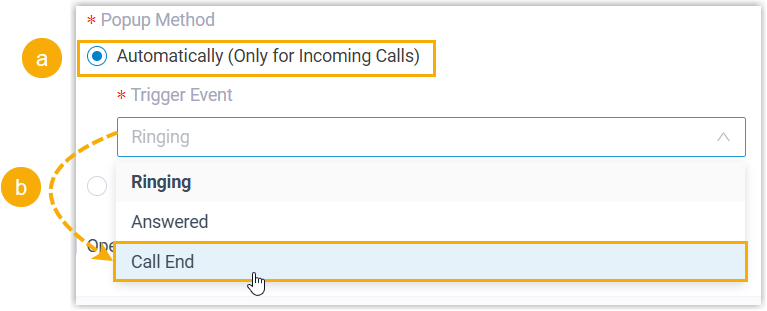
Automatically (Only for Incoming Calls): the app opens the contact page by itself for incoming calls. After choosing this option, use the Trigger Event drop-down to set the moment the page appears:
- Ringing: as soon as the incoming call arrives.
- Answered: when you pick up the call.
- Call End: after the call finishes.
-
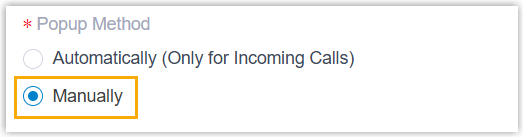
Manually: the page stays closed until you choose to open it during a call.
What happens next
Section titled “What happens next”-
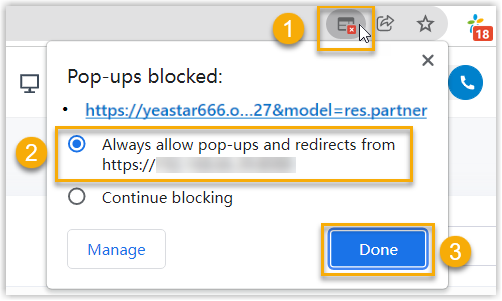
With automatic popup configured, a browser page opens on its own at the event you chose whenever a call reaches your extension, showing the matching customer details.
-
With manual popup configured, select the
CRMlabel on the call window to open the contact’s page while you are on the call.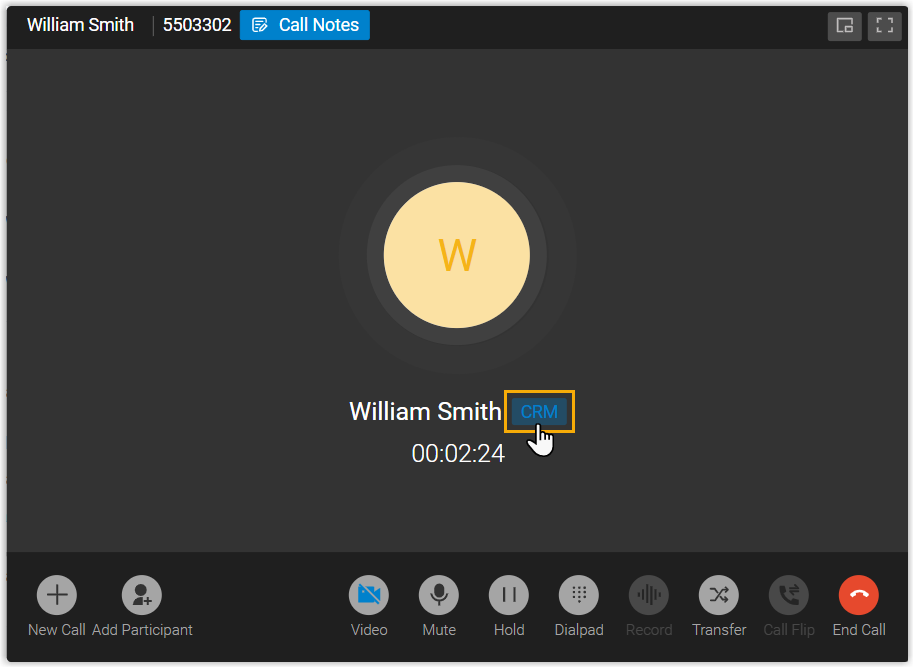
Question about this page?
Ask the AI assistant. It starts from this page, then searches the rest of the docs.
Ask Cloud Voice AI
Answers are AI-generated from the docs and may contain mistakes. Verify with the linked pages.