
Set the Desktop App to Run at Startup on a Computer
If you rely on the Cloud Voice App throughout your workday, you can have the desktop app open on its own whenever you start your computer, so it is ready and running before you need it. You set this once per computer, in the app’s own settings.
Turn on Auto Startup
Section titled “Turn on Auto Startup”-
Open the Cloud Voice App desktop app’s settings. Where you find them depends on your operating system.
-
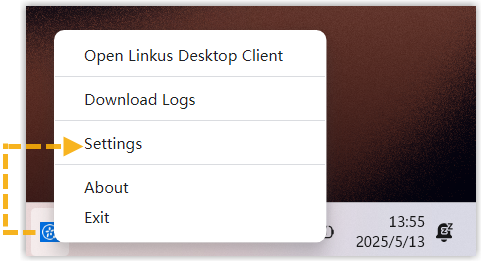
Windows: In the system tray, right-click the Cloud Voice App icon and choose Settings.
-
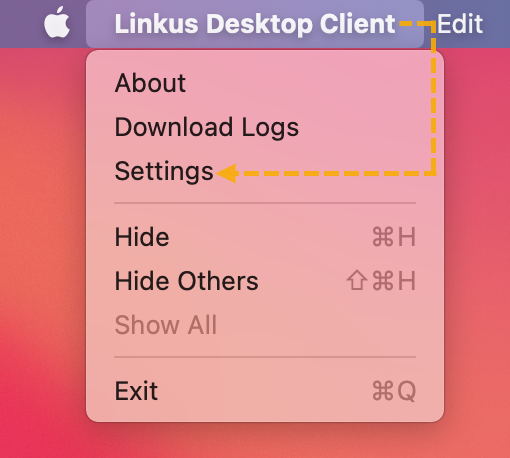
macOS: In the app menu, click Cloud Voice App and choose Settings.
-
-
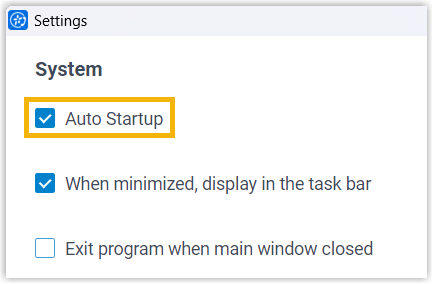
Under System, select the Auto Startup checkbox.
Result
Section titled “Result”From now on, the Cloud Voice App desktop app launches automatically when your computer boots.
Question about this page?
Ask the AI assistant. It starts from this page, then searches the rest of the docs.
Ask Cloud Voice AI
Answers are AI-generated from the docs and may contain mistakes. Verify with the linked pages.