
View Outbound Caller ID
An outbound caller ID is the number and name presented to the person you are calling when your call leaves through a particular trunk (a trunk is the connection that carries your calls out to the phone network). This page shows you where to review the outbound caller IDs your administrator has assigned to you.
Why this matters
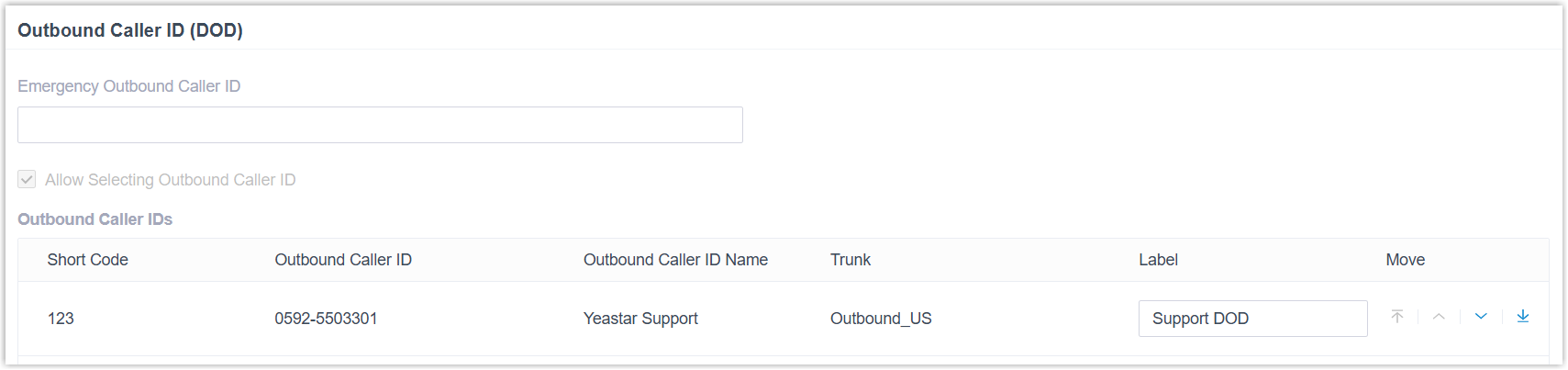
Section titled “Why this matters”Suppose you work on a support team and place your customer calls over a trunk named Outbound_US. Your administrator can pair that trunk with a fixed outbound caller ID number (for example, 0592-5503301) and a fixed outbound caller ID name (for example, Cloud Voice Support). Every time you dial out through Outbound_US, the recipient’s phone shows Cloud Voice Support <0592-5503301>, giving them a reliable way to confirm who is calling.
View your outbound caller IDs
Section titled “View your outbound caller IDs”- Sign in to the Cloud Voice App (desktop).
- Go to Preferences > User > Outbound Caller ID (DOD) > Outbound Caller IDs.
The list shows every outbound caller ID (DOD) your administrator has set up for you, including its short code, caller ID number, caller ID name, and the trunk it belongs to. You can also assign your own label to each DOD number so it is easier to tell them apart.
Question about this page?
Ask the AI assistant. It starts from this page, then searches the rest of the docs.
Ask Cloud Voice AI
Answers are AI-generated from the docs and may contain mistakes. Verify with the linked pages.