
Configure Two-Factor Authentication with an Authenticator App
Two-factor authentication adds a second check to your account login: after your password, you also supply a short code produced by an authenticator app on your phone. This page walks through turning that on from the desktop client.
Before you begin
Section titled “Before you begin”Install a supported authenticator app on your mobile phone. Any of these will work:
- Google Authenticator
- FreeOTP
- Twilio Authy
- Microsoft Authenticator
Turn on two-factor authentication
Section titled “Turn on two-factor authentication”-
In the desktop client, select your account in the top-right corner, then open Change Password & Security > Security Settings.
-
Tick the Two-Factor Authentication checkbox.
-
When the Password dialog appears, type your account password and click Confirm to authorize the change.
-
Choose Authenticated by Authenticator.
-
Register your account in the authenticator app using one of the two methods below.
Option A, Scan the QR code (fastest)
-
Open the authenticator app on your phone and choose to scan a QR code.
-
Point your phone at the QR code displayed in the desktop client.
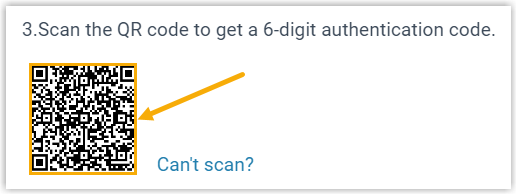
The app registers your account on its own and immediately starts showing a 6-digit code.
Option B, Enter a secret key manually
Use this if scanning isn’t possible.
-
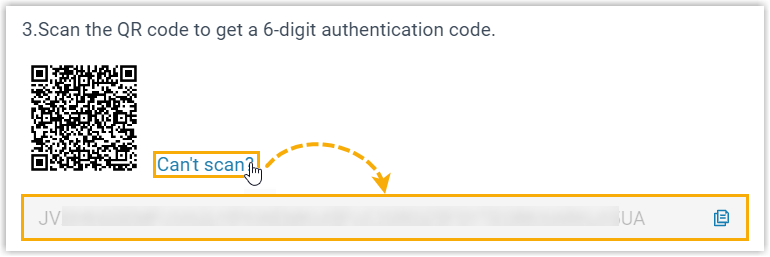
In the desktop client, click Can’t scan next to the QR code. A secret key appears beneath it, write it down.
-
Open the authenticator app on your phone and choose to add an account manually.
-
Fill in the account details and paste the secret key.
Your account is added and a 6-digit code appears.
-
-
Back in the desktop client, type the current 6-digit code into the Authentication Code field.
-
Click Save.
What happens next
Section titled “What happens next”- An Edited successfully. confirmation means two-factor authentication is now active.
- From now on, signing in to any Cloud Voice App client, web, desktop, or mobile, with your extension email address and password also prompts you for an authentication code.
Question about this page?
Ask the AI assistant. It starts from this page, then searches the rest of the docs.
Ask Cloud Voice AI
Answers are AI-generated from the docs and may contain mistakes. Verify with the linked pages.