
Enable Auto Answer for Non-paging/intercom Calls
Auto answer lets the Cloud Voice App connect incoming non-paging and intercom calls for you, so there is no need to tap to accept each one and callers spend less time waiting. This page walks through turning the feature on and adjusting how it behaves.
Before you begin
Section titled “Before you begin”Make sure your mobile app meets the minimum version:
- Cloud Voice App on iOS: 5.8.2 or later
- Cloud Voice App on Android: 5.8.3 or later
Turn on auto answer
Section titled “Turn on auto answer”- From the Calls screen, tap your account in the top-left corner.
- Open Settings > Advanced.
- Switch Auto Answer on, then set the options below to suit how you work.
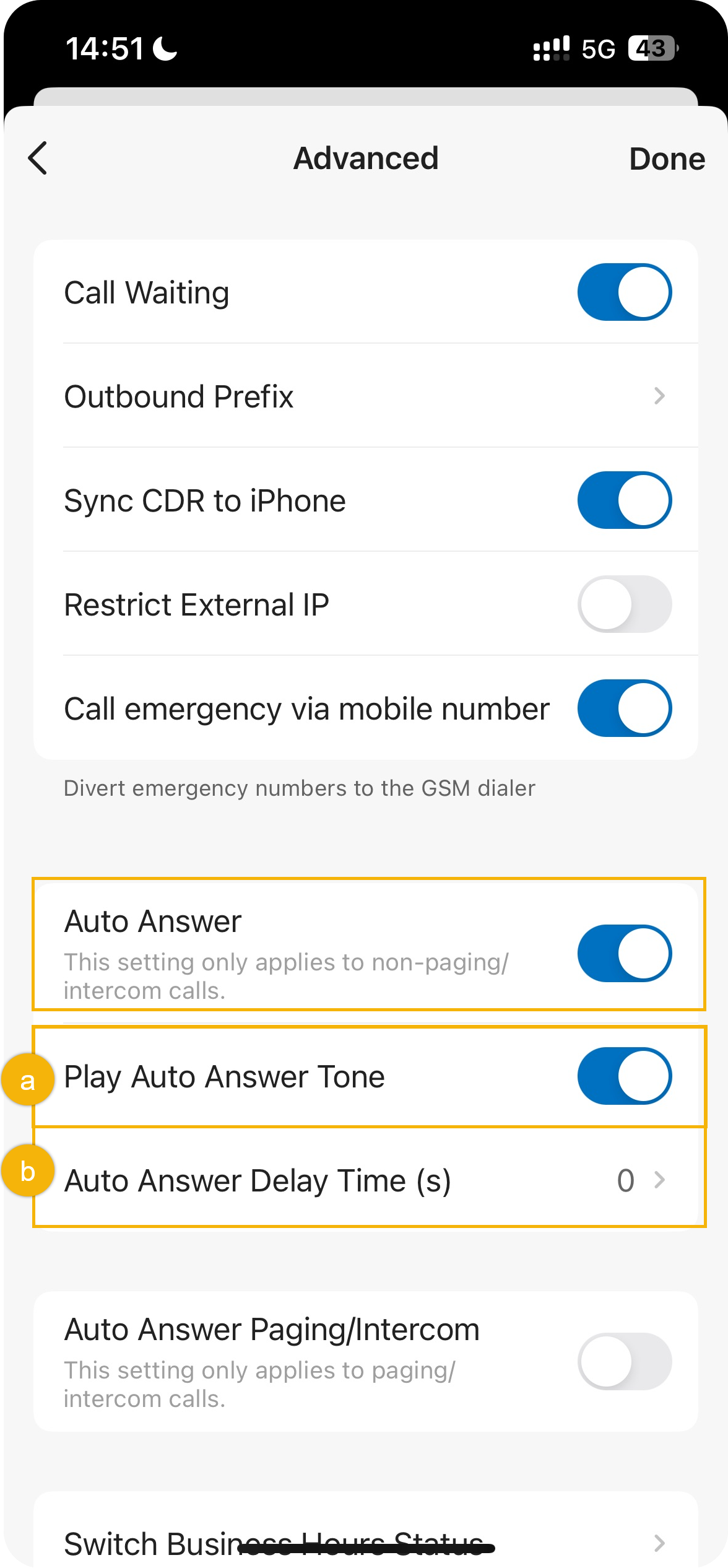
- Play Auto Answer Tone: Turn this on to hear a short beep whenever a non-paging or intercom call is answered for you.
- Auto Answer Delay Time(s): Choose how many seconds a caller waits before the app connects the call. Enter any value from 0 to 60; a value of 0 answers incoming non-paging and intercom calls right away.
What happens next
Section titled “What happens next”Once enabled, non-paging and intercom calls are picked up automatically after the delay you set.
Question about this page?
Ask the AI assistant. It starts from this page, then searches the rest of the docs.
Ask Cloud Voice AI
About
Answers are AI-generated from the docs and may contain mistakes. Verify with the linked pages.