
Log in to the Desktop App with One Click
If you are already signed in to the Cloud Voice App in your web browser, you can open the desktop app from there in a single click. No username, password, or extension number is required the second time around. Your extension is the internal phone identity the system assigns to you (the number colleagues dial to reach you inside the company).
Before you start
Section titled “Before you start”- Install the Cloud Voice App for desktop on your computer.
- Sign in to the Cloud Voice App in your web browser.
Launch the desktop app
Section titled “Launch the desktop app”-
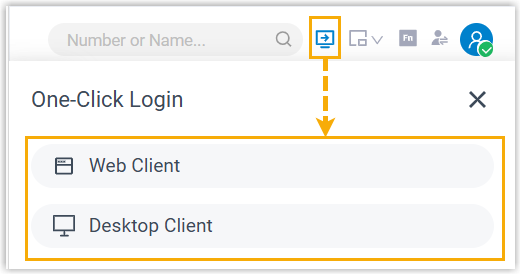
In the browser-based Cloud Voice App, click
 on the top bar, then click
  .
.
Your web browser then asks whether you want to allow it to open the application.
-
Respond to the prompt:
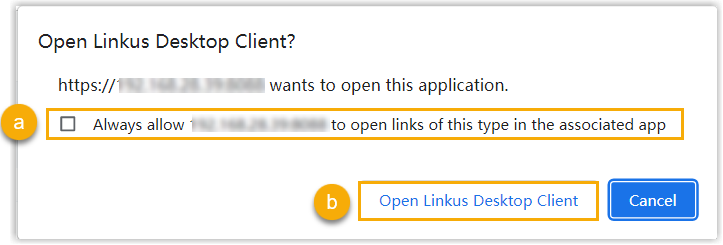
a. To skip this prompt on future launches, select the checkbox to always allow it.
b. Click the button to open the desktop app.
You are signed in to the desktop app immediately, without entering any credentials.
Question about this page?
Ask the AI assistant. It starts from this page, then searches the rest of the docs.
Ask Cloud Voice AI
Answers are AI-generated from the docs and may contain mistakes. Verify with the linked pages.