
Set up Auto Answer for Paging/Intercom Calls
Paging and intercom calls are meant to reach you instantly, so having to click to accept each one defeats the purpose. Turn on auto answer in the Cloud Voice App and these calls connect on their own the moment they arrive.
Before you begin
Section titled “Before you begin”You need version 1.8.3 or later of the Cloud Voice App desktop client. If auto answer is missing from your Preferences, check that the app is updated to at least this version.
Turn on auto answer
Section titled “Turn on auto answer”-
Open the Cloud Voice App desktop client and go to Preferences > Features.
-
Under Call, tick Auto Answer Paging/Intercom Call. Two related options become available, which you can set to suit how you want the feature to behave:
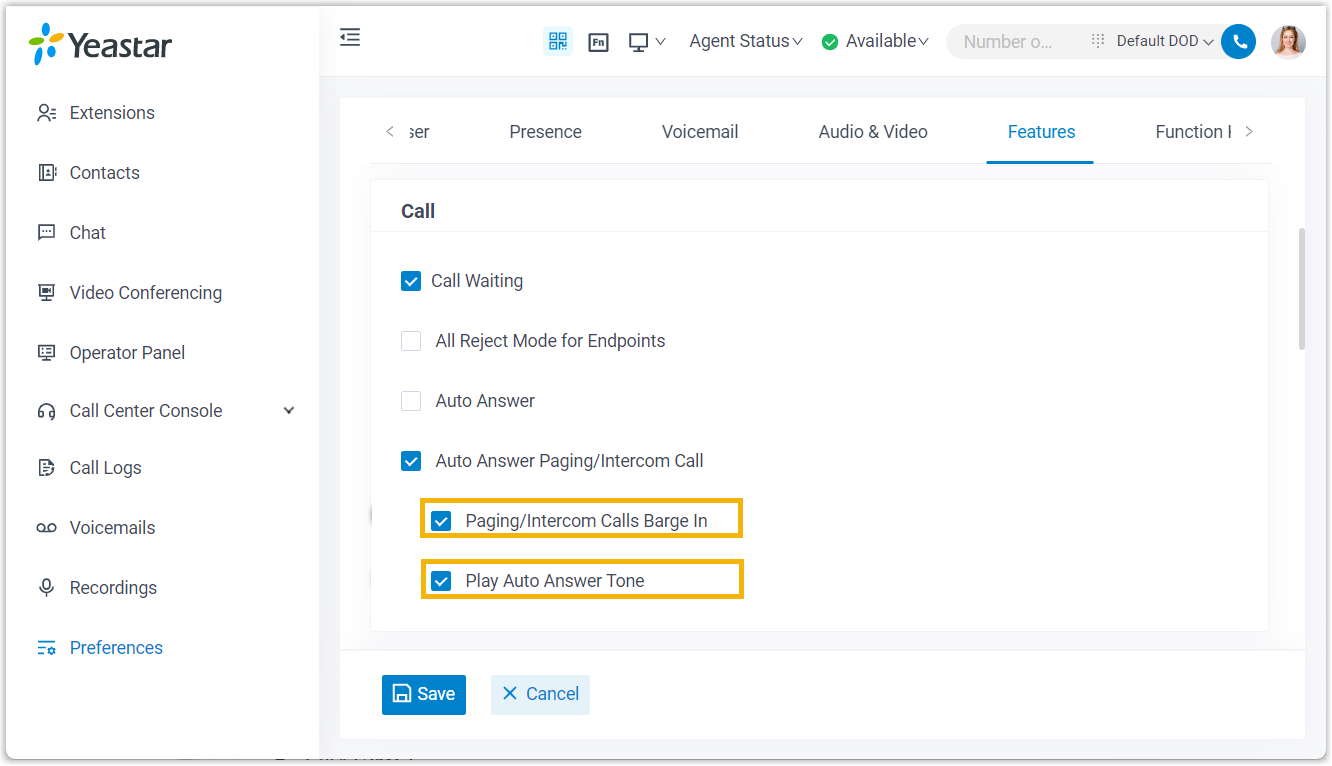
- Paging/Intercom Calls Barge In: With this on, an incoming paging or intercom call is answered automatically even while you are on another active call. With it off, auto answer is skipped whenever you are already on a call.
- Play Auto Answer Tone: With this on, a short beep plays whenever a paging or intercom call is picked up for you, so you know the line has opened.
-
Click Save.
Result
Section titled “Result”From now on, paging and intercom calls connect automatically without any action from you.
Question about this page?
Ask the AI assistant. It starts from this page, then searches the rest of the docs.
Ask Cloud Voice AI
Answers are AI-generated from the docs and may contain mistakes. Verify with the linked pages.