
View Outbound Caller ID
When you place an outbound call, the number and name shown on the recipient’s phone come from the trunk your call uses. This page explains how to review the outbound caller IDs assigned to your extension in the Cloud Voice App, so you know what other people see when you call them.
How outbound caller ID works
Section titled “How outbound caller ID works”Each outbound trunk (the connection that carries your call to the outside phone network) has a caller ID attached to it. By default, a trunk uses one shared number for everyone who dials through it. For example, if your administrator configures a trunk named “Outbound_US” with the caller ID “90001”, every outbound call over that trunk shows “90001” to the person you are calling.
Your administrator can also assign your extension its own dedicated caller ID number and name. A caller ID assigned to a single extension like this is called a DOD (Direct Outward Dialing) number. Dedicated caller IDs are common for roles that work closely with customers, such as technical support. If you are given a specific number (for example, 0592-5503301) and a specific name (for example, Cloud Voice Support), recipients can recognize who is calling before they answer.
View your outbound caller IDs
Section titled “View your outbound caller IDs”- Sign in to the Cloud Voice App.
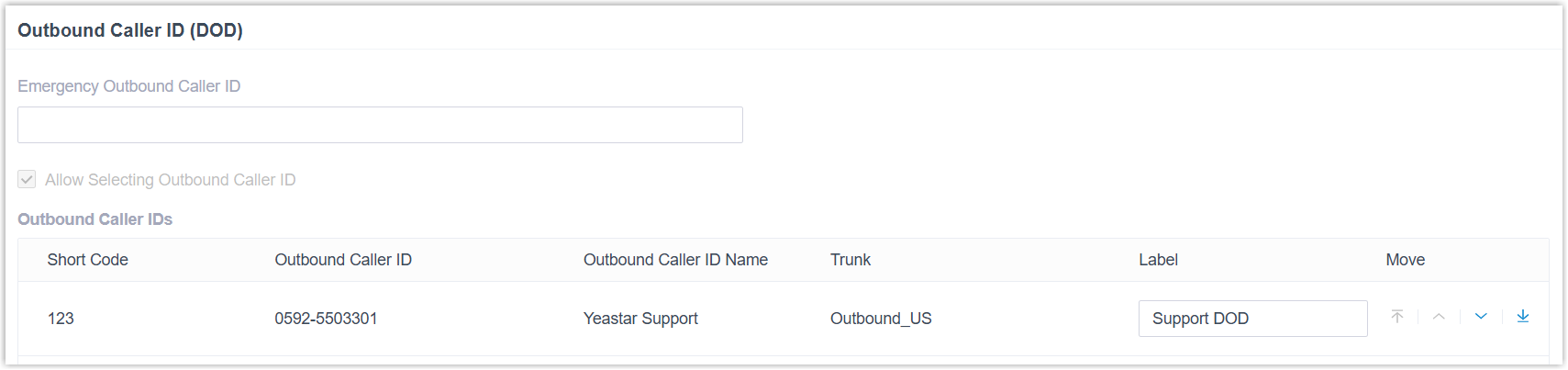
- Go to Preferences > User > Outbound Caller ID (DOD) > Outbound Caller IDs.
What you see
Section titled “What you see”The Outbound Caller IDs list shows every caller ID your administrator has set up for you. Each entry includes:
- Short Code - the internal code tied to the caller ID.
- Outbound Caller ID Number - the number recipients will see.
- Outbound Caller ID Name - the name recipients will see.
- Trunk - the outbound trunk each entry is tied to.
When you dial out over one of these trunks, the matching caller ID appears on the recipient’s phone. In the example above, the recipient sees “Cloud Voice Support <0592-5503301>”.
Question about this page?
Ask the AI assistant. It starts from this page, then searches the rest of the docs.
Ask Cloud Voice AI
Answers are AI-generated from the docs and may contain mistakes. Verify with the linked pages.