
Disallow Users to be Monitored by Others
Every extension on your Cloud Voice system can be monitored by default. When certain users handle sensitive calls that should never be listened in on (for example, HR, legal, or executive lines), you can switch off monitoring for their extensions one at a time or in bulk.
PBX below refers to the Private Branch Exchange, your hosted Cloud Voice phone system.
Disable monitoring for a single extension
Section titled “Disable monitoring for a single extension”-
Sign in to the PBX web portal and open Extension and Trunk > Extension.
-
Locate the extension you want to protect and click the edit icon next to it.

-
Open the Features tab.
-
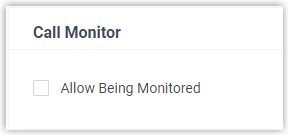
Under Call Monitor, clear the Allow Being Monitored checkbox.
-
Click Save, then Apply.
Disable monitoring for multiple extensions
Section titled “Disable monitoring for multiple extensions”-
Sign in to the PBX web portal and open Extension and Trunk > Extension.
-
Select the checkbox for each extension you want to protect, then click Edit.
-
Open the Features tab.
-
Select the Call Monitor checkbox, then clear the Allow Being Monitored checkbox.

-
Click Save, then Apply.
Result
Section titled “Result”Once applied, calls placed or received on the selected extensions can no longer be monitored by anyone.
Question about this page?
Ask the AI assistant. It starts from this page, then searches the rest of the docs.
Ask Cloud Voice AI
Answers are AI-generated from the docs and may contain mistakes. Verify with the linked pages.