
Limit Outbound Call Frequency of an Extension
Capping how quickly an extension can dial out is a simple but effective defense against toll fraud. If an account is ever compromised, a frequency limit stops the attacker from placing a flood of calls before you notice, keeping the financial damage small. Apply a rule to any extension you want to protect.
Apply a restriction rule
Section titled “Apply a restriction rule”-
Sign in to the PBX (Private Branch Exchange) web portal and open Extension and Trunk > Extension, then open the extension you want to protect for editing.
-
Switch to the Security tab.
-
Find the Call Restrictions section and open the Outbound Call Frequency Restriction drop-down. Choose one or more rules to enforce on this extension.
-
Click Save, then Apply.
What happens when the limit is reached
Section titled “What happens when the limit is reached”Once an extension goes over its allowed call frequency, the system responds in a few ways:
-
The extension can no longer place outbound calls, even when it is included in your outbound routes.
-
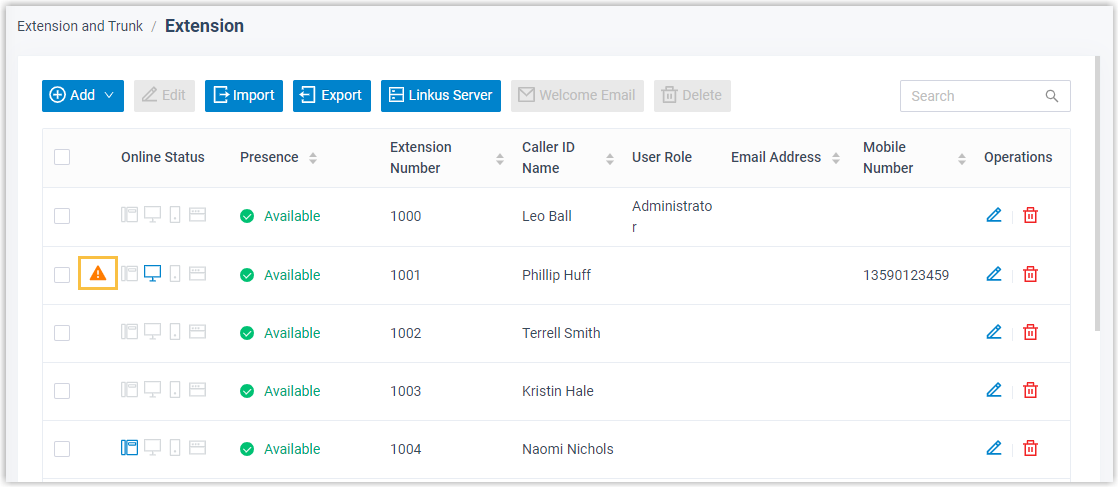
A warning icon
 appears beside the extension in the extension list.
 -
Cloud Voice sends an alert to the recipients configured for the Outbound Call Frequency Exceeded event.
Lift the block manually
Section titled “Lift the block manually”To restore outbound calling for a blocked extension, click the edit icon  next to it, go to the Security tab, and clear the Disable Outbound Calls checkbox in the Call Restrictions section.
Question about this page?
Ask the AI assistant. It starts from this page, then searches the rest of the docs.
Ask Cloud Voice AI
Answers are AI-generated from the docs and may contain mistakes. Verify with the linked pages.