
Allow Callers to Dial Numbers via IVR
An IVR (Interactive Voice Response) is the automated menu that answers a call and routes the caller based on the keys they press. By default, an IVR sends callers through the key options you define. You can also let callers who already know the number of a ring group, queue, or conference room dial that number straight from the IVR menu to reach it, skipping the menu options entirely. This page walks through enabling that behavior for an IVR.
Requirements
Section titled “Requirements”Your PBX server must be running firmware version 84.16.0.70 or later. On an older version the Allow Calling Numbers option will not appear.
Before you begin
Section titled “Before you begin”- Create the IVR you want to update, and make sure the ring groups, queues, or conference rooms you plan to expose already exist. You can only select destinations that are already configured.
- Record or upload an IVR greeting that tells callers they can dial a ring group, queue, or conference room number directly. For guidance, see Set Up IVR Prompts.
Enable direct dialing from an IVR
Section titled “Enable direct dialing from an IVR”-
Sign in to the management portal and go to Call Features > IVR, then open the IVR you want to edit.
-
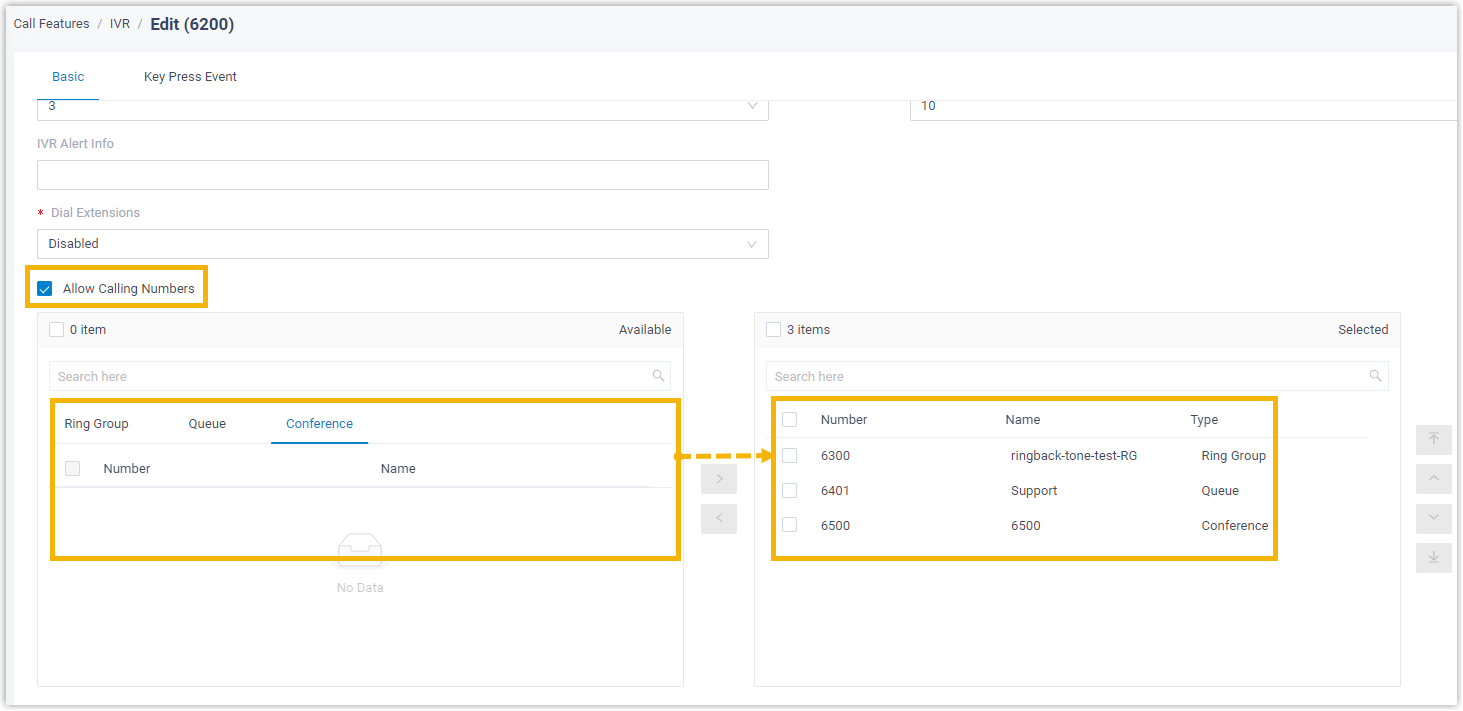
Select the Allow Calling Numbers checkbox. In the fields that appear, move each ring group, queue, or conference room you want to make reachable from the Available list into the Selected list.
-
Click Save, then Apply.
Result
Section titled “Result”Callers who reach this IVR can now dial the number of any ring group, queue, or conference room you moved into the Selected list to be connected directly to that destination.
Question about this page?
Ask the AI assistant. It starts from this page, then searches the rest of the docs.
Ask Cloud Voice AI
Answers are AI-generated from the docs and may contain mistakes. Verify with the linked pages.