
Grant Call Quality Monitoring Permission to Extensions
Call quality monitoring gives extension users a faster way to pinpoint what went wrong on a problem call. Once you grant the permission, users can start monitoring directly from the Cloud Voice App. You can hand this permission to a group of extensions at once through a client permission rule.
Before you begin
Section titled “Before you begin”Confirm that both your phone system and the Cloud Voice App meet the minimum versions below.
- Phone system: firmware
84.23.0.123or later. - Cloud Voice App (iOS): version
5.27.18or later. - Cloud Voice App (Android): version
5.27.12or later.
Turn on the permission
Section titled “Turn on the permission”-
Sign in to the phone system management portal and open Extension and Trunk > Client Permission.
-
On the Preference Settings tab, update the rule you want to apply the permission to. a. Find the permission rule you want to change and click the edit icon
 next to it.
b. Open the Configuration Item drop-down list and, under Features, select the Monitor Call Quality checkbox.
next to it.
b. Open the Configuration Item drop-down list and, under Features, select the Monitor Call Quality checkbox.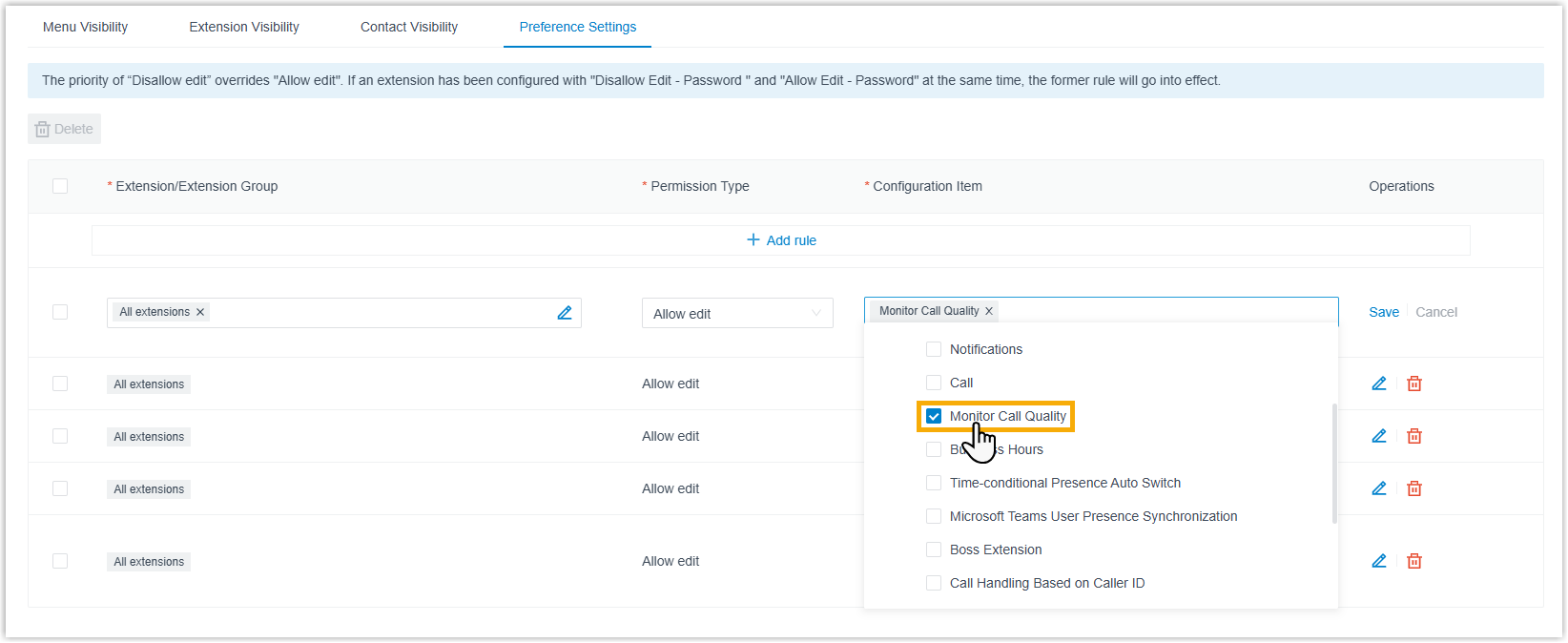 c. Click Save.
Result
Section titled “Result”Every extension covered by the rule can now set up and run call quality monitoring from their own Cloud Voice App. The exact steps differ slightly by platform, so users can follow the monitoring instructions for the Cloud Voice App they use on mobile, desktop, or the web.
Question about this page?
Ask the AI assistant. It starts from this page, then searches the rest of the docs.
Ask Cloud Voice AI
Answers are AI-generated from the docs and may contain mistakes. Verify with the linked pages.