
Switch Extension Presence by Function Key
Presence tells the rest of your organization whether an extension user is available, busy, away, and so on. Instead of opening a menu each time their availability changes, users can flip to a preset presence with a single function key (a programmable button on the phone or in the app). This page walks through defining those keys in the web portal and pushing them out to an IP phone (a desk phone that registers over the network).
Before you begin
Section titled “Before you begin”- Your Cloud Voice system must be running firmware
84.20.0.74or later. - To use these keys on a desk phone, the IP phone has to be provisioned through Cloud Voice and already assigned to an extension. For provisioning instructions, see:
Step 1: Define the function keys on the extension
Section titled “Step 1: Define the function keys on the extension”- Sign in to the web portal and go to Extension and Trunk > Extension, then open the extension you want to edit.
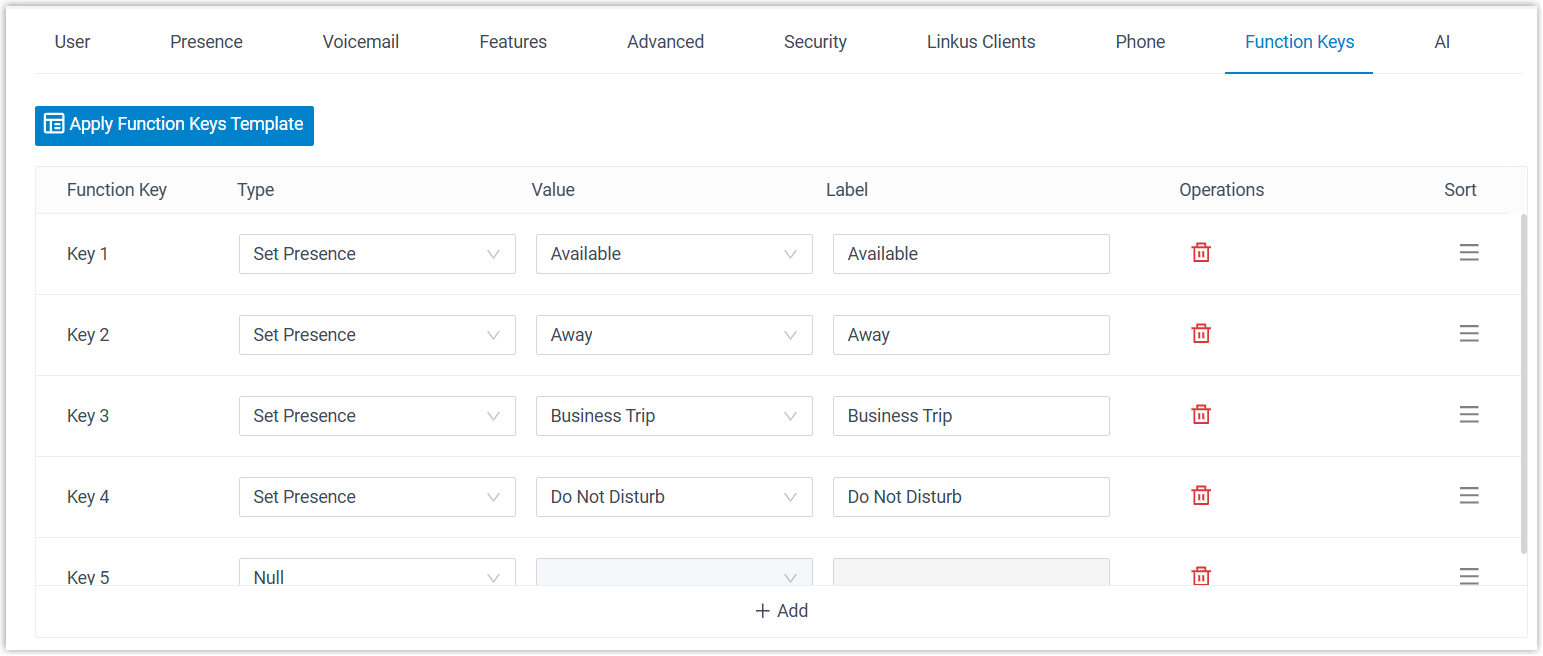
- Select the Function Keys tab.
- Add a key for each presence the user should be able to switch to:
- Type: Choose Set Presence.
- Value: Pick the target presence from the drop-down list. This is the presence the key will switch the extension to when pressed.
- Label: Optional. Any text you enter here appears on the phone display.
- Click Save.
Step 2: Push the keys to the IP phone
Section titled “Step 2: Push the keys to the IP phone”If the extension is tied to a provisioned desk phone, re-provision it so the new keys take effect. Skip this step if the user only uses the Cloud Voice App, which picks up the keys automatically.
- Go to Auto Provisioning > Phones and click the refresh icon
 next to the phone. The system asks whether you want to re-provision it.
 - Click OK in the confirmation window.
What the user sees
Section titled “What the user sees”Cloud Voice App
The new keys appear in the app’s function key list. The user changes presence by clicking the corresponding key.
IP phone
The keys are loaded onto the phone as BLF (Busy Lamp Field) keys: buttons with a status light. Pressing one switches the extension to that presence. The BLF LED (the light on the key) reflects the current state:
- Solid green: the extension is currently set to the presence tied to that key.
- Solid red: the extension is set to a different presence.
Question about this page?
Ask the AI assistant. It starts from this page, then searches the rest of the docs.
Ask Cloud Voice AI
Answers are AI-generated from the docs and may contain mistakes. Verify with the linked pages.