
Set up Music on Hold for Call Parking
When you park a call, the caller waits in a parking slot until someone retrieves it. While they wait, Cloud Voice plays the system-wide Music on Hold (MoH) defined under PBX Settings > Voice Prompt > Prompt Preferences > Music on Hold. If you would rather callers hear a different playlist specifically during parking, you can point Call Parking at a Music on Hold list of your own.
Before you begin
Section titled “Before you begin”- Create and upload the custom Music on Hold playlist you want to use. The list must already exist before it will appear as a selectable option.
Assign a playlist to Call Parking
Section titled “Assign a playlist to Call Parking”-
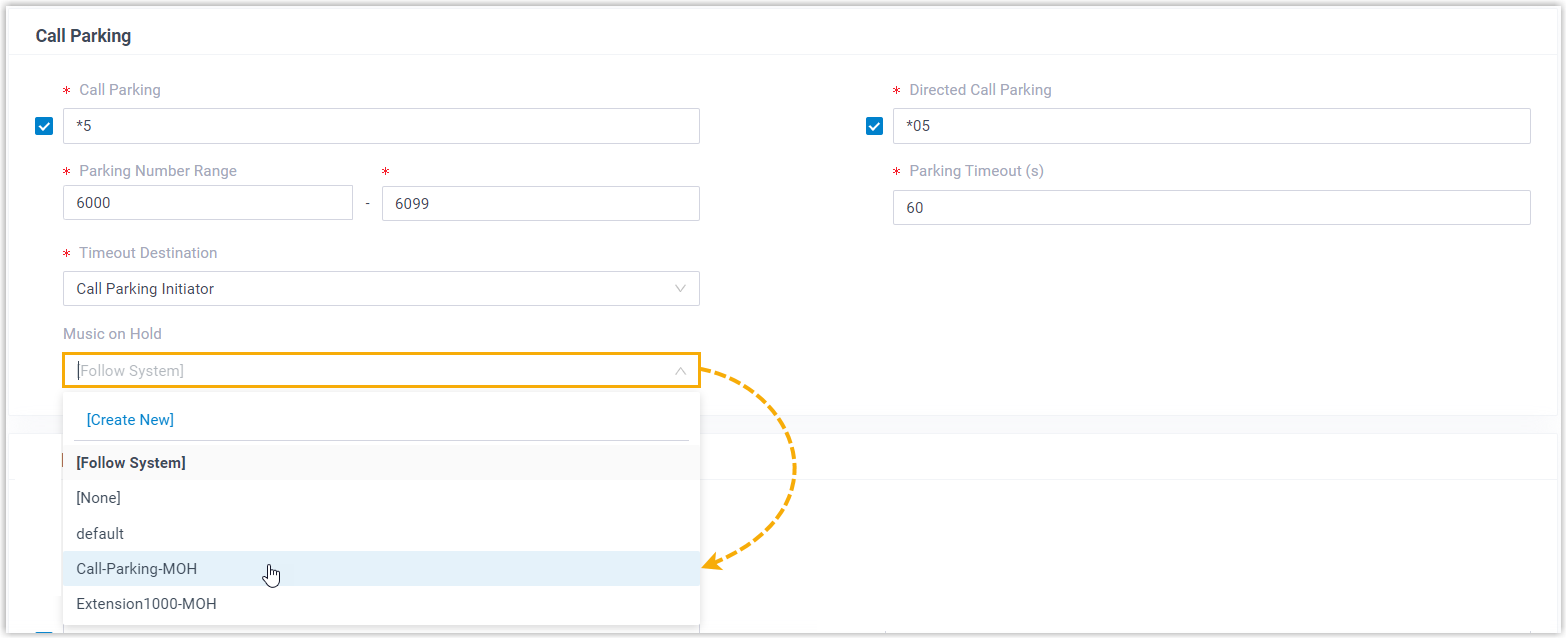
Sign in to the management portal and open Call Features > Feature Code > Call Parking.
-
Open the Music on Hold drop-down and choose the playlist you uploaded.
-
Click Save, then Apply.
Parked callers now hear the playlist you selected instead of the default Music on Hold.
Question about this page?
Ask the AI assistant. It starts from this page, then searches the rest of the docs.
Ask Cloud Voice AI
Answers are AI-generated from the docs and may contain mistakes. Verify with the linked pages.