
LDAP Server Overview
Your Cloud Voice PBX (Private Branch Exchange, the phone system that routes your calls) can act as an LDAP server, giving your organization a single, centralized phonebook. Contact details are stored on the PBX, so users can dial a colleague or customer directly from a search result instead of hunting for the number and keying it in by hand.
What LDAP does
Section titled “What LDAP does”LDAP (Lightweight Directory Access Protocol) is an application protocol for reading and maintaining directory information across an IP (Internet Protocol) network.
It follows a client/server model. The directory data itself lives on the LDAP server. An LDAP client (for example, an IP desk phone or the Cloud Voice App) opens a connection, asks for the records it needs, and the server returns them. Because every client reads from the same source, they all work from one shared set of contacts.
How the directory is organized
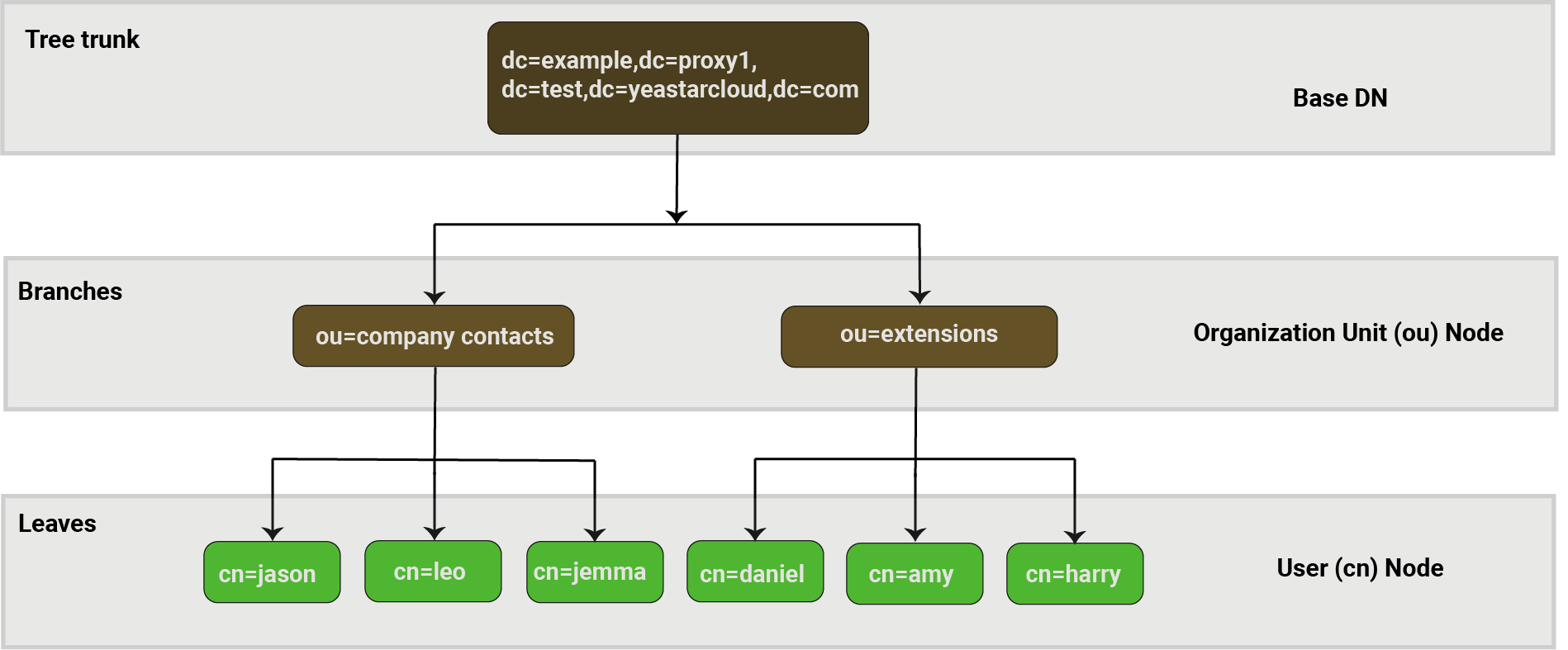
Section titled “How the directory is organized”An LDAP directory is a network database built from entries, where each entry gathers the information that describes a single entity. Entries are not stored in a flat list, they are arranged in a hierarchical, tree-like structure. The diagram below shows an example of the directory tree that Cloud Voice builds.
Key LDAP terms
Section titled “Key LDAP terms”Every entry is a collection of information about one entity, and each entry is defined by three things: a distinguished name, a set of attributes, and one or more object classes.
Distinguished Name (DN)
Section titled “Distinguished Name (DN)”A distinguished name is a globally unique identifier for an entry. It pinpoints both the entry itself and its exact position within the directory tree.
A DN is normally made up of three kinds of component:
- dc: Domain Component, typically one part of the domain name.
- ou: Organization Unit, typically the name of a group.
- cn: Common Name, typically a user’s name.
Think of a DN as the path to a file on a filesystem. For example, the DN cn=amy,ou=extensions,dc=example,dc=proxy1,dc=test,dc=cloudvoice,dc=com maps to the path com/cloudvoice/test/proxy1/example/extensions/amy.
The Base DN is the root of the directory tree and the point where an LDAP search starts, for example, dc=example,dc=proxy1,dc=test,dc=cloudvoice,dc=com.
Attributes
Section titled “Attributes”An entry can hold any number of attributes. Each attribute pairs an attribute type with one or more values, and those values are the actual contact data. The value format depends on the attribute type.
The table below lists the attributes available for a contact entry, using a sample record.
| Attribute | Information | Example |
|---|---|---|
| cn | Contact ID | Leo |
| displayName | Display Name | Leo Ball |
| givenName | First Name | Leo |
| sn | Last Name | Ball |
| Email Address | leoball@example.com | |
| company | Company | Acme Corp |
| comment | Remark | partner |
| telephoneNumber | Business Number | +1-202-555-0134 |
| telephoneNumber2 | Business Number 2 | +1-202-555-0148 |
| facsimileTelephoneNumber | Fax Business Number | +1-202-555-0134 |
| mobile | Mobile Number | 12025550101 |
| mobile2 | Mobile Number 2 | 12025550109 |
| homePhone | Home Number | 12025550172 |
| homePhone2 | Home Number 2 | 12025550173 |
| facsimileHomePhone | Home Fax | 12025550174 |
| otherTelephone | Other Number | 12025550188 |
| postalCode | Zip Code | 20500 |
| street | Street | 100 Main Street |
| I | City | Springfield |
| st | State | Illinois |
| co | Country | United States |
Object classes
Section titled “Object classes”An object class defines which attribute types an entry may use and which of those attributes are required rather than optional.
Every entry has one structural object class that declares what the entry represents, a person, a group, a device, a service, and so on, and it may also carry zero or more auxiliary object classes that add extra characteristics.
For example, with the person object class, givenName and sn are required attributes, while attributes such as description and seeAlso are optional.
Question about this page?
Ask the AI assistant. It starts from this page, then searches the rest of the docs.
Ask Cloud Voice AI
Answers are AI-generated from the docs and may contain mistakes. Verify with the linked pages.