
Manage Scheduled Call Report Delivery Tasks
A scheduled call report delivery task is a recurring job that builds a call report and emails it to the recipients you choose, on the schedule you set (for example every Monday morning). The report itself is drawn from your CDRs (Call Detail Records: the individual log entries the system keeps for each call). Once a task exists, you can come back to it at any time to change how it runs or to stop it entirely.
This page covers the two management actions for tasks that already exist: editing one and deleting one. Creating a new task is done elsewhere on the same tab.
Edit a scheduled call report delivery task
Section titled “Edit a scheduled call report delivery task”Edit a task when a schedule, recipient list, or report setting needs to change, for instance when a recipient leaves the company or you want the report to arrive on a different day.
-
Sign in to the Cloud Voice management portal and open Reports and Recordings > Call Reports.
-
Select the Scheduled Reports tab, then click the edit icon (
 ) next to the task you want to change.
-
Adjust the task settings as needed.
-
Click Save.
Delete a scheduled call report delivery task
Section titled “Delete a scheduled call report delivery task”Delete a task when a report is no longer needed and you want the system to stop sending it.
-
Sign in to the Cloud Voice management portal and open Reports and Recordings > Call Reports.
-
On the Scheduled Reports tab, do the following:
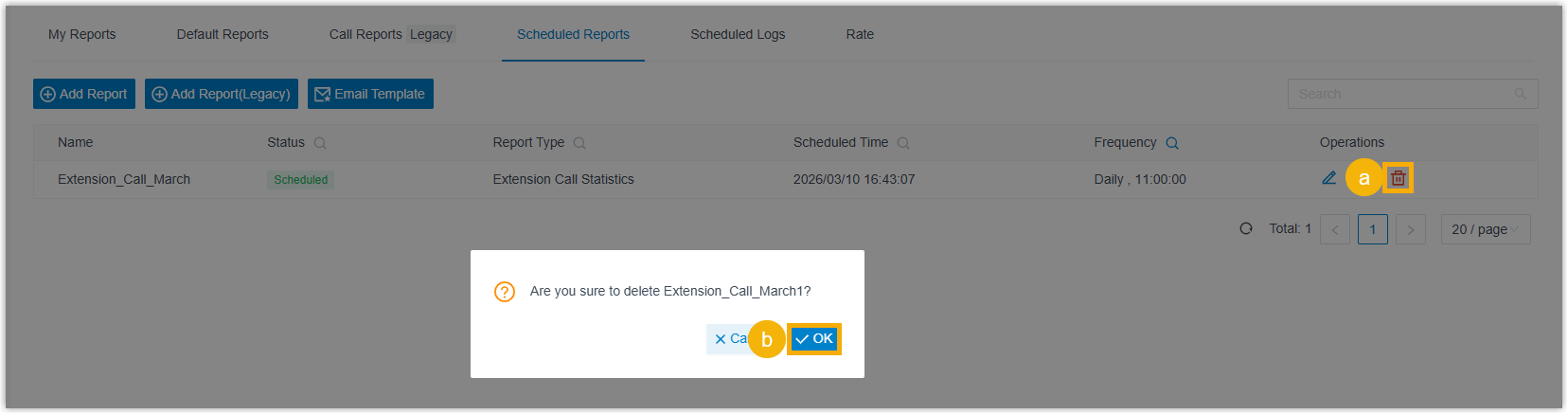
- Click the delete icon (
 ) next to the task you want to remove.
 - Click OK in the confirmation dialog.
- Click the delete icon (
Question about this page?
Ask the AI assistant. It starts from this page, then searches the rest of the docs.
Ask Cloud Voice AI
Answers are AI-generated from the docs and may contain mistakes. Verify with the linked pages.