
Outbound Dial Pattern
Every outbound route uses a dial pattern to decide which numbers it will carry and how those numbers are reshaped before they reach the carrier. This page explains the three parts of a dial pattern and how the related Prefix setting fits in.
Parts of a dial pattern
Section titled “Parts of a dial pattern”A dial pattern is built from three fields: Pattern, Strip, and Prepend.
Pattern
Section titled “Pattern”Pattern is required. It sets the rule that a dialed number must satisfy for the route to handle the call.
You can enter a complete number, or use the special characters below to match a group of numbers rather than a single one.
| Character | Matches |
|---|---|
X | Any single digit, 0 through 9. |
Z | Any single digit, 1 through 9. |
N | Any single digit, 2 through 9. |
[###] | Any one of the digits listed inside the brackets. For example, [123] matches 1, 2, or 3. |
. | One or more digits that follow the fixed part of the pattern. For example, 9011. matches any number that begins with 9011 and has at least one more digit, so 9011 on its own does not match. |
! | One or more characters. For example, 9011! matches any number that begins with 9011, including 9011 itself. |
Strip is optional. It sets how many digits are removed from the front of the dialed number once that number matches the Pattern.
For example, suppose you set Pattern to 9. and Strip to 1. To reach 1588902923, a user dials 91588902923. The system removes the leading 9 and places the call to 1588902923.
Prepend
Section titled “Prepend”Prepend is optional. It sets the digits added to the front of a dialed number once that number matches the Pattern.
For example, 202 is the area code for Washington, D.C. If users frequently call that city, set Prepend to 202. A user who wants to reach 2025553097 then only needs to dial 5553097.
Prefix and dial patterns
Section titled “Prefix and dial patterns”A prefix is a digit that the system removes from a dialed number before passing it to the carrier. You set the prefix to line up with the dial pattern on the outbound route that will carry the call.
Where the Prefix setting appears
Section titled “Where the Prefix setting appears”You are asked for a Prefix when you configure:
-
A mobile number for a notification contact.
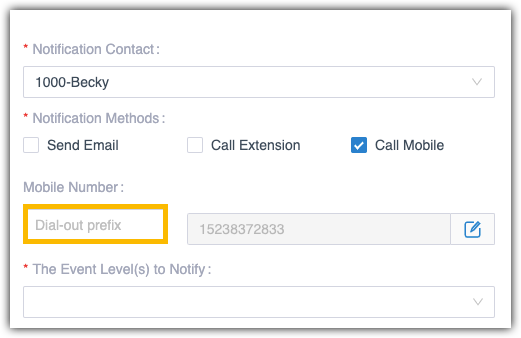
-
An external number reached when a caller presses a key in an IVR (Interactive Voice Response) menu, the automated menu that greets callers and routes them by keypress.

How to set the prefix
Section titled “How to set the prefix”Match the prefix to how the outbound route strips digits.
-
Leave the Prefix blank. When the route’s Strip value is not set, you do not add anything ahead of the number.
In the example below, only destination numbers that begin with
1can leave through this route. To call 125451, dial 125451 as is.
-
Add a prefix before the number. When the route has a Strip value, add a prefix that satisfies the Pattern.
In the example below, you add the prefix
9, and the destination number must begin with1. To call 125451, dial 9125451.
Question about this page?
Ask the AI assistant. It starts from this page, then searches the rest of the docs.
Ask Cloud Voice AI
Answers are AI-generated from the docs and may contain mistakes. Verify with the linked pages.