
Reformat Inbound Caller ID on a Trunk
Some carriers deliver inbound caller ID in a form that is awkward to dial back: a missing leading digit, an extra area code, or a prefix that no one would type when returning the call. Cloud Voice lets you rewrite that number on the way in, per trunk, so the version your users see in call history and on their phones is one they can redial directly.
Reformatting works on every trunk type. Because each carrier presents numbers differently, the rule you need depends on the provider feeding that trunk.
Add a reformatting rule
Section titled “Add a reformatting rule”- Sign in to the PBX (Private Branch Exchange) portal and go to Extension and Trunk > Trunk, then open the trunk you want to change.
- Select the Inbound Caller ID Reformatting tab.
- Click Add.
- In the dialog, define the rule, then click Confirm:
- Patterns: The caller IDs the rule applies to. Any incoming number matching this pattern is reformatted; others pass through unchanged.
- Strip: How many digits to remove from the front of the number.
- Prepend: Digits to add to the front of the number.
- Click Save, then Apply.
Example 1: add a leading zero
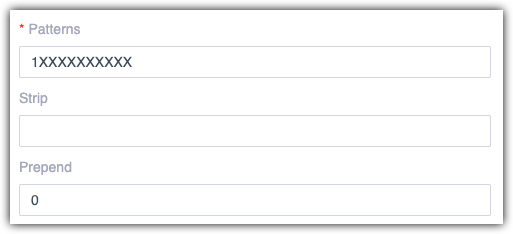
Section titled “Example 1: add a leading zero”Company A receives 11-digit numbers that begin with 1 and wants a 0 in front of each one so staff can redial without editing the number, for instance, showing 012345678910 rather than 12345678910.
Configure the rule like this:
- Patterns:
1XXXXXXXXXX - Strip: leave empty
- Prepend:
0
Example 2: drop the area code
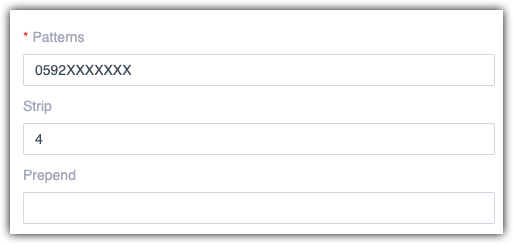
Section titled “Example 2: drop the area code”Company B wants local calls shown without the 0592 area code, for example, 5503301 instead of 05925503301.
Because the four area-code digits sit at the start of the number, strip them:
- Patterns:
0592XXXXXXX - Strip:
4 - Prepend: leave empty
Question about this page?
Ask the AI assistant. It starts from this page, then searches the rest of the docs.
Ask Cloud Voice AI
Answers are AI-generated from the docs and may contain mistakes. Verify with the linked pages.