
Download Scheduled CDR from PBX Web Portal
A scheduled CDR task exports call records on a recurring schedule and emails them to a list of recipients. Each recipient can open the email and preview or download the report from the link inside it. You do not have to wait for that email, though: every completed report also stays available inside the Cloud Voice web portal, so you can pull it down yourself at any time. This page walks through doing that from the portal.
Before you begin
Section titled “Before you begin”At least one scheduled CDR task must have already run successfully. The report only appears in the portal once its scheduled export has completed, so if the list is empty, check that the task has run at least once.
Download the report
Section titled “Download the report”-
Sign in to the Cloud Voice web portal and open Reports and Recordings > CDR.
-
Select the Scheduled Logs tab, find the task you want, and click the download icon (
 ) next to it.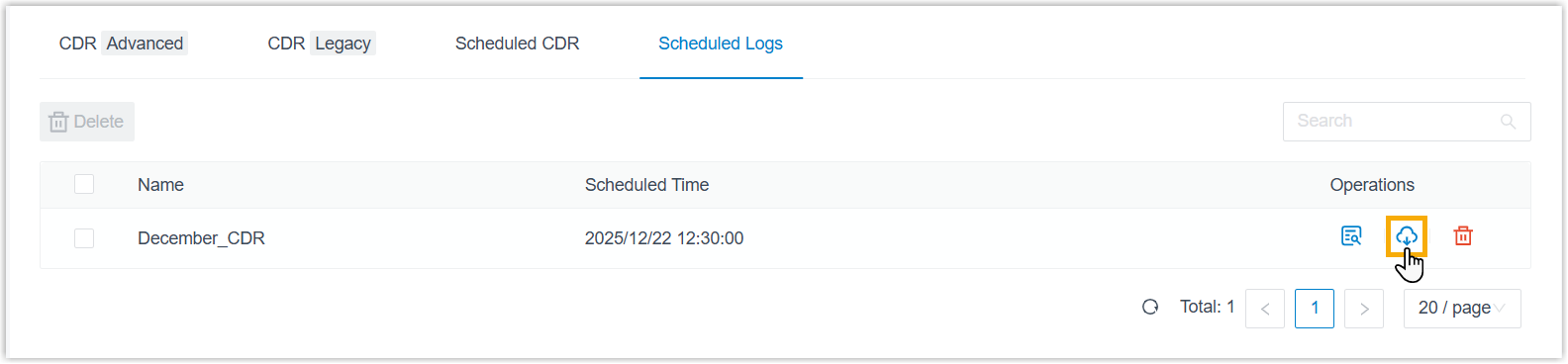
The report saves to your computer in the file format that was chosen when the scheduled task was set up. If you need a different format, change it in the scheduled task settings rather than on this screen.
Question about this page?
Ask the AI assistant. It starts from this page, then searches the rest of the docs.
Ask Cloud Voice AI
Answers are AI-generated from the docs and may contain mistakes. Verify with the linked pages.