
View Call Report
Cloud Voice call reporting turns raw call data into readable summaries so you can track how your phone system is performing and see where communication can be tightened up. This page walks through opening a report from the PBX web portal, narrowing it with filters, and finding the detailed reference for each report type.
PBX stands for Private Branch Exchange, the phone system that manages your extensions, trunks, and call routing. The PBX web portal is the browser-based admin console for that system.
Open a report
Section titled “Open a report”-
Sign in to the PBX web portal and go to Reports and Recordings > Call Reports.
-
Open the report you want. How you get to it depends on whether it is one you saved earlier (a custom report) or a built-in report.
A report you saved (My Reports)
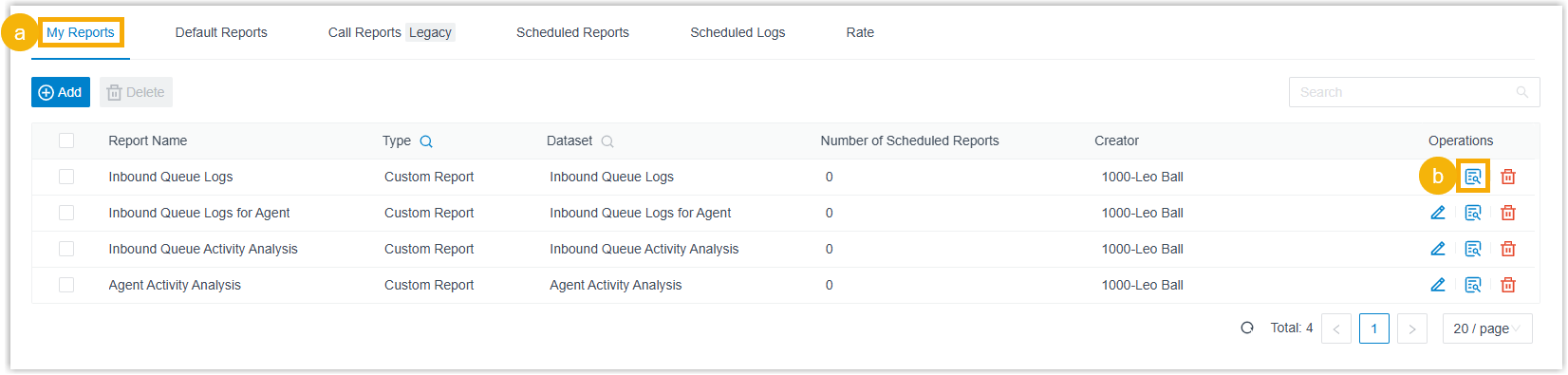
- Open the My Reports tab.
- Select the view icon
 , or double-click the report you want.
A built-in report (Default Reports)
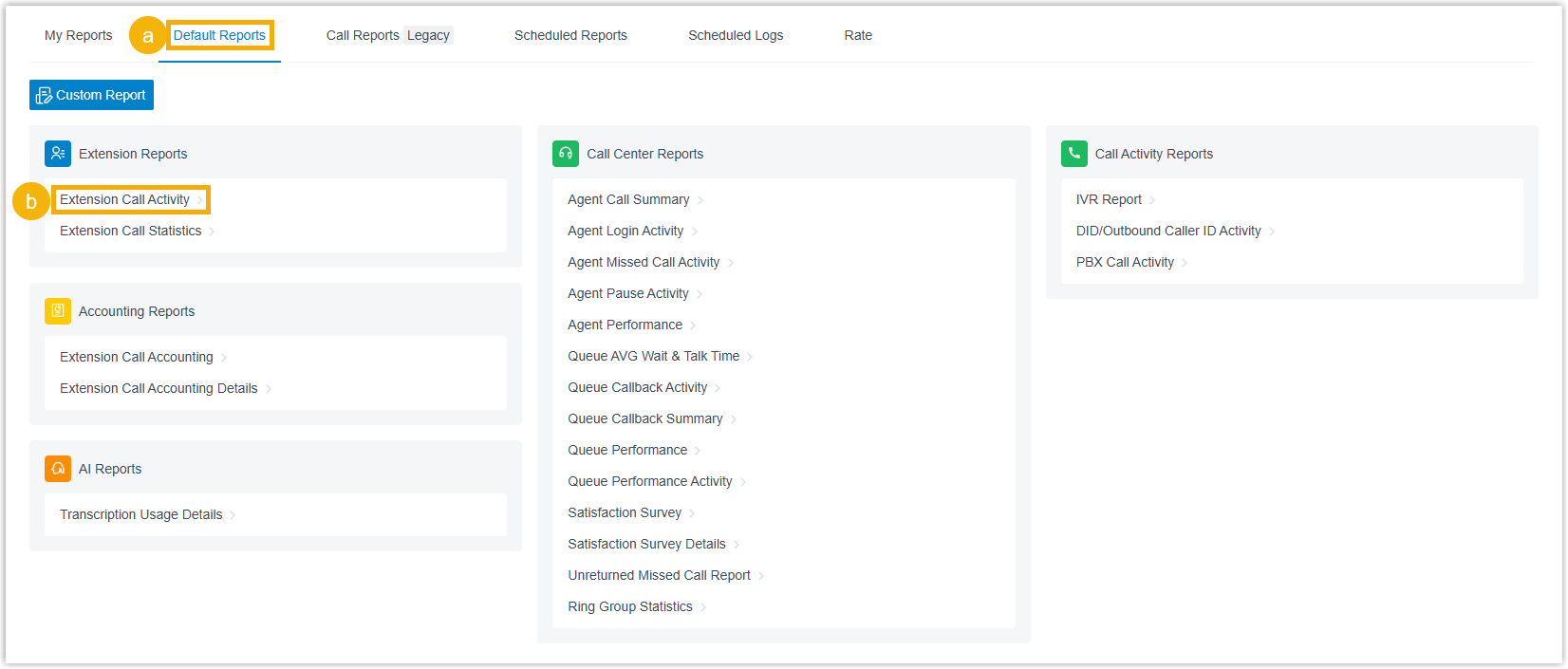
- Open the Default Reports tab.
- Select the report you want.
Set the report filters
Section titled “Set the report filters”Filters let you scope a report to a specific time frame and to the extensions, queues, trunks, or numbers you care about, so you see only the activity you are investigating. Every report opens with its own set of filters.

- Set the Time range the report should cover.
- Apply the filters that belong to the report you opened. The table below lists which filters each report supports.
The report updates to reflect your filters.
Filters by report
Section titled “Filters by report”Some filter names use telephony shorthand. Here is what they mean:
- Trunk: the connection between your phone system and your provider’s network that carries calls in and out.
- Organization: a grouping of extensions, for example by department or site.
- Communication Type: the kind of call activity to include, such as inbound or outbound.
- DID (Direct Inward Dialing): a phone number that routes incoming calls straight to a destination on your system. Also written DDI (Direct Dialing In), the European term for the same thing.
- DOD (Direct Outward Dialing): the caller ID number presented to the person being called on an outbound call.
- IVR (Interactive Voice Response): the automated menu that answers a call and routes it based on the caller’s keypad choices.
- PIN Code (Personal Identification Number): a code an extension enters to place billed outbound calls through a trunk.
| Category | Report | Available filters |
|---|---|---|
| Extension | Extension Call Activity | Extensions/Extension Groups, Organization, Communication Type |
| Extension | Extension Call Statistics | Extensions/Extension Groups, Organization, Communication Type |
| Accounting | Extension Call Accounting | Extensions/Extension Groups, Trunk, Organization |
| Accounting | Extension Call Accounting Details | Extensions/Extension Groups, PIN Code, Organization, Trunk |
| Call Activity | IVR Report | Type, IVR |
| Call Activity | DID/Outbound Caller ID Activity | Trunk, DID, DOD, Communication Type |
| Call Activity | PBX Call Activity | Trunk, Include internal calls, Communication Type |
| Call Center | Agent Call Summary | Queue, Agent |
| Call Center | Agent Login Activity | Queue, Agent |
| Call Center | Agent Missed Call Activity | Queue, Agent |
| Call Center | Satisfaction Survey Detail | Queue, Agent |
| Call Center | Agent Pause Activity | Queue, Agent, Pause Reason |
| Call Center | Agent Performance | Queue, Agent, Exclude Calls Abandoned within Xs |
| Call Center | Queue AVG Wait & Talk Time | Queue |
| Call Center | Satisfaction Survey | Queue |
| Call Center | Queue Callback Summary | Queue |
| Call Center | Queue Callback Activity | Queue, Callback Result |
| Call Center | Queue Performance Activity | Queue, Exclude Calls Abandoned within Xs |
| Call Center | Queue Performance | Queue, Exclude Calls Abandoned within Xs, Exclude Calls within Xs |
| Call Center | Inbound Queue Activity Analysis | Queue, Wait Time Range, Time Range & Select Date, Exclude Calls Abandoned within Xs, Exclude Calls within Xs |
| Call Center | Unreturned Missed Call Report | Call From, Call To, Call Destination, Missed Call Type, Callback Status, Exclude Calls Abandoned within Xs |
| Call Center | Ring Group Statistics | Ring Group |
| Call Center | Inbound Queue Logs | Queue, Communication Type, Call From, Queue Status, Answered Agent, Wait Time, Agent Answer Time, Talk Time, Pure Talk Time, Hold Time, Source Trunk, DID/DDI, Exclude Calls Abandoned within Xs, Exclude Calls within Xs |
| Call Center | Agent Activity Analysis | Queue, Agent, Time Range & Select Date, Exclude Calls Abandoned within Xs, Exclude Calls within Xs |
| Call Center | Inbound Queue Logs for Agent | Queue, Agent, Communication Type, Call From, Agent Last Call Status, Queue Status, Process Result, Wait Time in Queue, Agent Wait Time, Talk Time, Pure Talk Time, Hold Time, Source Trunk, DID/DDI, Exclude Calls Abandoned within Xs, Exclude Calls within Xs |
| AI | AI Receptionist Call Activity | Receptionist |
| AI | Transcription Usage Details | None |
How the filter fields work
Section titled “How the filter fields work”Most filters simply limit the report to the value you pick (a queue, an agent, a trunk, an organization, and so on). A few carry specific behavior:
| Filter | What it does |
|---|---|
| Include internal calls | On the PBX Call Activity report, controls whether internal call activity is counted alongside external calls. |
| Exclude Calls Abandoned within Xs | Sets a ring-duration threshold. Calls abandoned within that window are left out of the report so short abandons don’t skew the numbers. |
| Exclude Calls within Xs | Sets a talk-duration threshold. Answered calls that ended within that window are left out of the report. |
| Wait Time Range | The interval used to group how long callers waited in the queue before an agent picked up. |
| Time Range & Select Date | The date and time span the report covers. |
| Call From | The caller’s number or name. |
| Call To | The callee’s number or name. |
| Call Destination | The type of destination an inbound call was routed to. |
| Missed Call Type | The category of missed call to report on. |
| Callback Status | Whether a missed call was returned. |
| Process Result | The outcome recorded for an abandoned or missed queue call. |
| Wait Time / Wait Time in Queue | How long callers waited in the queue before reaching an agent or leaving. |
| Agent Answer Time / Agent Wait Time | How long agents took to answer queue calls. |
| Talk Time | Time agents spent talking to callers, including hold time. |
| Pure Talk Time | Time agents spent talking to callers, excluding hold time. |
| Hold Time | Time agents kept queue calls on hold. |
Read the results
Section titled “Read the results”The matching statistics appear on the page. For a breakdown of every metric in a given report, open its detailed reference below.
Extension
Section titled “Extension”Accounting
Section titled “Accounting”Call Activity
Section titled “Call Activity”- IVR Report
- DID/Outbound Caller ID Activity Report
- PBX Call Activity Report
- Quality of Service Report
- Agent Call Summary Report
- Agent Login Activity Report
- Agent Missed Call Activity Report
- Agent Pause Activity Report
- Agent Performance Report
- Queue AVG Wait & Talk Time Report
- Queue Callback Activity Report
- Queue Callback Summary Report
- Queue Performance Report
- Queue Performance Activity Report
- Satisfaction Survey Report
- Satisfaction Survey Details Report
- Unreturned Missed Call Report
- Ring Group Statistics Report
- Inbound Queue Activity Analysis Report
- Inbound Queue Logs Report
- Inbound Queue Logs for Agent Report
- Agent Activity Analysis Report
Reports for calls handled by the AI (Artificial Intelligence) receptionist and for transcription minutes used by the built-in AI engine.
Question about this page?
Ask the AI assistant. It starts from this page, then searches the rest of the docs.
Ask Cloud Voice AI
Answers are AI-generated from the docs and may contain mistakes. Verify with the linked pages.