
Set Distinctive Ringtones for External Calls
Distinctive ringtones let a user tell what kind of call is coming in before they pick up. By pairing an inbound route with a dedicated tone, you can signal the nature of an external call, an international caller, a support line, or any route you choose, the moment the phone rings. This page walks through setting that up on a user’s IP phone.
The setup has two parts:
- Define an alert info value on the inbound route.
- Map that alert info to a ringtone on the user’s phone.
Define alert info on the inbound route
Section titled “Define alert info on the inbound route”The alert info is a tag the PBX attaches to calls from a route. It tells the IP phone which ringtone to play.
-
Sign in to the PBX web portal and go to Call Control > Inbound Route, then open the route you want to flag for editing.
-
Under General, type a label in the Inbound Alert Info field.
Use a value that describes the calls on this route. In this example,
internationalmarks incoming international calls.
-
Click Save, then Apply.
Map the alert info to a ringtone
Section titled “Map the alert info to a ringtone”To play a specific tone for these calls, assign a ringtone to the user’s extension and push it to the phone through auto provisioning. See Auto Provisioning for background.
Before you start: each affected user must already have a phone bound to their extension. If that isn’t done yet, see:
Assign the ringtone to the extension
Section titled “Assign the ringtone to the extension”-
In the PBX web portal, go to Extension and Trunk > Extension and open the user’s extension.
-
Select the Phone tab.
-
In the Distinctive Ringtone section, click Add.
-
For Alert Info, choose the value you defined on the inbound route,
internationalin this example. -
For Ringtone, pick the tone to play for those calls. This example uses
Ring2.wav.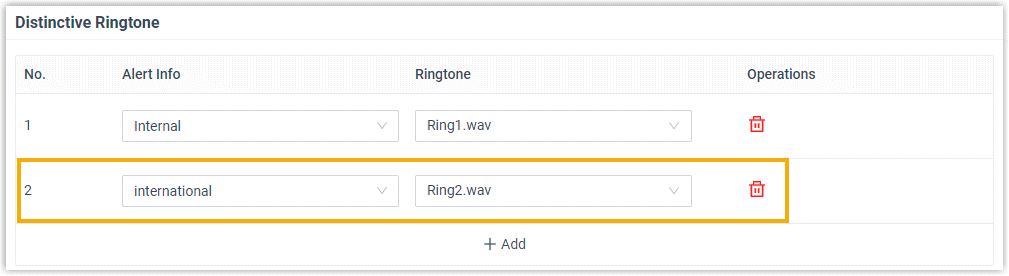
-
Click Save.
Reprovision the phone
Section titled “Reprovision the phone”The change takes effect after the phone reprovisions.
- Go to Auto Provisioning > Phones.
- Click
 next to the phone tied to the user’s extension.
Result
Section titled “Result”When a call comes in on that inbound route, the user’s phone rings with the tone you assigned, Ring2.wav in this example, so external calls from the route are recognizable on sight.
Question about this page?
Ask the AI assistant. It starts from this page, then searches the rest of the docs.
Ask Cloud Voice AI
Answers are AI-generated from the docs and may contain mistakes. Verify with the linked pages.