
Check for Available Firmware Updates
Firmware is the built-in software that runs the phone system. Keeping it on a current build is easier when the system tells you a new release is ready. You can let the system poll for updates on a schedule and notify you, or run a check yourself whenever you want. Both options live on the upgrade page.
Schedule automatic update checks
Section titled “Schedule automatic update checks”Configure the system to look for new firmware on its own and alert you when something new lands.
-
Sign in to the management portal and open Maintenance > Upgrade.
-
Under Automatic Upgrade, set the following options.
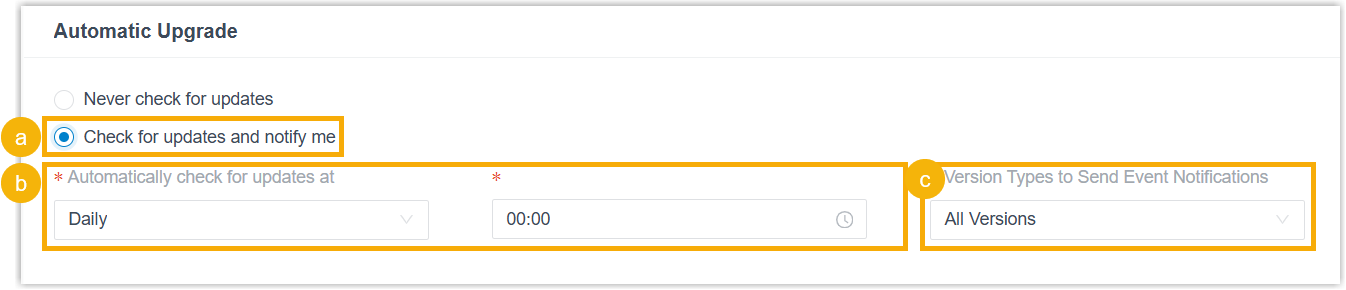
a. Turn on Check for updates and notify me.
b. Use the Automatically check for updates at drop-down lists to choose when the check runs.
c. In the Version Types to Send Event Notifications drop-down list, pick the firmware track you care about. When a new release of that type is found, the system fires the New System Firmware Detected event.
-
Click Save.
Once saved, the system checks for new firmware on your chosen schedule. When it finds a release:
-
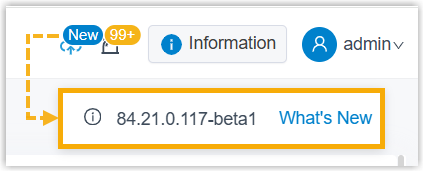
A badge appears in the top-right corner of the portal. Click the version number to jump to the upgrade page, or select What’s New to read the release notes for that build.

-
If the New System Firmware Detected event is enabled, the system also notifies your chosen contacts using whatever notification channels you’ve set up.
Check for updates manually
Section titled “Check for updates manually”Run a one-off check whenever you want to know if a newer build is available.
- Sign in to the management portal and open Maintenance > Upgrade.
- Click Check for the New Firmware.
If a newer release exists, the page shows it in a table. Open the link in the Release Notes column to see what changed, then upgrade when you’re ready.

Question about this page?
Ask the AI assistant. It starts from this page, then searches the rest of the docs.
Ask Cloud Voice AI
Answers are AI-generated from the docs and may contain mistakes. Verify with the linked pages.