
Organization Overview
Every company runs on some combination of roles, reporting lines, and responsibilities that keep work moving toward its goals. The Organization feature in Cloud Voice lets you mirror that structure inside your phone system: group employees into departments by skill or function, then manage them with department-level controls.
Organization compared with extension groups
Section titled “Organization compared with extension groups”Cloud Voice gives you two ways to sort and manage extensions: Organization and Extension Group. They solve different problems, so it helps to know when each one fits.
Organization models a company hierarchy. It suits larger businesses with many departments, and any organization that cares about a clear separation of duties. With it you get:
- Departments that nest into multiple layers, shown as a hierarchical tree.
- The freedom to restructure departments as the business changes.
- A defined reporting structure that makes each person’s role and place in the company unambiguous.
Extension Group collects extensions that share a common purpose or function into a single group. It suits businesses whose main concern is call management. With it you get:
- Groups that all sit at the same level, listed in strict alphabetical order.
- Permission presets that give you granular control over what users can do on a call:
- Per group, apply different permissions to groups that have different calling needs.
- Per user role, divide users into Manager, User, and Custom roles and assign permissions by role.
For details, see Extension Group Overview.
The two features also differ in how they appear. An organization renders as a nested tree of departments, while extension groups render as a flat, alphabetized list.
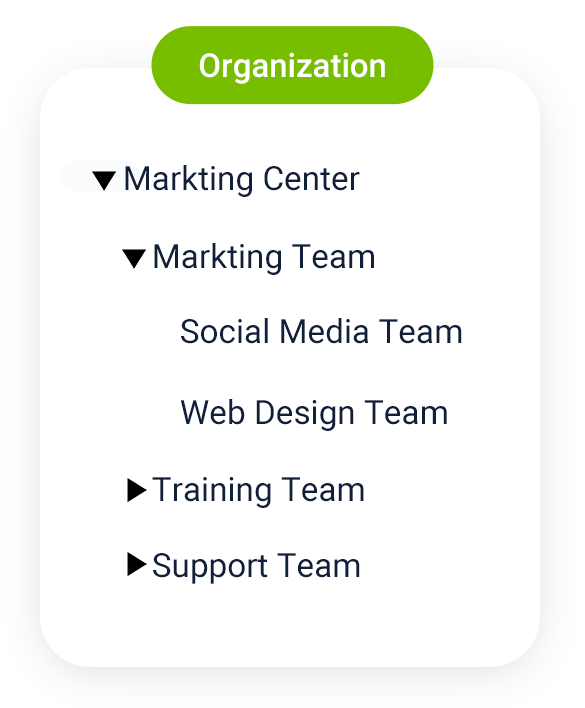
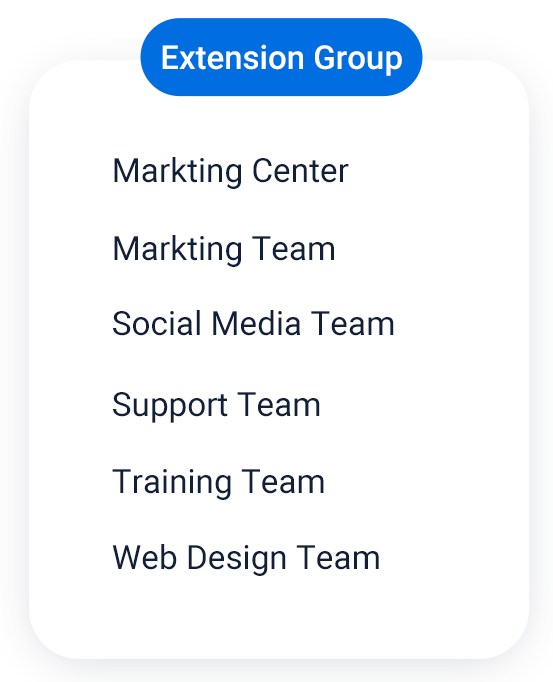
What the Organization feature enables
Section titled “What the Organization feature enables”Once you turn on Organization and build out your departments, the following becomes possible.
In the Cloud Voice App, users can browse and find colleagues by department.
In the PBX (Private Branch Exchange, the phone system) web portal, you can apply department-based limits on what users can access:
- Control which extensions or company contacts a user can see.
- Control access to every call feature and to the Call Center Console.
Question about this page?
Ask the AI assistant. It starts from this page, then searches the rest of the docs.
Ask Cloud Voice AI
Answers are AI-generated from the docs and may contain mistakes. Verify with the linked pages.