
Allow Calls To or From a Phone Number
When a number you trust ends up on a blocklist, you can override that by adding it to the system allowlist. Entries on the allowlist are permitted to dial in, be dialed out to, or both, depending on the type you assign.
When to use the allowlist
Section titled “When to use the allowlist”If a customer’s number has been caught by either the system blocklist or an individual blocklist, adding it to the allowlist restores communication with your extensions.
This page covers the system-wide allowlist. To allow a number for a single extension instead, see Handle Incoming Calls Based on Caller ID.
Limits
Section titled “Limits”How many allowed-number lists you can create, and how many numbers each list can hold, depends on the number of extensions (N) on your phone system.
| Extensions (N) | Allowed-number lists | Numbers per list |
|---|---|---|
| N ≤ 200 | 256 | 100 |
| N > 200 | 512 | 200 |
Add an allowlist entry
Section titled “Add an allowlist entry”-
Sign in to the management portal and go to Call Features > Blocked/Allowed Numbers > Allowed Numbers.
-
Click Add to start a new allowed-number list.
-
Complete the fields in the dialog that opens:
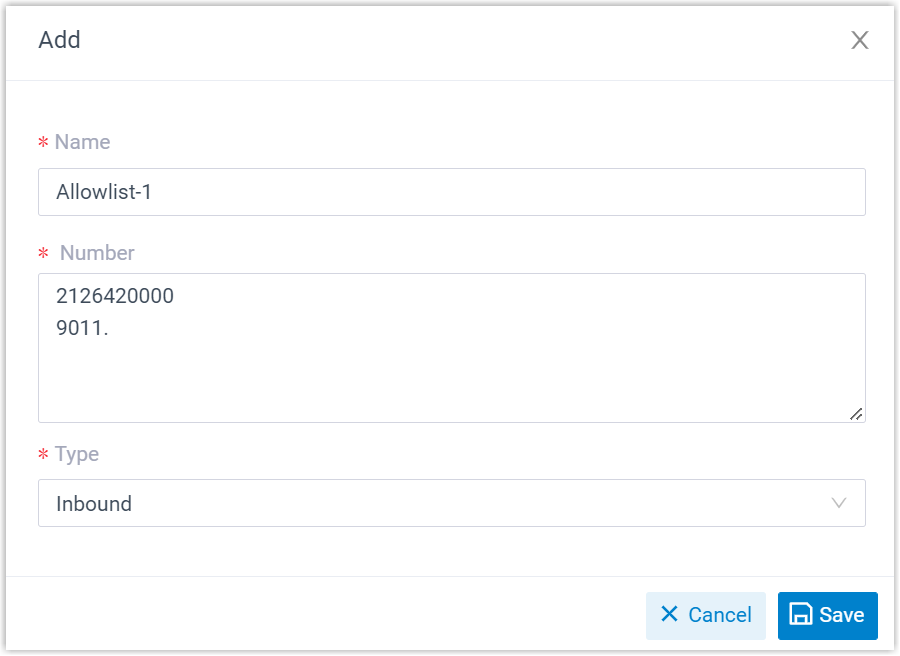
- Name: A label that helps you recognize the numbers this list allows.
- Number: One number or number pattern per line.
- For a single number, type it exactly, for example,
2126420000. - For a range, use a wildcard pattern, for example,
9011.allows any number beginning with 9011. See DID Pattern and Caller ID Pattern for how patterns work. (DID stands for Direct Inward Dialing, the external number that reaches an extension directly.)
- For a single number, type it exactly, for example,
- Type: Choose the direction of calls this list permits:
- Inbound: The numbers may call into your phone system.
- Outbound: Your extensions may call the numbers.
- Both: Calls are allowed in either direction.
-
Click Save, then Apply.
Result
Section titled “Result”The new list appears on the Allowed Numbers page. From now on, the numbers it contains can exchange calls with your extensions according to the type you selected.

Question about this page?
Ask the AI assistant. It starts from this page, then searches the rest of the docs.
Ask Cloud Voice AI
Answers are AI-generated from the docs and may contain mistakes. Verify with the linked pages.