
Automatically Generate Random Passwords for Phones
Leaving phones on their factory default passwords is a security risk, and updating each one by hand does not scale. Cloud Voice can create a unique, complex password for the three built-in login accounts on each auto-provisioned phone (admin, user, and var), so every device is secured without any manual effort on your part. This page walks through turning the feature on.
Before you begin
Section titled “Before you begin”Your PBX must be running firmware 84.18.0.101 or later.
Turn on random password generation
Section titled “Turn on random password generation”-
Sign in to the PBX web portal and open Auto Provisioning > Phones.
-
Above the phone list, click Options.

-
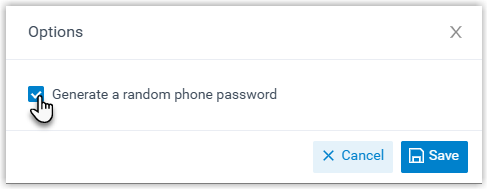
In the dialog that appears, tick Generate a random phone password, then click Save.
What happens next
Section titled “What happens next”From now on, each time you add a phone, Cloud Voice fills in randomly generated password(s) for it automatically.
Question about this page?
Ask the AI assistant. It starts from this page, then searches the rest of the docs.
Ask Cloud Voice AI
Answers are AI-generated from the docs and may contain mistakes. Verify with the linked pages.