
WebSocket Audio Streaming Overview
WebSocket Audio Streaming lets Cloud Voice forward the live audio of active calls to an external platform over a WebSocket connection, so that another service can transcribe, analyze, or otherwise process the conversation as it happens.
Requirements
Section titled “Requirements”Before you can use this feature, your system must meet the following conditions:
- Firmware: Version 84.20.0.74 or later.
- Subscription: The Ultimate Plan.
Highlights
Section titled “Highlights”Efficient, stable transmission : The connection is full-duplex (audio can flow in both directions at the same time) and low-latency, moving audio with millisecond-level delay.
Secure, reliable connectivity : Audio can travel over WebSocket Secure (WSS) with authentication credentials, keeping the stream encrypted and protected.
Flexible integration : Because the audio reaches any WebSocket-capable platform, you can layer on services such as speech-to-text transcription, call-compliance monitoring, multilingual translation, and other language-processing tasks.
How it works
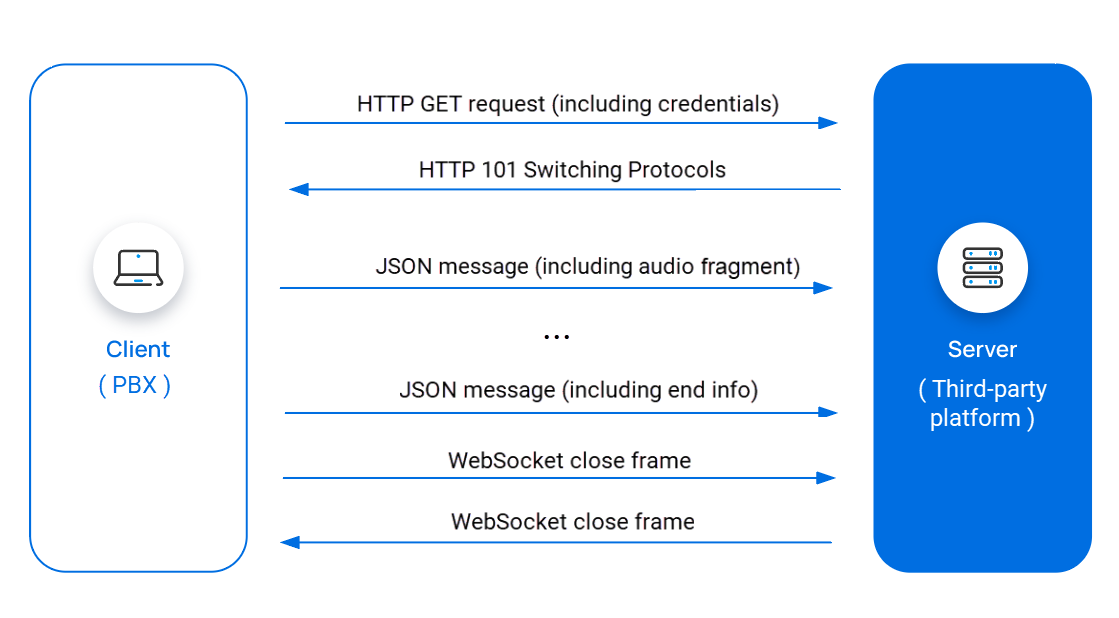
Section titled “How it works”The diagram below shows how Cloud Voice opens a WebSocket connection to a third-party platform and streams the audio of a call.
-
Cloud Voice sends an HTTP (Hypertext Transfer Protocol) GET request to the third-party platform to start a WebSocket connection, placing the credentials in the request header.
-
The platform checks the credentials. When they are valid, it replies with an HTTP
101 Switching Protocolsstatus. This status completes the handshake and upgrades the connection from HTTP to WebSocket, so both sides can now exchange messages freely. -
While the call is in progress, Cloud Voice streams the audio to the platform inside JSON (JavaScript Object Notation) messages. The audio is encoded as 16-bit little-endian PCM (pulse-code modulation), then Base64-encoded before it is placed in each message.
-
Once the call ends, Cloud Voice sends the end-of-call information to the platform, again as JSON messages.
-
Cloud Voice sends a Close frame to begin shutting down the WebSocket.
-
The platform answers with its own Close frame, and the WebSocket connection closes.
Question about this page?
Ask the AI assistant. It starts from this page, then searches the rest of the docs.
Ask Cloud Voice AI
Answers are AI-generated from the docs and may contain mistakes. Verify with the linked pages.