
Add a Call Rate Rule
Call rate rules let Cloud Voice put a price on outbound calls (calls that leave your system and go out to the public phone network). Once a rule is in place, the system charges every matching call automatically, which makes it easy to keep an eye on what teams and individuals are spending on local, long-distance, and international dialing, and to spot unusual activity that might signal fraud.
How many rules you can create
Section titled “How many rules you can create”A single Cloud Voice system supports up to 30,000 call rate rules.
Create a rule
Section titled “Create a rule”-
Sign in to your Cloud Voice management portal and go to Reports and Recordings > Call Reports.
-
Open the Rate tab and click Add.
-
Fill in the rule’s settings, described below.
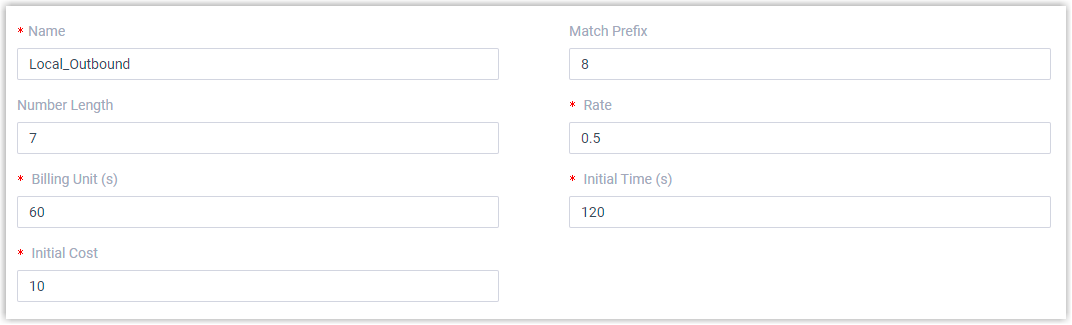
Setting What to enter Name A label that helps you recognize the rule later, such as Local_Outbound.Match Prefix Optional. The dialing prefix (the leading digits) a call must start with to be priced by this rule. Only outbound calls whose number begins with the prefix are charged this rate. Number Length Optional. The length of the dialed number the rule applies to. A call matches only when the dialed number is the same length as this value or shorter. Rate The amount charged for each billing unit once the initial time has elapsed. Billing Unit (s) The block of time, in seconds, used to add up the cost after the initial time. Defaults to 60. For example, with a Rate of 0.5 and a Billing Unit of 60, the call’s cost grows by 0.5 for every 60 seconds. Initial Time (s) The opening stretch of the call, in seconds, that is billed at the flat initial cost. Initial Cost The fixed charge that covers the initial time. For example, an Initial Time of 120 and an Initial Cost of 2 means the first two minutes cost 2; beyond that, the rate takes over. -
Click Save, then Apply.
What happens next
Section titled “What happens next”From this point on, any outbound call that matches the rule is billed using the formula below:
Amount = Initial Cost + [(Talk Duration + Hold Duration - Initial Time) / Billing Unit] * RateWorked example. Suppose a rule has an Initial Cost of 1, Initial Time of 60, Billing Unit of 60, and Rate of 0.5. A 200-second call with no time on hold costs:
Amount = 1 + [(200 + 0 - 60) / 60] * 0.5 = 1 + [2.33 rounded up to 3] * 0.5 = 1 + 1.5 = 2.5When you have more than one rule, Cloud Voice evaluates them from the top of the list downward and applies the first one that matches. To change the order, use the 


 controls to reposition a rule.
Where to see the charges
Section titled “Where to see the charges”With rules in place, you can review the accumulated call costs for individual extensions, extension groups, and departments in your call reports. See Extension Call Accounting Report and Extension Call Accounting Details Report for details.
Question about this page?
Ask the AI assistant. It starts from this page, then searches the rest of the docs.
Ask Cloud Voice AI
Answers are AI-generated from the docs and may contain mistakes. Verify with the linked pages.