
Restrict Outbound Calls for an Extension
Toll fraud is an ongoing threat across the telecom industry: an attacker who gains access to your phone system can rack up costly calls through a compromised account. One way to limit that risk is to turn off outbound calling for any extension that does not need it, so a stolen credential cannot be used to dial out.
Disable outbound calling
Section titled “Disable outbound calling”- Sign in to the Cloud Voice management portal and go to Extension and Trunk > Extension, then open the extension you want to lock down for editing.
- Open the Security tab.
- Under Call Restrictions, tick the Disable Outbound Calls checkbox.
- Select Save, then Apply.
What changes
Section titled “What changes”- The extension can no longer place outbound calls, even when it is still listed in an outbound route.
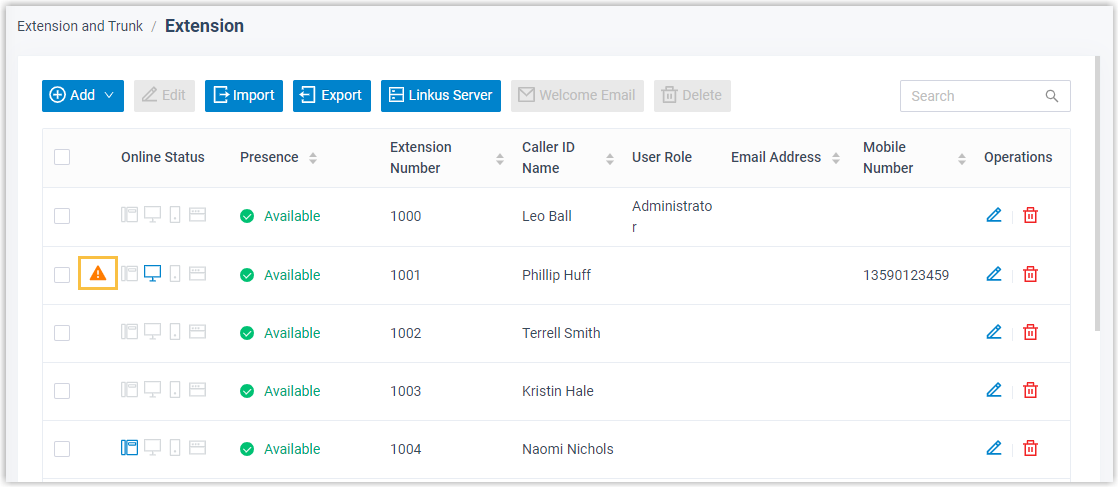
- In the extension list, a warning marker
 appears beside the extension so you can see the restriction at a glance.
Question about this page?
Ask the AI assistant. It starts from this page, then searches the rest of the docs.
Ask Cloud Voice AI
About
Answers are AI-generated from the docs and may contain mistakes. Verify with the linked pages.