
Enable or Disable the Call Flip Feature Code
Call Flip lets a user move an in-progress call from one device to another where the same extension is registered, by dialing a short feature code. As an administrator, you control whether that feature code is available on your phone system. This page shows you how to switch it on and off.
Turn on the Call Flip feature code
Section titled “Turn on the Call Flip feature code”-
Sign in to the Cloud Voice management portal and open Call Features > Feature Code.
-
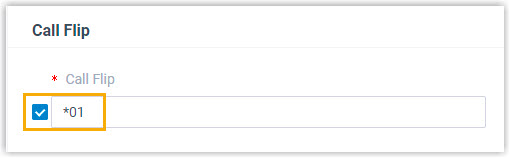
Find the Call Flip section, select its checkbox, and set the feature code you want users to dial.
-
Click Save, then Apply.
Once applied, an extension user on an active call can dial this feature code to hand the call off to another device where the same extension is signed in. For the caller-side steps, see Flip an Active Call by Dialing a Feature Code.
Turn off the Call Flip feature code
Section titled “Turn off the Call Flip feature code”Turn the feature code off when you do not want users moving live calls between devices, for example if calls should stay on a specific desk phone.
-
Sign in to the Cloud Voice management portal and open Call Features > Feature Code.
-
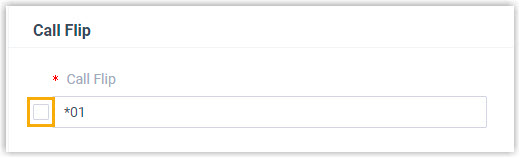
In the Call Flip section, clear the checkbox.
-
Click Save, then Apply.
With the feature code disabled, users can no longer flip an active call by dialing it.
Question about this page?
Ask the AI assistant. It starts from this page, then searches the rest of the docs.
Ask Cloud Voice AI
Answers are AI-generated from the docs and may contain mistakes. Verify with the linked pages.