
Redirect a Call
When a queue call rings for too long without being picked up, you can move it elsewhere so the caller isn’t left waiting. From the Queue Panel you can send a still-ringing call to a different extension, to a ring group or queue, or straight to an extension’s voicemail. This page covers each option for calls that are in the Ringing state.
Send a call to another extension
Section titled “Send a call to another extension”- In the Cloud Voice App (web or desktop), open Call Center Console > Queue Panel.
- In the Waiting Calls list, move your pointer over a call that shows the Ringing status.
- Move the call to an agent using either method below.
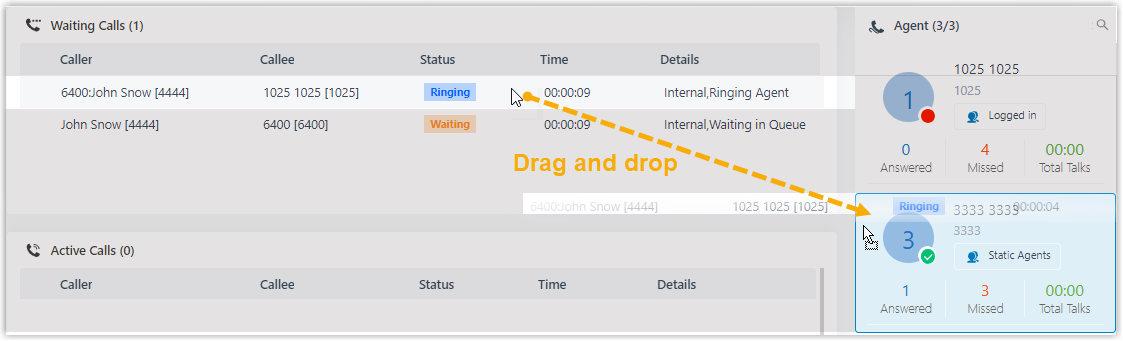
Drag and drop
Drag the ringing call onto the agent you want in the Agent panel and release it. That agent’s phone starts ringing.
Right-click menu
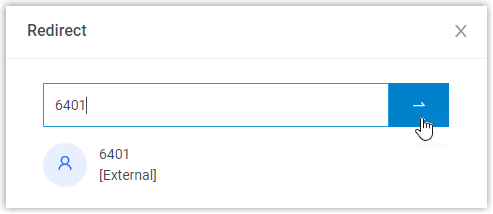
Right-click the call and choose Redirect. In the panel that appears, type the extension number and click the redirect button ( ). The chosen agent’s phone rings.
Send a call to an extension’s voicemail
Section titled “Send a call to an extension’s voicemail”- In the Cloud Voice App (web or desktop), open Call Center Console > Queue Panel.
- In the Waiting Calls list, point to a call in the Ringing status.
- Right-click the call and choose Redirect.
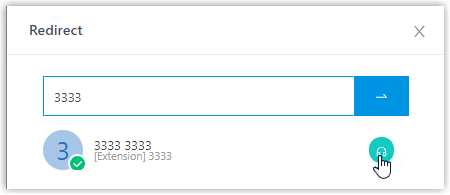
- Type an extension number to look up the user.
- In the matching results, click the voicemail icon (
 ) for that extension.
The call drops into the extension’s voicemail box, where the caller can leave a message.
Send a call to another ring group or queue
Section titled “Send a call to another ring group or queue”- In the Cloud Voice App (web or desktop), open Call Center Console > Queue Panel.
- In the Waiting Calls list, point to a call in the Ringing status.
- Right-click the call and choose Redirect.
- Type the ring group number or queue number, then click the redirect button ().
The system routes the call to the ring group or queue you entered.
Question about this page?
Ask the AI assistant. It starts from this page, then searches the rest of the docs.
Ask Cloud Voice AI
Answers are AI-generated from the docs and may contain mistakes. Verify with the linked pages.