
Cloud Voice 84.23.0.83 Beta 1
Firmware 84.23.0.83 reached its first beta build on May 25, 2026 as version V24.2-Beta. This release brings new capabilities for data export, AI-driven call handling, and messaging, along with a broad set of refinements and fixes across the phone system.
To try the build, open your PBX admin portal, check for a firmware update, and upgrade your phone system.
New features
Section titled “New features”Data Connector
- Cloud Voice can now export PBX data, for example call detail records (CDRs) and call report data, to a third-party database such as PostgreSQL, MySQL, or Microsoft SQL Server through a data connector. Once the data is synchronized, business intelligence (BI) tools and other applications can read it for visualization and analytics.
AI Receptionist
The AI receptionist gained two capabilities for smarter call handling:
- Pick the large language model (LLM) that drives the AI receptionist, Gemini, GPT, or Claude, for instance, and supply a custom system prompt that sets how it responds and behaves.
- Build custom rules so the AI receptionist gathers caller details (such as name, email, or order number) during the conversation and passes what it collected to a live agent when the call is transferred.
AI Transcription
-
AI transcription and call summary generation can now run on your own third-party AI services through custom service accounts. Supported providers:
Feature Supported providers AI transcription (speech-to-text for calls and voicemails) Amazon, ElevenLabs, OpenAI LLM-powered call summary generation OpenAI GPT, Google Gemini
Omnichannel Messaging
- SMS messaging now supports Voxtelesys. Set up an SMS channel for the provider in Cloud Voice, and your agents can then send and receive customer SMS from the Cloud Voice App.
Improvements and bug fixes
Section titled “Improvements and bug fixes”Extension
-
A new function key lets an extension watch for and answer incoming calls to the members of an extension group it belongs to, every group qualifies except Default_All_Extensions. Set it up under **Extension and Trunk > Extensions
Function Keys**.

The key works on both the Cloud Voice App and auto-provisioned IP phones, and it lets a user:
- Tell whether any member of the group has a call ringing.
- See the group’s incoming calls, as many as 10 in the Cloud Voice App and 2 on an IP phone, and pick one to answer.
- Press the key to answer the group’s first incoming call right away.
-
Resolved an issue that caused extensions registered on IP phones to drop offline repeatedly.
-
Fixed a case where a call forwarding rule set under Do Not Disturb was cleared after a bulk presence edit switched the status away and then back.
Extension Group
-
The extension group’s ID now appears on the group’s editing page (Extension and Trunk > Extension Group), making a group easier to identify by its ID.

-
With the ID in hand you can, for example, dial the Group Call Pickup feature code followed by an extension group ID to answer the first call ringing in that group, see Feature Code below.
Client Permission
- Fixed a crash that occurred when an extension blind-transferred a call to another extension it wasn’t permitted to view.
Trunk
-
SIP (Session Initiation Protocol) trunks add an Outbound Failover SIP Code setting under Extension and Trunk > Trunk > Advanced > VoIP Settings. It controls which SIP response codes cause a call to fail over to the next trunk in the same outbound route; keep the built-in codes or enter your own.

Auto Provisioning
- Fixed a problem where, past the first 120 function keys, the additional keys had no effect on the IP phone after provisioning.
- Corrected the custom template list so its count matches the actual number of templates.
Feature Code
- The Group Call Pickup feature code (Call Features > Feature Code > Call Pickup) now accepts an extension group ID: dial the code followed by the ID to answer the first call ringing in that group.
Ring Group
-
Ring groups add a No Extension Online Destination setting (Call Features > Ring Group) that chooses where to send a call when none of the group’s extensions is online, that is, when every member is unregistered or disconnected.

Call Queue
-
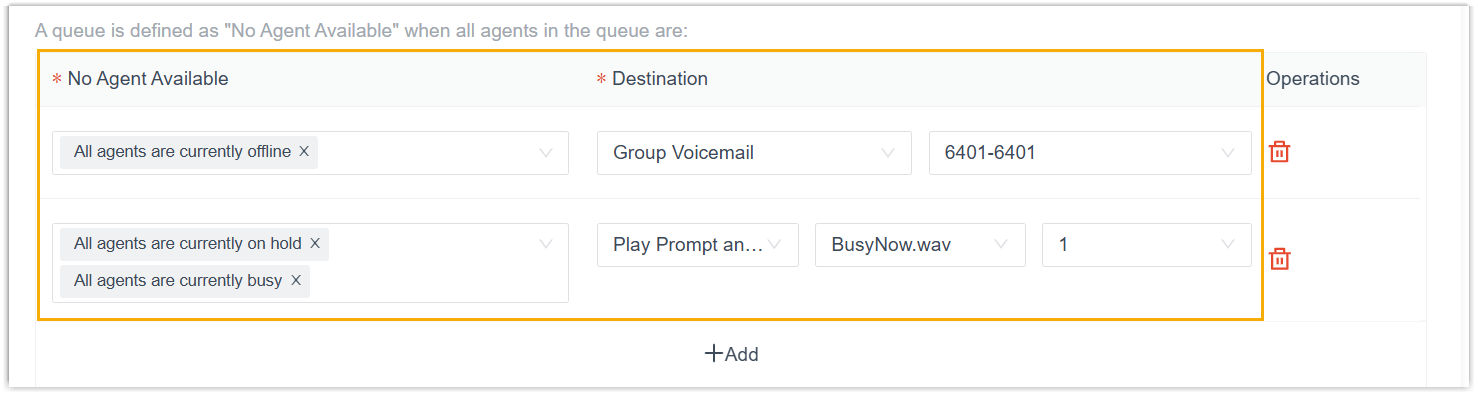
Routing for the Leave Empty and Disallow to Join When Empty options (Call Features > Queue > Basic > Call Routing Destination) is now finer-grained. Assign a distinct destination to each “No Agent Available” situation, such as all agents offline, on hold, or busy, and a call follows the destination that matches the situation it hits.
Recording
-
IVR (Interactive Voice Response, the automated menu callers hear) recording now respects the IVR’s own auto-recording setting (Call Features > Recording):
- Before: when the source channel of a call entering an IVR (a trunk or queue, say) was set to record automatically, the call was recorded whether or not the IVR itself was.
- After: when an IVR isn’t set for automatic recording, a call entering it isn’t recorded, even if its source channel is.
-
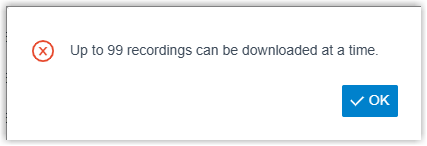
Bulk recording downloads are now limited to 99 files at a time (Reports and Recordings > Recording Files), with a prompt when your selection goes over.
Email Template
- Polish joins the notification email languages (System > Email > Email Templates > Notification Email Language).
- The Agent Auto Pause template accepts the
{{.ExtensionName}}and{{.ExtensionNumber}}variables, which insert the agent extension’s name and number.
CRM/Helpdesk Integration
CRM and Helpdesk integrations were refined.
-
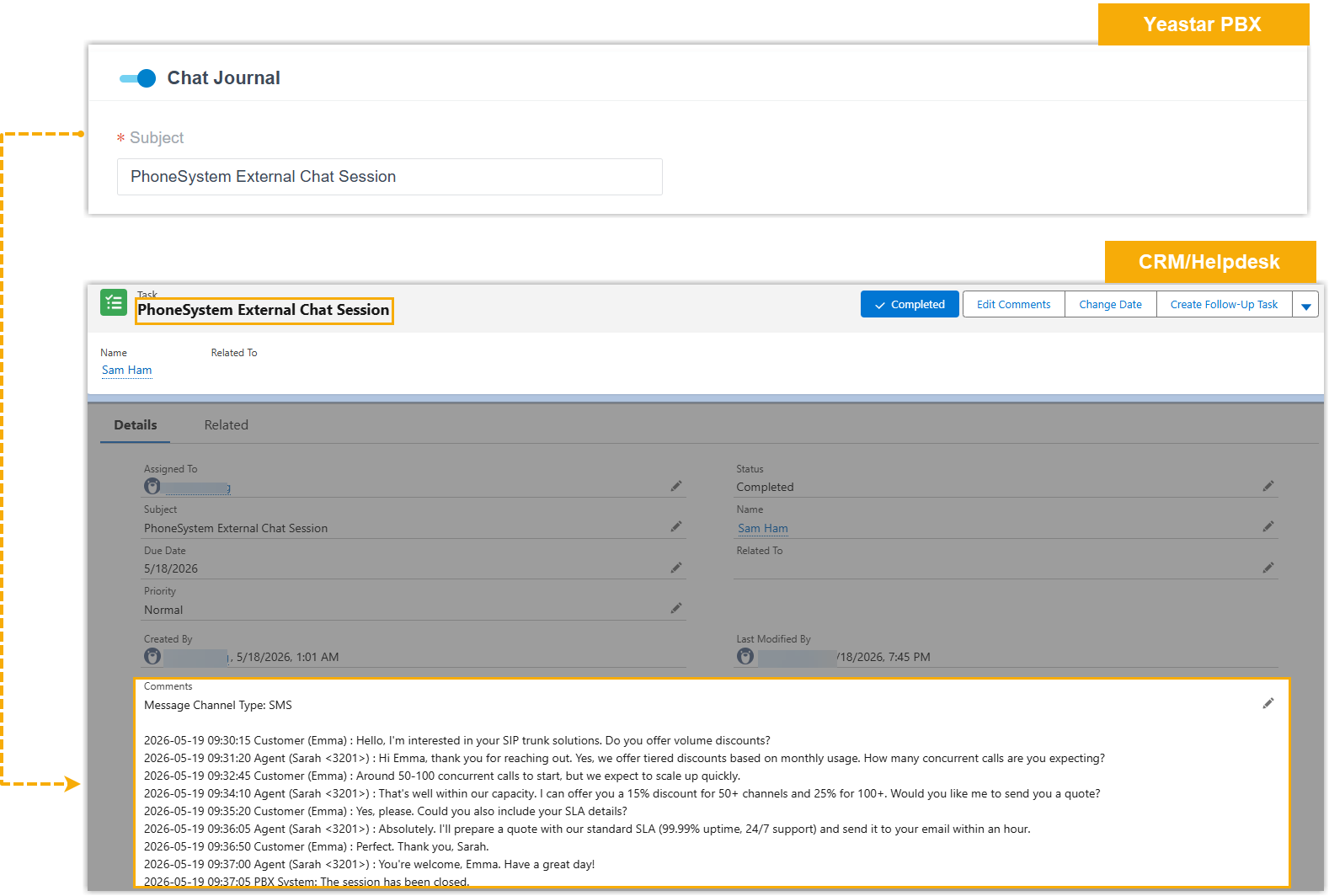
Chat Journal is now supported. With it enabled, when the other party in an external chat session matches a CRM/Helpdesk contact, the chat, its channel type and full, time-ordered message history, is synchronized to the CRM/Helpdesk system once the session closes.
-
The Call Journal setting gains the
{{.AI_Transcription}},{{.AI_Summary}}, and{{.Call_Note}}variables. Add them and Cloud Voice syncs the matching content to the CRM/Helpdesk system when the call ends or when the content changes.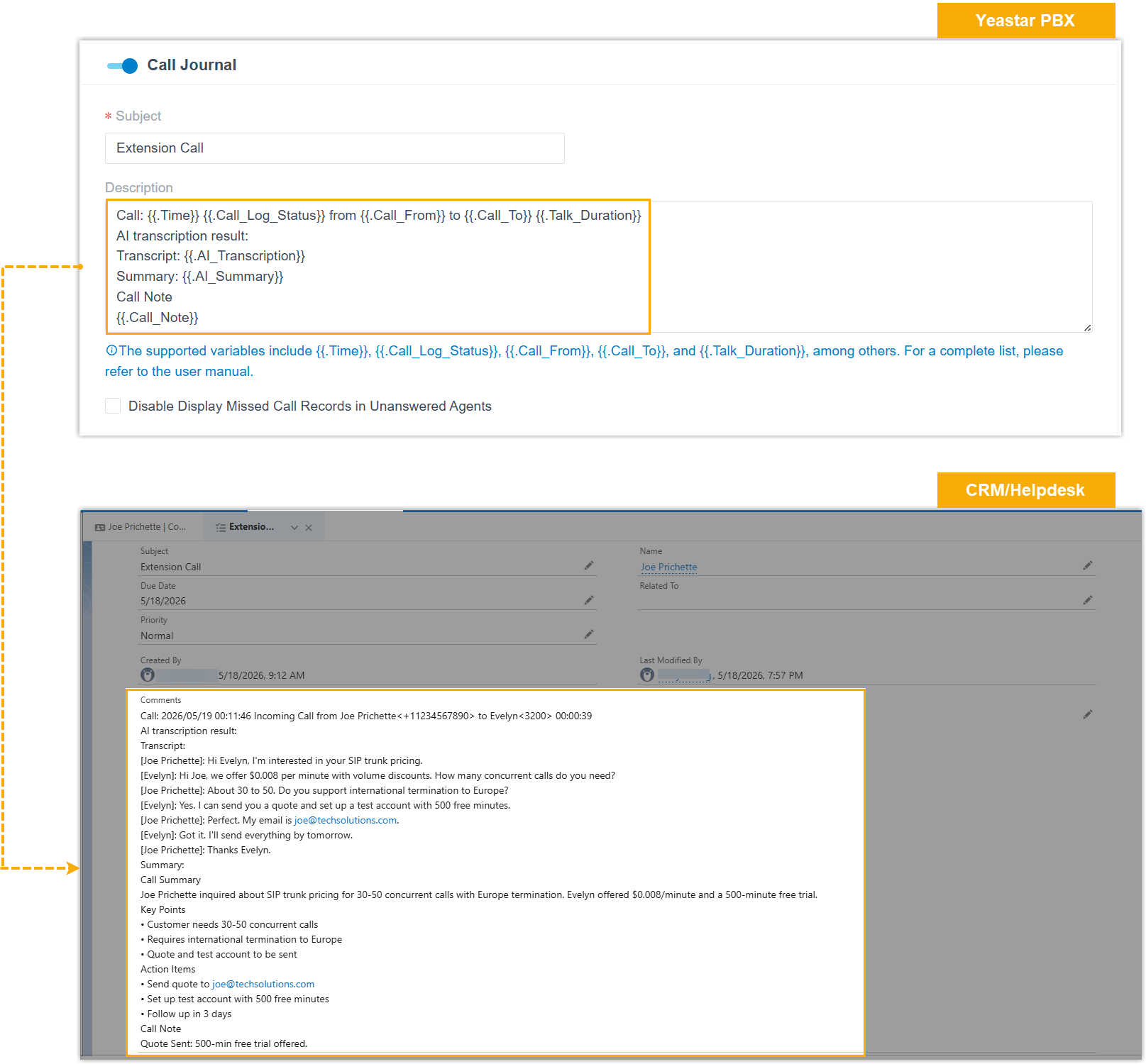
API
-
API interfaces were added and refined:
Feature What changed Added, Extension Group New interfaces list extension groups, search them, query one or several, and add, edit, or delete a group. Added, Ring Group New interfaces list ring groups, search them, query one or several, and add, edit, or delete a group. Added, Voicemail Greeting New interfaces manage greetings for group and extension voicemail: list them (by group, by extension, or combined), record or upload, play, download, and delete. Added, Voice Prompt New interfaces list music on hold (MoH) playlists, query one or more playlists, add a playlist, upload a custom prompt, and list custom prompts. Added, CDR The new cdr/getaicontext,cdr/getaisummary, andcdr/aidownloadinterfaces return the AI transcript for a CDR (which can span several call legs), return the AI summary for a call leg, and download the AI transcription data as JSON.Updated, Extension extension/get,extension/query,extension/create, andextension/updateadd themoh,call_forward_moh,ringback_tone_moh, andvm_greetingparameters to read or set an extension’s music on hold and voicemail greeting.Updated, Trunk trunk/get,trunk/query,trunk/create, andtrunk/updateadd theoutbound_failover_sip_codeandsip_codesparameters to read or set the SIP codes that trigger failover to the next trunk in the same outbound route.Updated, Inbound Route inbound_route/get,inbound_route/query,inbound_route/create, andinbound_route/updateadd aringback_toneparameter, used when the destination is an extension.Updated, Queue queue/get,queue/query,queue/create, andqueue/updateaddringback_tone,play_full_join_prompt,leave_empty_no_agent_list, andjoin_empty_no_agent_listfor prompt settings and the “No Agent Available” scenarios and their routing destinations.
CDR
- Fixed a filtering fault: querying the CDR list by extension or extension group left out records for intermediate participants, anyone other than the first, second, and last.
Call Report
- Fixed a scheduled-report fault: previewing or downloading a scheduled Extension Call Activity report showed times in the data, in both the chart and the list, that did not match the selected period.
Question about this page?
Ask the AI assistant. It starts from this page, then searches the rest of the docs.
Ask Cloud Voice AI
Answers are AI-generated from the docs and may contain mistakes. Verify with the linked pages.