
AI Transcription Overview
AI transcription lets Cloud Voice convert spoken audio into text that users can read at a glance. Both voicemail messages and live call audio can be transcribed, either by the phone system’s built-in AI engine or by a supported third-party service, so users can scan a message or review the details of a conversation without listening back.
Requirements and limitations
Section titled “Requirements and limitations”Before you turn on AI transcription, confirm the following.
| Item | Requirement |
|---|---|
| Firmware | Version 84.23.0.83 or later. |
| Subscription | An Enterprise Plan or Ultimate Plan subscription is required for the AI Transcription feature to be available. |
Key capabilities
Section titled “Key capabilities”- Accurate, near-instant transcripts. Voicemail-to-text and call-to-text conversion is fast and reliable, so users can quickly triage and prioritize what matters.
- Easy review and editing. Users can read, edit, and refine an AI-generated transcript to correct details, add notes, and highlight key points.
- Automatic or manual modes. Choose whether voicemails and calls are transcribed automatically or only on demand.
- Multiple languages. Voicemails and calls can be transcribed in a range of languages, and each extension user can set their own preferred transcription language.
- Choice of transcription service. Run transcription on the built-in AI engine or on a third-party provider (Amazon, ElevenLabs, or OpenAI), so you can balance cost, security, and accuracy to suit your needs.
Set up AI transcription
Section titled “Set up AI transcription”1. Enable and configure the feature
Section titled “1. Enable and configure the feature”Turn on AI transcription for the phone system, pick the transcription service you want to use (the built-in AI engine or a third-party provider), set the transcription language, and choose which extensions are allowed to use the feature.
AI Call Transcription
Call transcription works on two-party calls and runs in real time as the conversation happens. When you use the built-in AI engine, it also generates an automatic summary of the call.
- Configure AI Call Transcription with Built-in Service
- Configure AI Call Transcription with Amazon Service
- Configure AI Call Transcription with ElevenLabs Service
- Configure AI Call Transcription with OpenAI Service
AI Voicemail Transcription
- Configure AI Voicemail Transcription with Built-in Service
- Configure AI Voicemail Transcription with Amazon Service
- Configure AI Voicemail Transcription with ElevenLabs Service
- Configure AI Voicemail Transcription with OpenAI Service
2. Tailor transcription per extension
Section titled “2. Tailor transcription per extension”Once transcription is enabled, voicemails and calls for the authorized extensions can be converted to text. You can set the transcription mode (automatic or manual) and the preferred language separately for each extension.
For details, see Configure AI Voicemail Transcription for an Extension and Configure AI Call Transcription for an Extension.
Track transcription usage
Section titled “Track transcription usage”When transcription runs on the built-in AI engine, you can monitor how many minutes have been used in either of these ways:
- Check consumed minutes in the Transcription Usage Details report. See Access Transcription Usage Details Report.
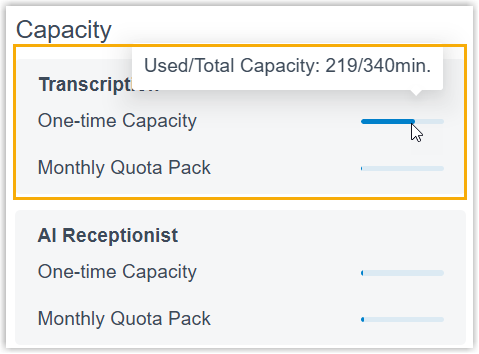
- View used minutes and total capacity directly on the Dashboard. This is visible only to the administrator account.
Question about this page?
Ask the AI assistant. It starts from this page, then searches the rest of the docs.
Ask Cloud Voice AI
Answers are AI-generated from the docs and may contain mistakes. Verify with the linked pages.