
Configure AI Call Transcription with ElevenLabs Service
Cloud Voice can transcribe the audio of a two-party call into readable text in real time using the ElevenLabs Speech to Text service. This page walks you through pointing the phone system at ElevenLabs and, if you want automatic post-call summaries, at a GPT or Gemini large language model (LLM) as well.
Requirements
Section titled “Requirements”Your phone system must meet the following before you begin.
| Item | Requirement |
|---|---|
| Firmware | 84.23.0.83 or later. |
| Subscription | An Enterprise Plan or Ultimate Plan subscription, so the AI Transcription feature is available. |
Before you begin
Section titled “Before you begin”Network access
The phone system needs to reach the domains for the services you plan to use. You can confirm a domain is reachable from Maintenance > Troubleshooting > IP Ping.
| Service | Domain |
|---|---|
| ElevenLabs Speech to Text | api.elevenlabs.io |
| GPT LLM | api.openai.com |
| Gemini LLM | oauth2.googleapis.com and generativelanguage.googleapis.com |
Service accounts
Have the relevant third-party accounts and their sign-in credentials ready.
| Service | Account |
|---|---|
| ElevenLabs Speech to Text | An ElevenLabs account with enough transcription-minute quota, plus its username and password. |
| GPT / Gemini LLM | An OpenAI account (for GPT) or a Google account (for Gemini) with enough token quota, plus its username and password. |
Step 1. Create an ElevenLabs API key
Section titled “Step 1. Create an ElevenLabs API key”The phone system authenticates to the ElevenLabs Speech to Text service with an API (application programming interface) key, so generate one on the ElevenLabs platform first.
-
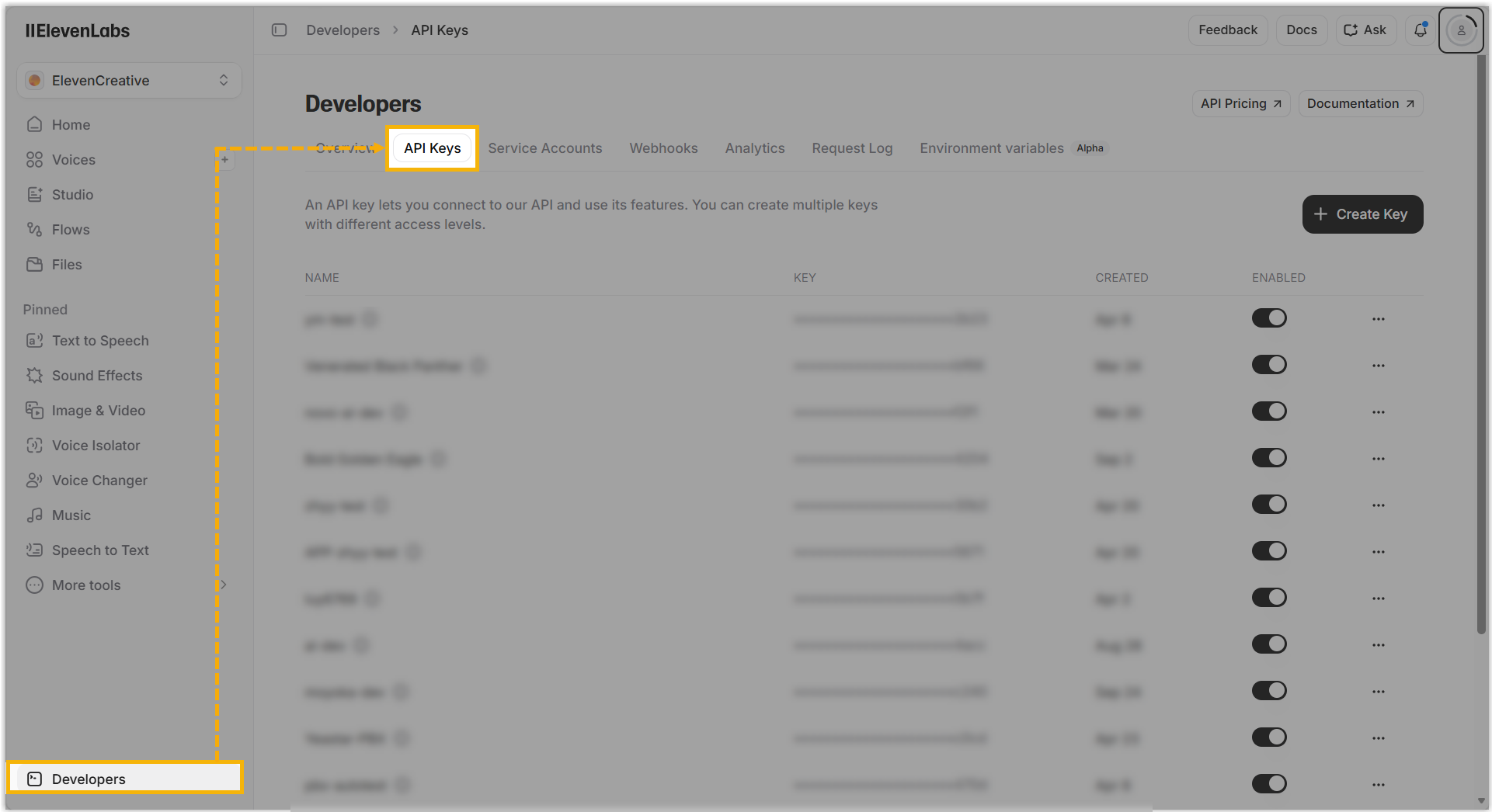
Sign in to the ElevenLabs Platform with your ElevenLabs username and password, then open Developers > API Keys.
-
At the top right of the key list, click Create Key.
-
Fill in the new key in the right sidebar.
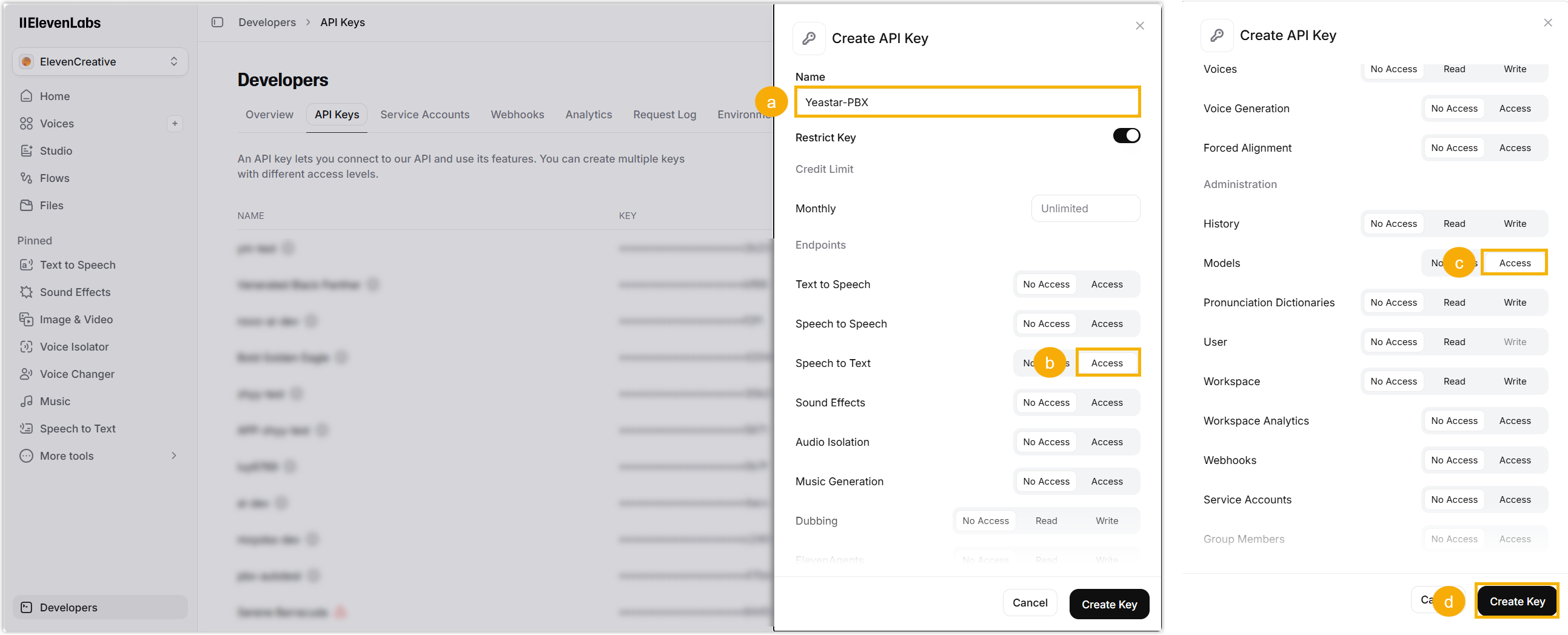
a. In Name, enter something that identifies the key.
b. Under Endpoints, click Access next to Speech to text.
c. Under Administration (scroll down to find it), click Access next to Models.
d. Click Create Key at the bottom right. The generated key appears in a pop-up window.
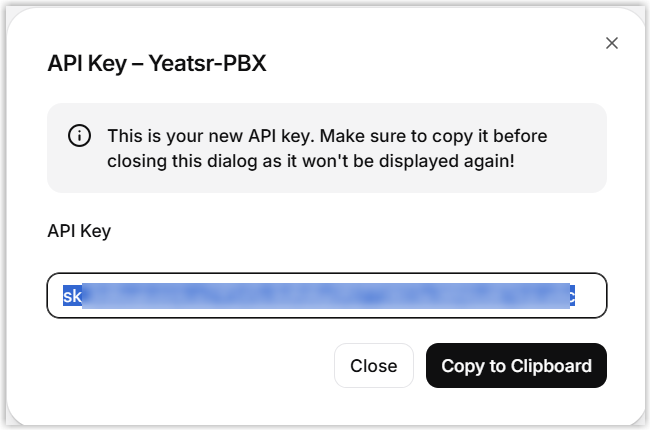
e. Click Copy to Clipboard and save the key somewhere safe for later.
Step 2. (Optional) Create a GPT or Gemini API key
Section titled “Step 2. (Optional) Create a GPT or Gemini API key”To have Cloud Voice call a GPT or Gemini LLM and produce a summary from each transcript after a call ends, create an API key for that provider so the requests can be authenticated. Follow the section that matches your LLM.
OpenAI (GPT)
Section titled “OpenAI (GPT)”-
Sign in to the OpenAI Platform with your OpenAI username and password, then open API Keys.
-
At the top right of the key list, click Create new secret key.
-
Fill in the new key in the pop-up window.
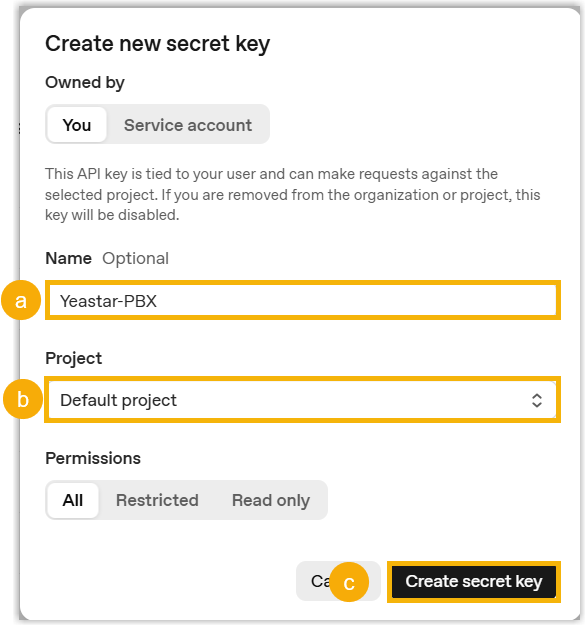
a. In Name, enter something that identifies the key.
b. In the Project drop-down list, choose the project you want.
c. Leave the permission set to the default All, then click Create secret key. The generated key appears in a pop-up window.
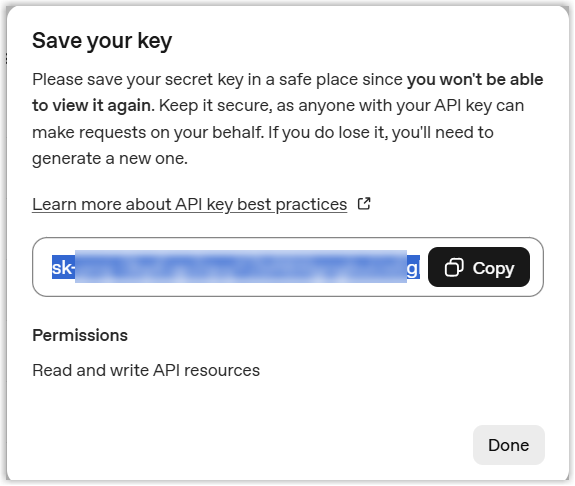
d. Click Copy and save the key for later.
Google (Gemini)
Section titled “Google (Gemini)”-
Sign in to Google AI Studio with your Google username and password, then open Dashboard > API keys.
-
At the top right of the key list, click Create API key.
-
Fill in the new key in the pop-up window.
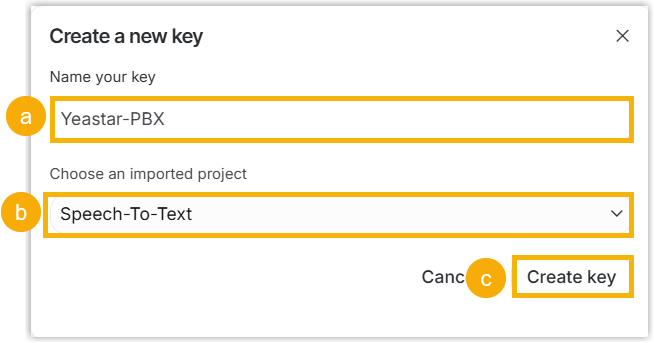
a. In Name your key, enter something that identifies the key.
b. In the Choose an imported project drop-down list, select the project you want.
c. Click Create key. The details of the generated key appear in a pop-up window.
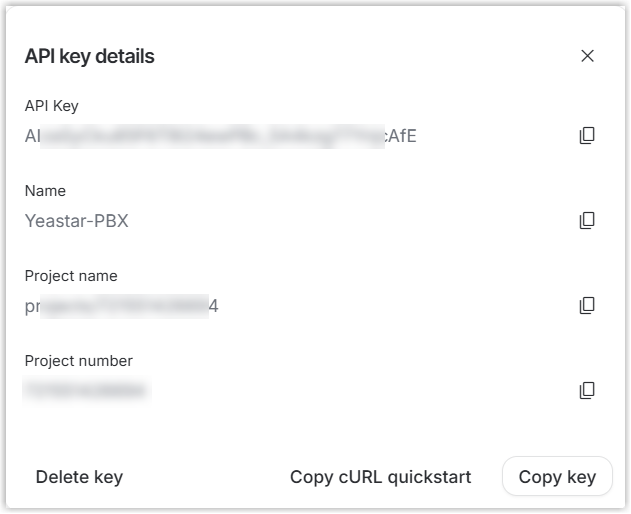
d. Click Copy key and save the key for later.
Step 3. Configure call transcription on the phone system
Section titled “Step 3. Configure call transcription on the phone system”With your ElevenLabs (and optional LLM) credentials in hand, enter them on the phone system to link it to the services.
-
Sign in to the phone system web portal and open AI > AI Toolbox.
-
Turn on the Call Transcription switch.
-
Set up the transcription service.
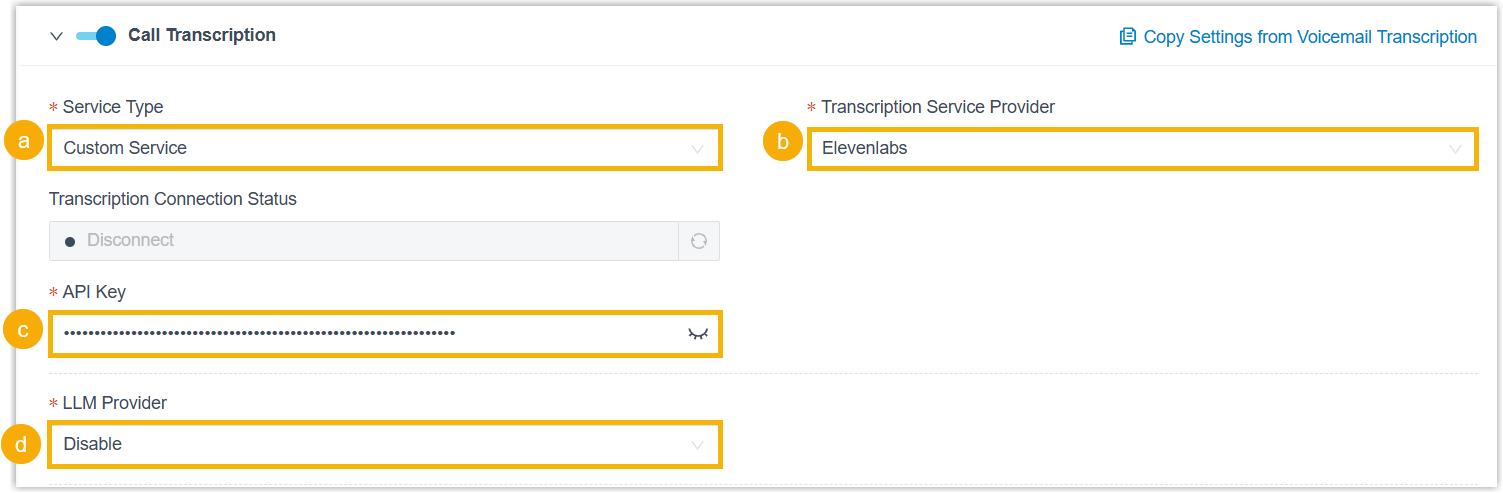
a. In the Service Type drop-down list, select Custom Service.
b. In the Transcription Service Provider drop-down list, select Elevenlabs.
c. In the API key field, paste the key you created on the ElevenLabs platform.
d. Set up the LLM service using whichever of the following applies:
-
No summaries: In the LLM Provider drop-down list, select Disable.
-
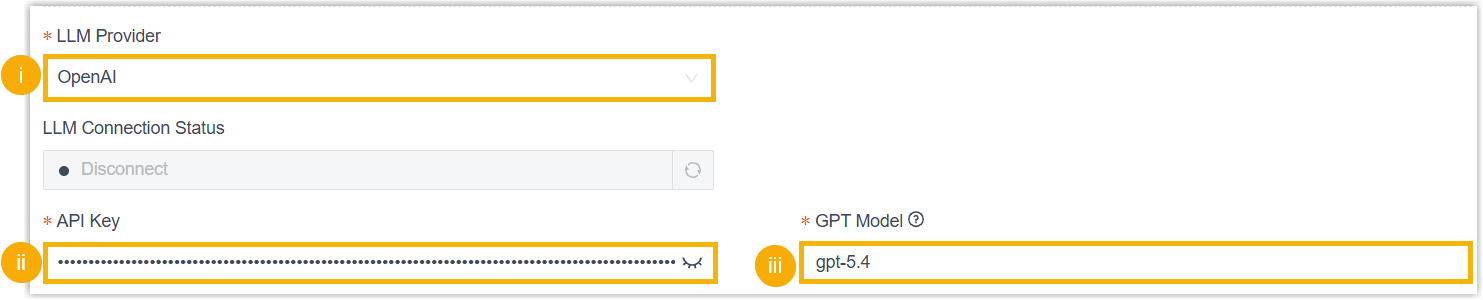
GPT: Complete these settings:
-
In the LLM Provider drop-down list, select OpenAI.
-
In the API key field, paste the key you created on the OpenAI platform.
-
In the GPT Model field, enter the model ID of the GPT model you want.
-
-
Gemini: Complete these settings:

-
In the LLM Provider drop-down list, select Google.
-
In the API key field, paste the key you created in Google AI Studio.
-
In the Gemini Model field, enter the model code of the Gemini model you want.
-
-
-
In the Language drop-down list, choose the language to detect and transcribe from call audio.
-
Under Extension Scope for This Feature, decide which extensions, extension groups, or departments can use call transcription:
- All Extensions: Everyone can use the feature.
- Specific Extensions: Only the extensions you select can use it.
-
Click Save.
Result
Section titled “Result”-
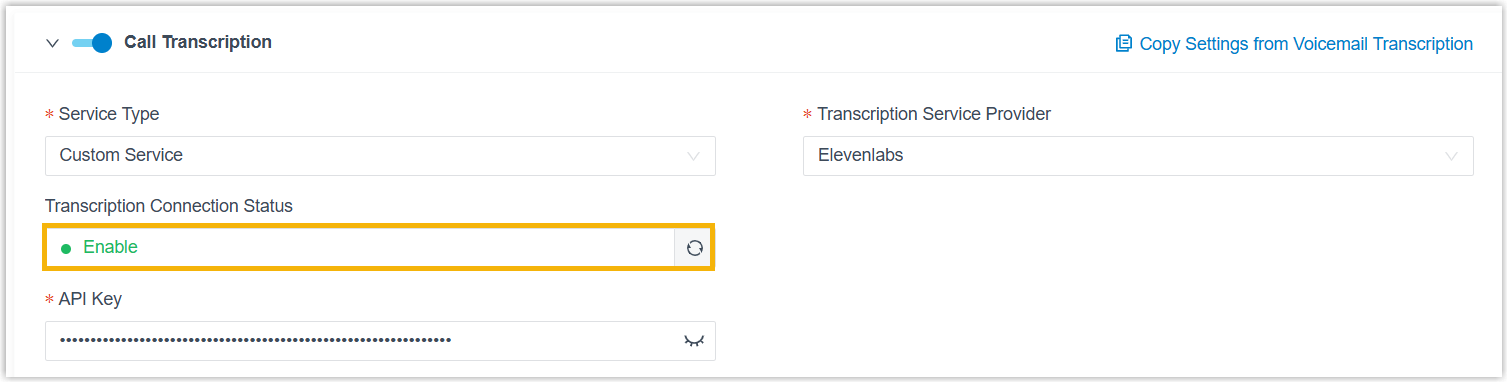
Transcription Connection Status shows Enable, confirming that AI call transcription via ElevenLabs Speech to Text is live. Call audio is now detected and transcribed into text in your chosen language as calls happen.
-
LLM Connection Status shows Enable, confirming that the phone system is connected to your chosen LLM. It will now generate a summary from each transcript automatically after a call ends.

Question about this page?
Ask the AI assistant. It starts from this page, then searches the rest of the docs.
Ask Cloud Voice AI
Answers are AI-generated from the docs and may contain mistakes. Verify with the linked pages.