
Enable AI Text-to-Speech
AI Text-to-Speech (TTS) converts text you type into spoken audio, so you can build voice prompts (greetings, menu announcements, hold messages) without recording anything yourself. It is turned off by default. This page covers the one-time setup that switches the feature on for the whole system. Once it is on, TTS becomes available wherever prompts are used, so you only have to do this once.
Before you begin
Section titled “Before you begin”Confirm that your deployment meets both of these conditions:
- Firmware: version 84.22.0.138 or newer.
- Subscription: an active Enterprise Plan or Ultimate Plan.
Turn on AI Text-to-Speech
Section titled “Turn on AI Text-to-Speech”-
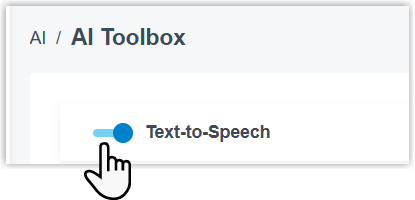
Sign in to the PBX (Private Branch Exchange, your phone system) web portal, then open AI > AI Toolbox.
-
Enable the Text-to-Speech toggle.
-
Select Save.
AI Text-to-Speech is now active and ready to use.
Next step
Section titled “Next step”With the feature enabled, you can start creating spoken prompts from text. See Generate Audio Prompts using AI Text-to-Speech.
Question about this page?
Ask the AI assistant. It starts from this page, then searches the rest of the docs.
Ask Cloud Voice AI
Answers are AI-generated from the docs and may contain mistakes. Verify with the linked pages.