
Configure AI Call Transcription with Built-in Service
Cloud Voice includes a built-in AI (artificial intelligence) engine that turns the audio of a two-party call into readable text as the conversation happens, and produces a written summary once the call ends. This gives you searchable, skimmable records of what was said without replaying the recording. This page walks you through enabling call transcription with that built-in engine.
Requirements
Section titled “Requirements”Before you turn on call transcription, confirm the following.
| Item | Requirement |
|---|---|
| Firmware | Version 84.23.0.83 or later. |
| Subscription | Your plan includes a one-time block of free transcription minutes, 120 minutes on the Enterprise Plan, or 240 minutes on the Ultimate Plan. |
To add more transcription minutes beyond what your plan provides, ask your service provider to enable one of the add-on services below. You subscribe to these under Plan > Add-on Subscription.

- AI Transcription (One-Time Capacity): A fixed block of minutes that you buy once. When the block runs out, purchase more capacity to continue.
- AI Transcription (Monthly Quota Pack): A recurring pack of 500 minutes that refreshes at the start of each month. Any minutes you don’t use are lost, they do not carry over.
Enable call transcription
Section titled “Enable call transcription”-
Log in to the Cloud Voice Dashboard at https://portal.voice.izt.cloud and click Login to open your phone system’s management portal with full administrator access, then go to AI > AI Toolbox.
-
Switch on Call Transcription.

-
From the Service Type drop-down list, choose Build-in Service.
-
Configure the transcription settings.
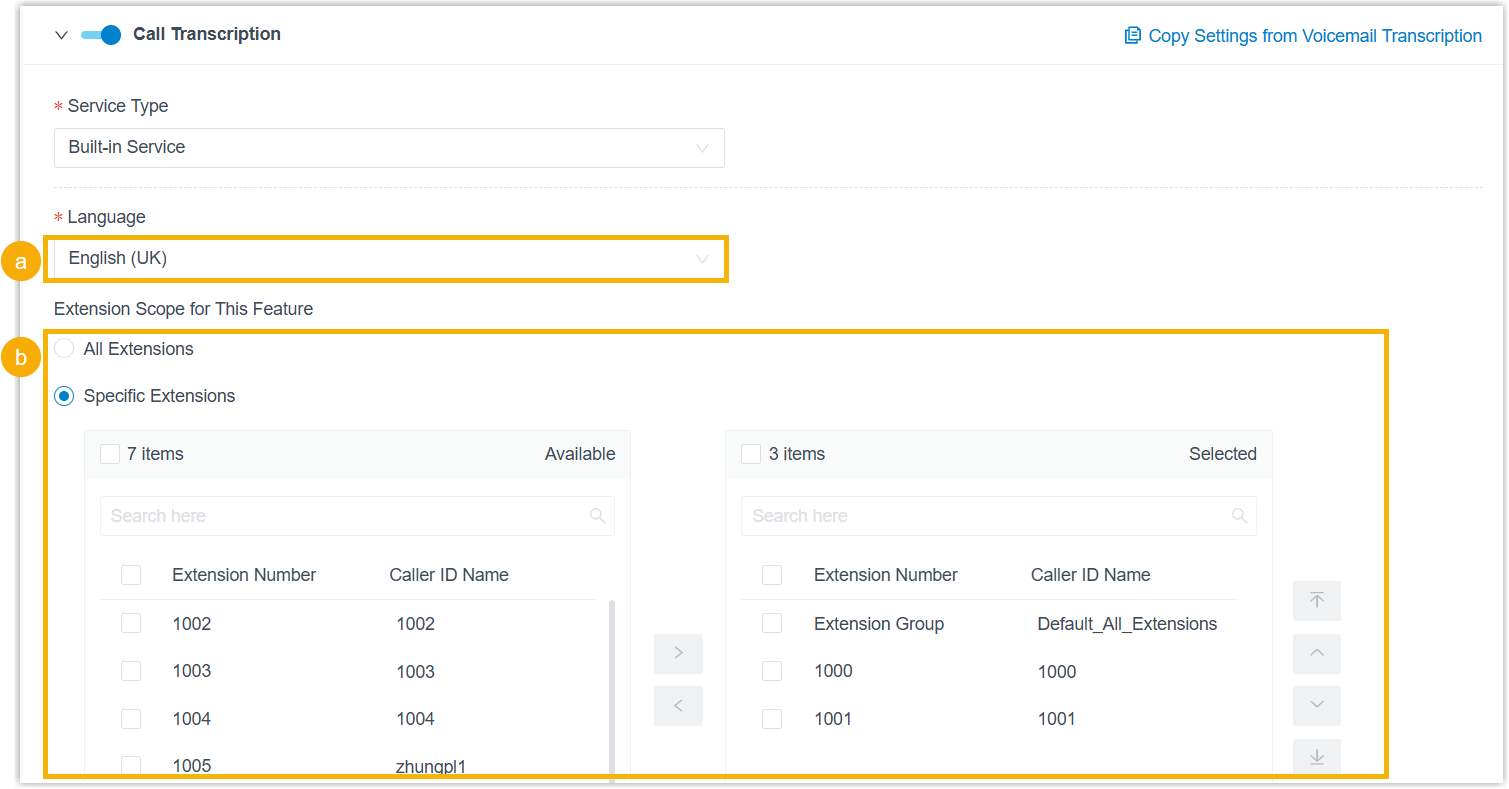
a. In the Language drop-down list, pick the language the engine should detect and transcribe for call audio.
b. Under Extension Scope for This Feature, decide which extensions, extension groups, or departments can use call transcription:
- All Extensions: Every extension can use the feature.
- Specific Extensions: Only the extensions you select can use it.
-
Click Save.
Result
Section titled “Result”Call transcription powered by the built-in AI engine is now active. Audio from qualifying calls is detected and transcribed into text in your chosen language in real time, and a summary is generated automatically once the call finishes.
Usage alerts
Section titled “Usage alerts”The system keeps an eye on how many minutes you’ve consumed and notifies your contacts as you approach your limit:
- When the utilization rate (used minutes divided by total minutes) of either your one-time capacity or your monthly quota pack crosses a configured threshold, the PBX sends the notification Your AI Transcription Usage is Reaching the Capacity Limit.
- When every available minute, across both one-time capacity and the monthly quota pack, has been used, the PBX sends the notification AI Transcription Limit Reached.
Tracking usage
Section titled “Tracking usage”You can also check transcription usage at any time in one of two ways:
- Open the Transcription Usage Details report for a breakdown of minutes used by both Voicemail Transcription and Call Transcription. See Access Transcription Usage Details Report.
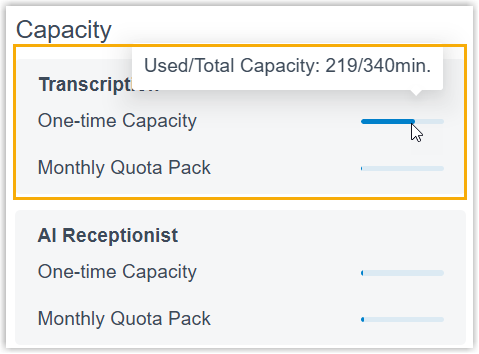
- View used minutes and total capacity directly on the Dashboard (visible only to the administrator).
Question about this page?
Ask the AI assistant. It starts from this page, then searches the rest of the docs.
Ask Cloud Voice AI
Answers are AI-generated from the docs and may contain mistakes. Verify with the linked pages.