
Set the Default Status for Dynamic Agents
When a dynamic agent is added to a queue, they start out logged out unless you tell the system otherwise. Setting a default login status lets every newly added dynamic agent inherit the same starting state across all of your queues. This cuts down on repetitive manual changes and reduces the chance of an agent being left in the wrong state.
Before you begin
Section titled “Before you begin”Your PBX (Private Branch Exchange, the phone system that routes your calls) server must be running firmware version 84.19.0.110 or later. Older versions do not include this option.
Set the default status
Section titled “Set the default status”-
Sign in to the PBX web portal and open Call Features > Queue.
-
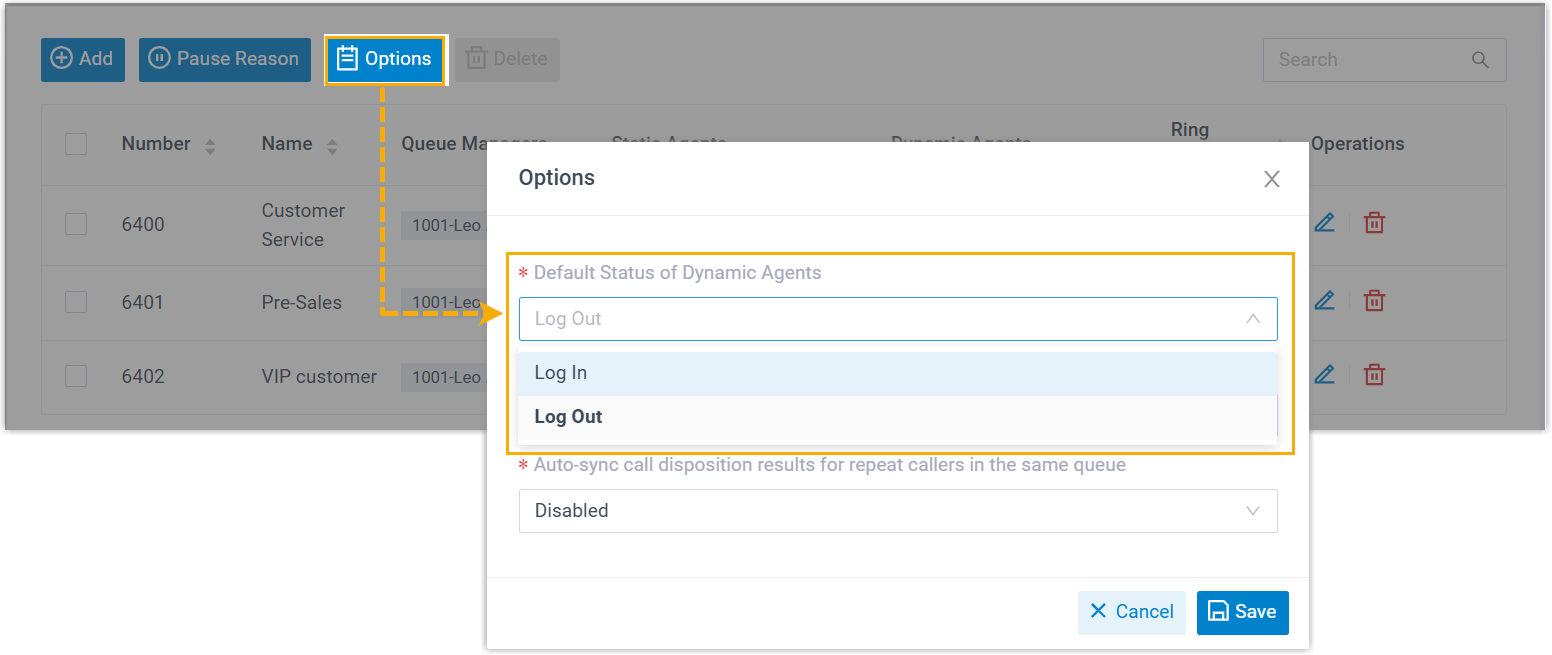
At the top of the page, click Options.
-
Open the Default Status of Dynamic Agents drop-down and choose the status you want new dynamic agents to start with.
-
Click Save.
What happens next
Section titled “What happens next”From now on, any dynamic agent added to a queue takes on the status you selected.
Question about this page?
Ask the AI assistant. It starts from this page, then searches the rest of the docs.
Ask Cloud Voice AI
Answers are AI-generated from the docs and may contain mistakes. Verify with the linked pages.