
Pick up a Call
When a queued call sits ringing without an agent answering it, you can step in and take that call yourself rather than leave the caller waiting. This page walks through picking up a ringing call from the queue.
Before you begin
Section titled “Before you begin”You need the Allow for picking up or hanging up agents’ calls permission before you can take another agent’s incoming call. If you do not have it, ask your system administrator to grant it.
Pick up a ringing call
Section titled “Pick up a ringing call”-
Open the Cloud Voice App (Web or Desktop) and go to Call Center Console > Queue Panel.
-
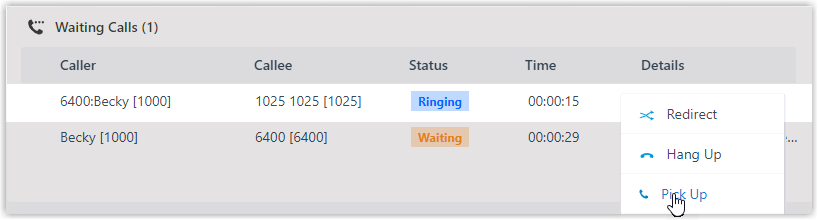
In the Waiting Calls panel, find a call whose status is Ringing and rest your pointer on it.
-
Right-click the call and choose Pick Up. The PBX (Private Branch Exchange, the phone system that routes your calls) connects the call to your extension.
-
Answer the call.
Question about this page?
Ask the AI assistant. It starts from this page, then searches the rest of the docs.
Ask Cloud Voice AI
Answers are AI-generated from the docs and may contain mistakes. Verify with the linked pages.