
Pick up a Call
When a queued call keeps ringing and no agent has taken it, you can grab the call yourself and route it to your own extension. This is handy for shortening the caller’s wait when an agent is slow to answer or has stepped away.
A few terms used below:
- Extension: the internal number assigned to a phone or agent.
- Queue: a line that holds incoming callers until an agent is free to take them.
Before you begin
Section titled “Before you begin”Picking up another agent’s ringing call requires a specific permission. Confirm that your system administrator has assigned you the Allow for picking up or hanging up agents’ calls permission.
Pick up a ringing call
Section titled “Pick up a ringing call”-
Open the Cloud Voice App (Web or Desktop) and navigate to Call Center Console > Queue Panel.
-
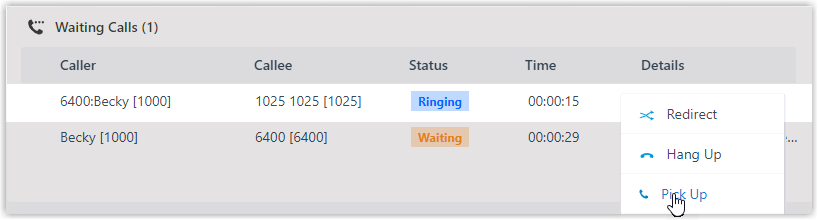
In the Waiting Calls panel, move your pointer over a call whose status shows as Ringing.
-
Right-click that call and choose Pick Up.
The PBX (Private Branch Exchange, the phone system that routes your calls) pulls the call away from the original extension and delivers it to yours.
-
Answer the call at your extension.
Question about this page?
Ask the AI assistant. It starts from this page, then searches the rest of the docs.
Ask Cloud Voice AI
Answers are AI-generated from the docs and may contain mistakes. Verify with the linked pages.