
Automatically Synchronize Processing Results for Repeat Calls
When the same person calls a queue several times without reaching an agent, each attempt lands as a separate missed or abandoned call log. Auto-sync ties those logs together: once an agent sets a disposition on one of them, Cloud Voice copies that result to the caller’s other missed or abandoned calls to the same queue within a time window you define. The records stay consistent, and no second agent wastes a callback on a caller who has already been handled.
Before you begin
Section titled “Before you begin”Your phone system must be running firmware version 84.19.0.110 or later.
Turn on auto-sync
Section titled “Turn on auto-sync”-
Sign in to the management portal and open Call Features > Queue.
-
At the top of the page, click Options.
-
In the dialog that appears, configure the following:
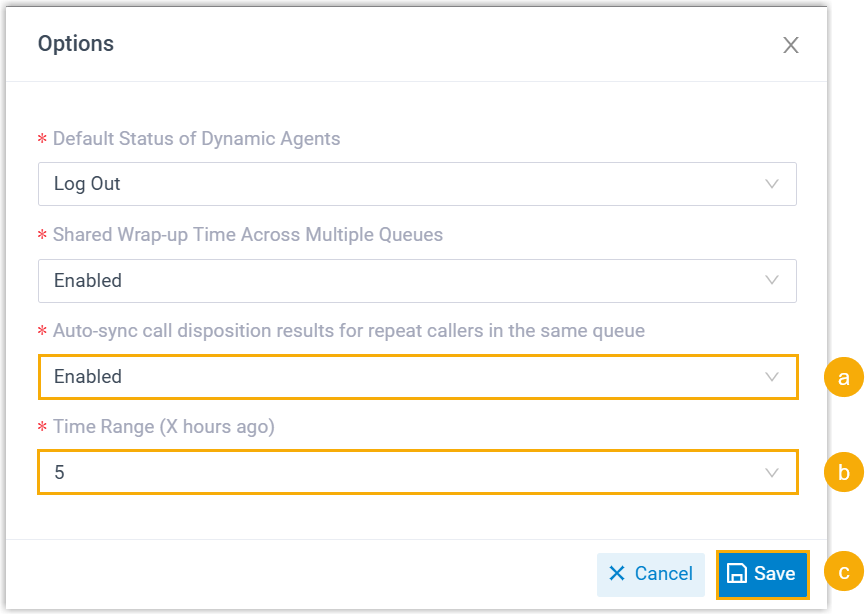
a. Set Auto-sync call disposition results for repeat callers in the same queue to Enabled.
b. Choose a value for Time Range (X hours ago). This is the look-back window applied at the moment an agent updates the disposition on a missed or abandoned queue call log: every missed or abandoned log from that same number to that same queue in the preceding X hours is brought in line.
For example, with the range set to 2 hours, if you change the disposition on a missed call log at 3:00 PM, the system updates every missed call from that number received between 1:00 PM and 3:00 PM.
c. Click Save.
What happens next
Section titled “What happens next”From now on, updating the disposition of a missed or abandoned queue call automatically applies the same status to that caller’s other missed calls to the queue that fall inside your time range.

Question about this page?
Ask the AI assistant. It starts from this page, then searches the rest of the docs.
Ask Cloud Voice AI
Answers are AI-generated from the docs and may contain mistakes. Verify with the linked pages.