
Allow Agents to Manage Their Status by Dialing a Feature Code
Cloud Voice ships with a set of queue feature codes that let agents change their own availability without opening an app. A feature code is a short dial string (for example, *7 followed by a queue number) that tells the system to run an action instead of placing a call. Once you turn these codes on, an agent can join or leave a queue, or step away from calls, simply by dialing the code. This page shows you how to enable and customize those codes.
Enable the queue feature codes
Section titled “Enable the queue feature codes”- Sign in to the Cloud Voice management portal and go to Call Features > Feature Code.
- Find the Queue section further down the page.
- To let agents join and leave queues by dialing a code:
- Tick the Log in/Log out checkbox.
- Optionally, edit the feature code to match your dial-plan preferences.
- To let agents step away from and return to queue calls by dialing a code:
-
Tick the Pause/Unpause checkbox.
-
Optionally, edit the feature code to match your dial-plan preferences.
-
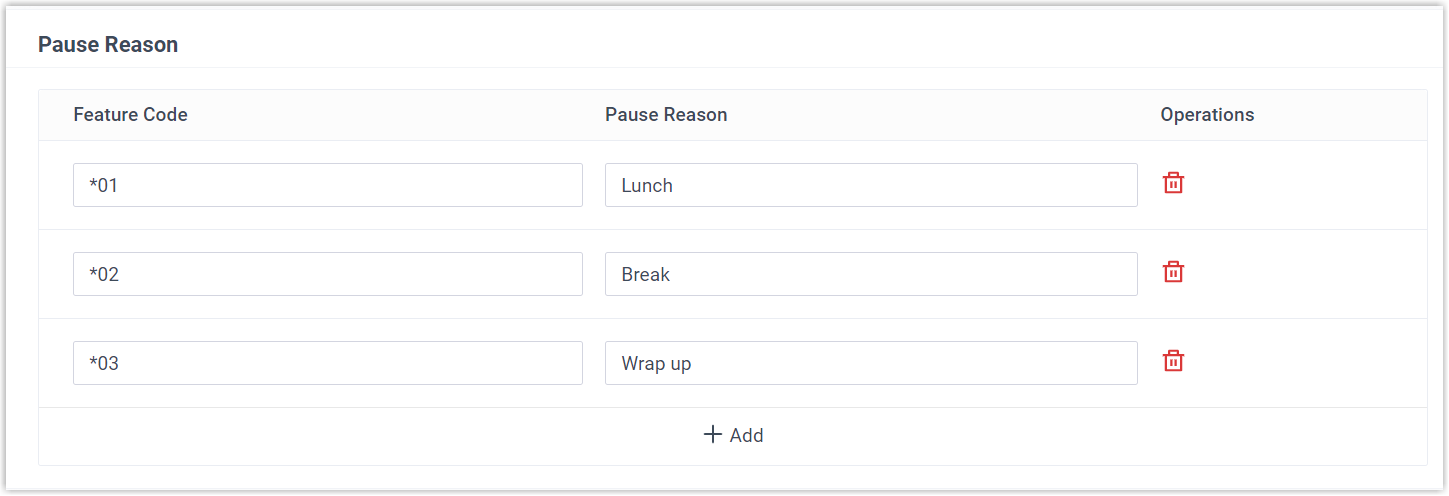
Optionally, open the Pause Reason section and define the reasons an agent can pause for, each with its own feature code. Agents can then pause for a specific reason by dialing the matching pause reason code.
-
- Click Save, then Apply.
How agents use the codes
Section titled “How agents use the codes”After the codes are active, agents dial them from either the Cloud Voice App or a desk phone (IP phone) to change their status. In the examples below, 6400 is the queue extension and 1000 is the agent’s extension.
| Action | How it works |
|---|---|
| Log in to a queue | Only dynamic agents log in; static agents are permanently assigned to the queue. Example: a dynamic agent dials *76400 to join queue 6400. |
| Log out of a queue | Only dynamic agents log out; static agents remain in the queue at all times. Example: dynamic agent 1000 dials *76400 to leave queue 6400. |
| Pause queue calls | Both static and dynamic agents can pause when they step away. Cloud Voice stops routing queue calls to any agent in the Paused state. Dial *076400 to pause queue 6400 with no reason, or add a reason code such as *076400*03 to pause for after-call work. |
| Unpause queue calls | Both static and dynamic agents can resume when they are ready for calls again. Example: agent 1000 dials *076400 to unpause queue 6400. |
Question about this page?
Ask the AI assistant. It starts from this page, then searches the rest of the docs.
Ask Cloud Voice AI
Answers are AI-generated from the docs and may contain mistakes. Verify with the linked pages.