
Dial by Name
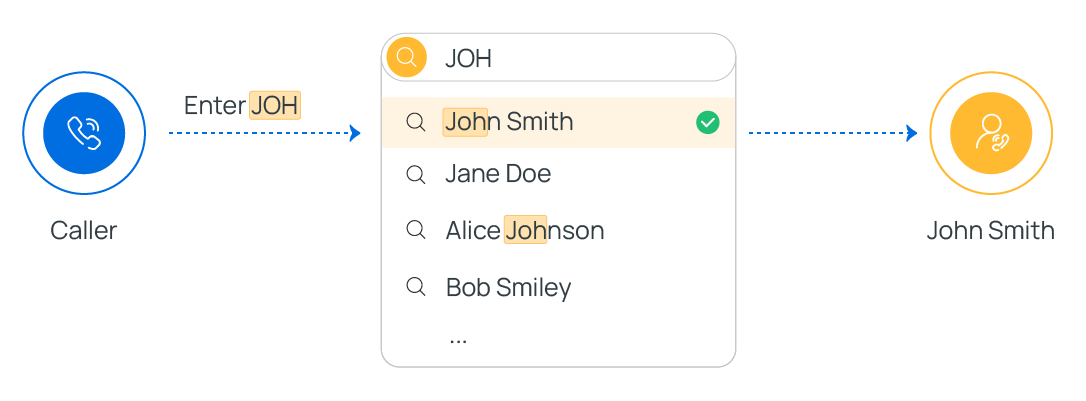
The Dial by Name component gives callers a spoken directory: they enter the first three letters of a person’s name on the keypad, and the system connects them to the matching extension. Use this section to understand what the component does, how to prepare your extensions for it, and how the caller experience plays out.
Overview
Section titled “Overview”Dial by Name is a terminating component, meaning it ends a caller’s path through the call flow. When a call reaches it, the component hands control to a built-in directory prompt that lets the caller spell a name and be routed to the corresponding extension user.
Configuration
Section titled “Configuration”The component itself has no settings to fill in. What it relies on is your extension and system-wide name settings, so callers can actually be found when they spell a name. Confirm the following two items before you publish the call flow.
-
Give each extension a Caller ID Name.
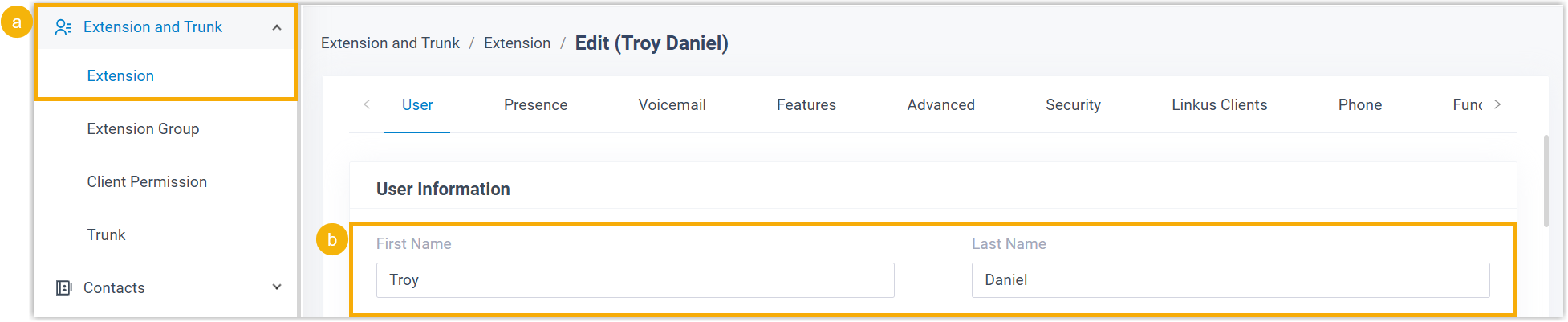
a. Go to Extension and Trunk > Extension and edit the extension you want to include. b. Under User Information, fill in the user’s first name and last name.
-
Choose how Caller ID Names are ordered.

a. Go to PBX Settings > Preferences. b. Open the Name Display Format drop-down and pick a format:
- To let callers spell a person’s first name, choose First Name Last Name with Space Inbetween.
- To let callers spell a person’s last name, choose Last Name First Name with Space Inbetween or Last Name First Name without Space Inbetween.
The three letters a caller enters are matched against the start of each extension’s Caller ID Name, in whichever order the display format defines. Pick the format that matches how your callers are most likely to search.
How callers use it
Section titled “How callers use it”Once a call reaches the component, the system walks the caller through the directory:
-
The system plays a prompt: “Welcome to the directory. Please enter the first three letters of your party’s first or last name, using your touchtone keypad, use the 7 key for Q, and the 9 key for Z.”
-
The caller keys in the first three letters of a name.
-
The system finds the closest match and responds:
- If nothing matches, it plays “No directory entries match your search.”
- If there is at least one match, it plays “[Name] extension [Number]. If this is the person you are looking for, press 1 now, otherwise please press star now,” then acts on the caller’s choice:
- Press 1 to be connected to that extension user.
- Press * to hear the next match. When no matches remain, the system plays “There are no more compatible entries in the directory.”
Connections
Section titled “Connections”Dial by Name includes a built-in Call End branch. You can wire this branch to a single downstream component, chosen from any of the following.
| Component | What it does |
|---|---|
| Internal Data Ops | Reads and writes data in the PBX’s own database. For the specific operations, see Get Extension Presence Status, Set Extension Presence Status, Get Queue Agent, Get Queue Info, Get Agent Status, Set Agent Status, Get System Info, Get System Capacity, Get Extension Info, and Get Company Contact Info. |
| Email Sender | Sends email so you can push notifications, alerts, or user-specific details in real time. See Email Sender. |
| Database Access | Works with a database during the call flow, running SQL (Structured Query Language) to retrieve or update records. See Database Access. |
| HTTP Request | Sends HTTP (Hypertext Transfer Protocol) requests to outside web servers to exchange data with third-party services. See HTTP Request. |
Question about this page?
Ask the AI assistant. It starts from this page, then searches the rest of the docs.
Ask Cloud Voice AI
Answers are AI-generated from the docs and may contain mistakes. Verify with the linked pages.