
Condition
The Condition component decides where a call goes by testing logical expressions. Each expression can combine variables, constants, and functions to check for a specific situation, and when an expression evaluates to true the call is passed to the component wired to that branch. Reach for it when a call flow needs to branch on a rule you can write out, for example the digit a caller entered, whether the call arrived during business hours, or a value returned by an earlier component. This page explains what the component does, how to set up its branches, and which components a branch can lead to.
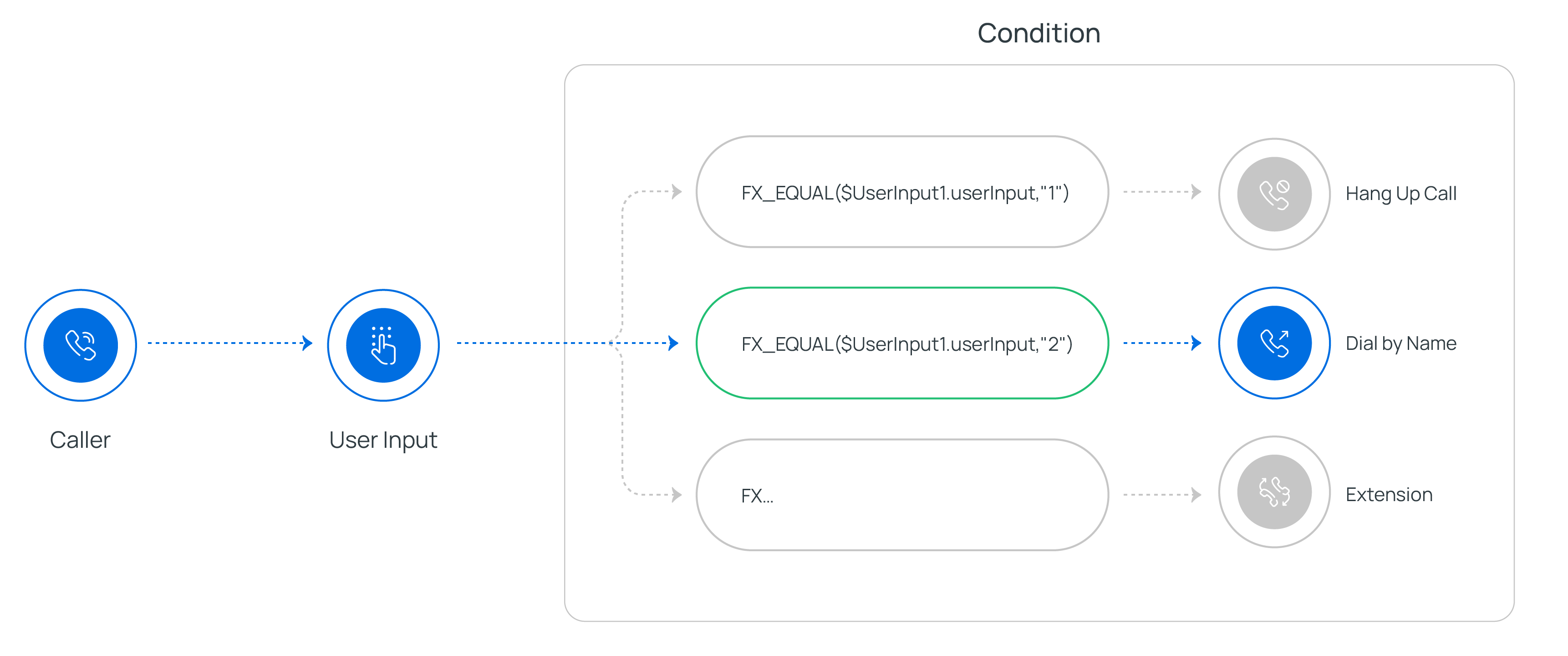
Configure branches
Section titled “Configure branches”Once you drop a Condition component onto the canvas, you build out its logic by adding branches. Each branch pairs an expression with a destination, and a built-in No Match branch handles calls that satisfy none of them.
Add a branch for each condition
Section titled “Add a branch for each condition”-
Click
 on the component to create a
new branch.
on the component to create a
new branch.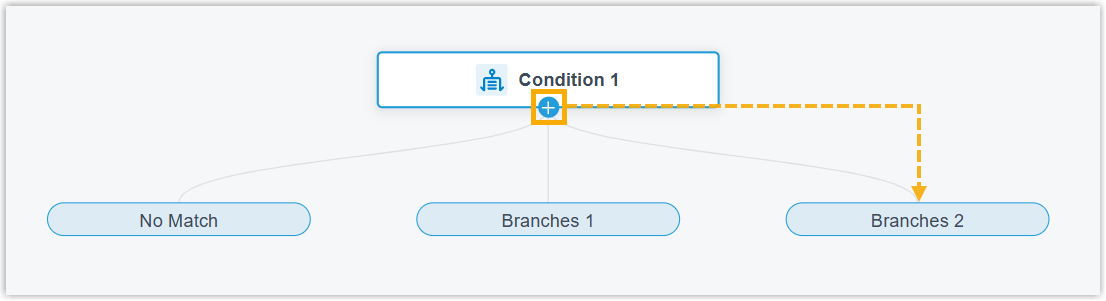
-
Click the branch, enter its expression, then click Confirm.
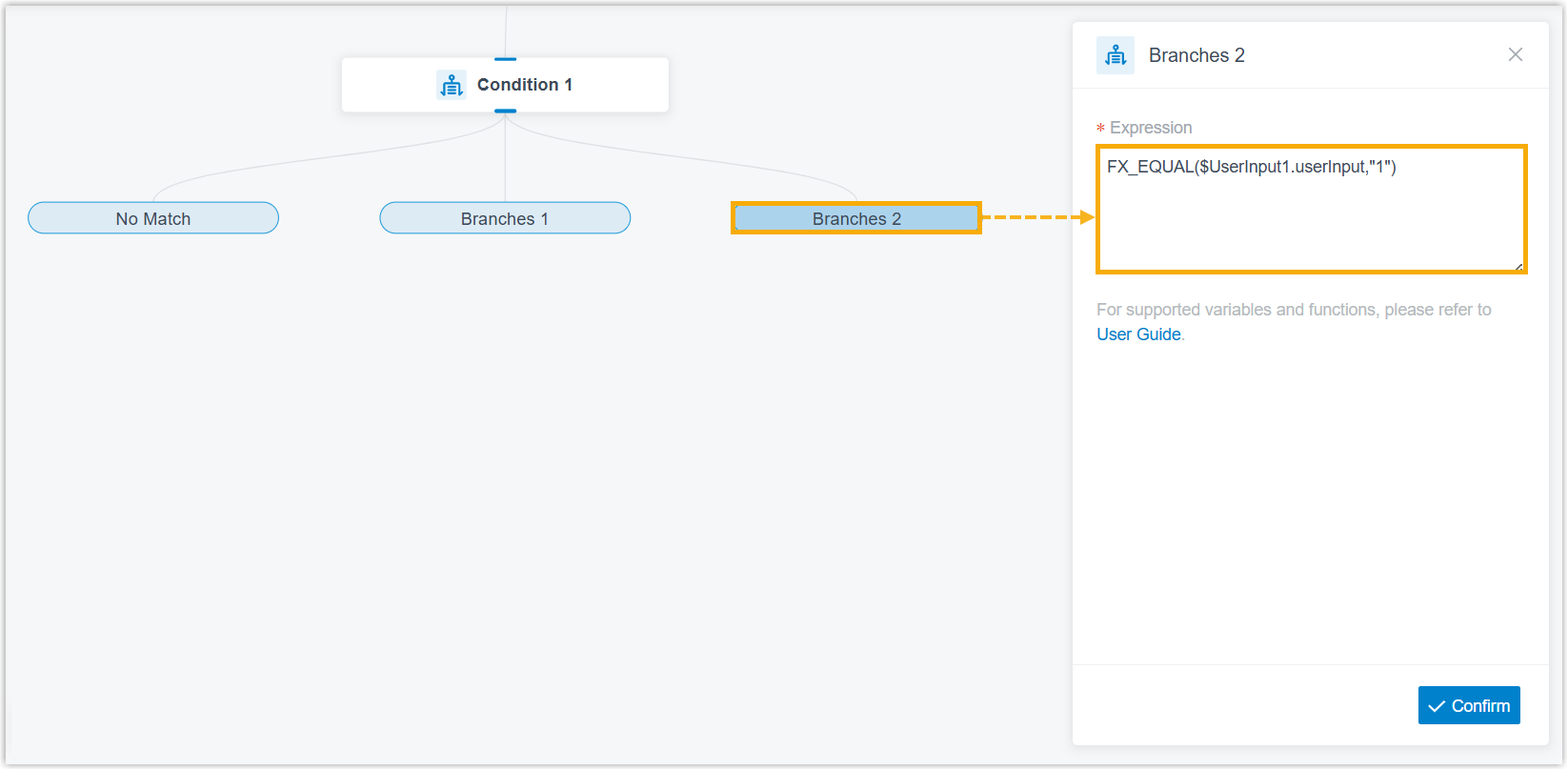
For instance, an expression of
FX_EQUAL($UserInput1.userInput,"1")routes the call to the component attached to that branch whenever the caller presses1. Here$UserInput1.userInputis the value that a User Input component collected earlier in the flow, which is the usual way to branch on what a caller keyed in on their phone.
Set the No Match destination
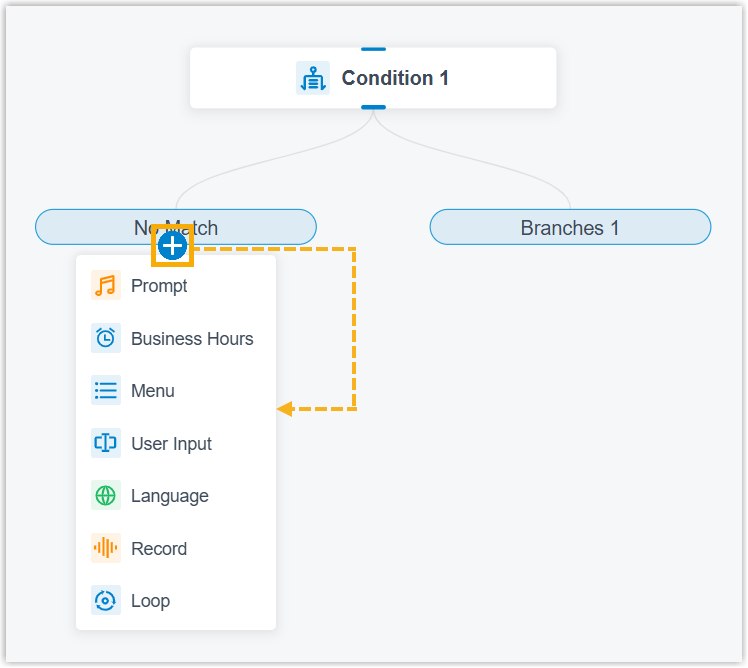
Section titled “Set the No Match destination”Click on the No Match branch to
attach a component. This component runs whenever a call fails to match any of
the conditions you defined.
Supported connections
Section titled “Supported connections”Every Condition component includes the built-in No Match branch plus up to 10 branches of your own. A branch can connect to exactly one downstream component, chosen from the following.
| Component | Description |
|---|---|
| Prompt | Plays one or more audio prompts or a text-to-speech message to the caller. See Prompt. |
| Business Hours | Sends calls to different destinations depending on the time of day. See Business Hours. |
| Menu | Offers callers a set of options and routes each call by the DTMF (Dual-Tone Multi-Frequency, the tone a phone sends when a key is pressed) digit the caller keys. See Menu. |
| User Input | Collects DTMF digits from the caller, often paired with Condition to evaluate what was entered and branch accordingly. See User Input. |
| Language | Switches the system prompt language for the components that follow in the flow. See Language. |
| Record | Starts recording once the caller connects to another party, with optional prompts to announce recording at the start and while it runs. It can also turn recording off for calls that would otherwise be recorded. See Record. |
| Dial by Number | Lets callers dial a number directly to reach their destination. See Dial by Number. |
| Dial by Name | An end component that closes the caller’s path through the flow, letting them reach an extension user by keying the first three letters of that user’s name. See Dial by Name. |
| Transfer | An end component that hands the caller off to a chosen destination, with optional prompts to announce the transfer. See Transfer. |
| Hang Up Call | An end component that disconnects the call as soon as it is reached. See Hang Up Call. |
| Condition | Branches calls by evaluating logical expressions. See Condition. |
| Loop | Repeats a group of components, either a set number of times or until a condition is satisfied. See Loop. |
| Internal Data Ops | Reads from and writes to the built-in PBX (Private Branch Exchange, your phone system) database. See Get Extension Presence Status, Set Extension Presence Status, Get Queue Agent, Get Queue Info, Get Agent Status, Set Agent Status, Get System Info, Get System Capacity, Get Extension Info, and Get Company Contact Info. |
| Email Sender | Sends email from within the flow for real-time notifications, alerts, or user-specific details. See Email Sender. |
| Database Access | Runs SQL (Structured Query Language) operations against a database mid-flow to retrieve or update data. See Database Access. |
| HTTP Request | Sends HTTP (Hypertext Transfer Protocol, the protocol web browsers and servers use to exchange data) requests to external web servers to exchange data with third-party services. See HTTP Request. |
Question about this page?
Ask the AI assistant. It starts from this page, then searches the rest of the docs.
Ask Cloud Voice AI
Answers are AI-generated from the docs and may contain mistakes. Verify with the linked pages.