
Transfer a Call
From the Operator Panel you can hand off any live call to a colleague or send it straight to voicemail. This page walks through each destination: transferring to an extension, to an extension’s personal voicemail, and to a group voicemail.
Before you begin
Section titled “Before you begin”To move active calls that belong to members of an extension group, your account needs the Call distribution management (Redirect, Transfer, Drag and Drop operation) permission. Without it, the transfer controls described below will not be available for those calls.
Transfer a call to an extension
Section titled “Transfer a call to an extension”-
On the Inbound & Internal Calls panel or the Outbound Calls panel, move your mouse over the active call you want to move.
-
Complete the transfer using either of the following methods.
Drag and drop
Drag the call onto the target extension in the Extension list and release it. That extension user immediately receives an incoming call.

Right-click menu
Right-click the call, choose Transfer, then pick who should receive it. In the panel that opens, type the destination extension number and click the transfer button
 . The extension user then receives an incoming call.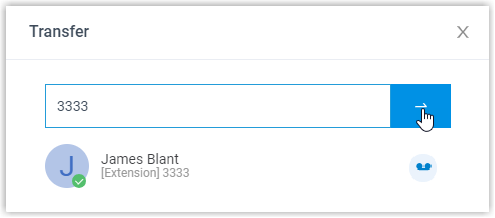
Transfer a call to a group voicemail
Section titled “Transfer a call to a group voicemail”-
On the Inbound & Internal Calls panel or the Outbound Calls panel, move your mouse over the active call.
-
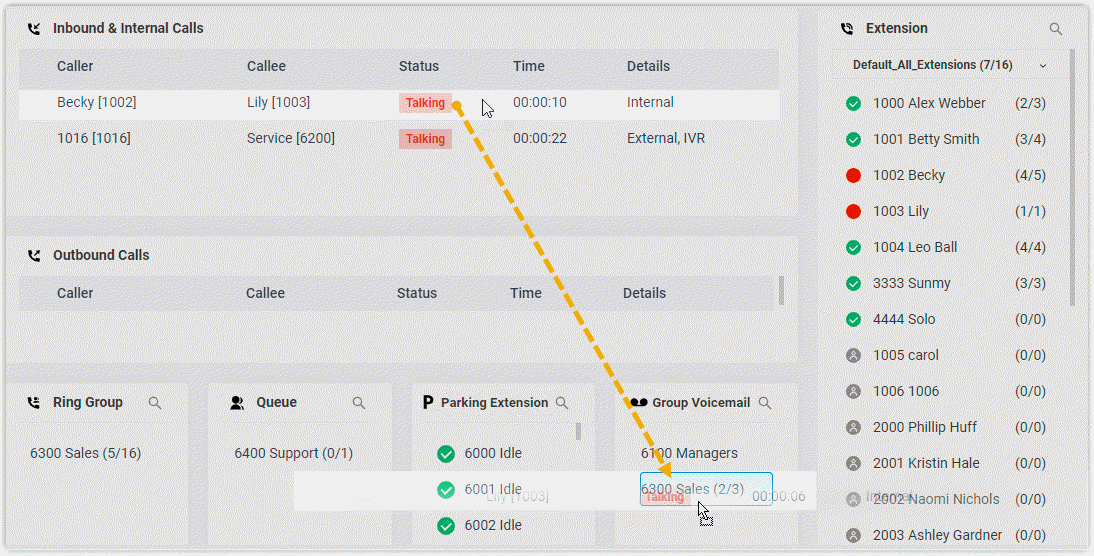
Drag the call onto the group you want in the Group list and release it.
The call goes to that group’s voicemail, and the caller can record a message for the group’s members.
Transfer a call to an extension’s voicemail
Section titled “Transfer a call to an extension’s voicemail”-
On the Inbound & Internal Calls panel or the Outbound Calls panel, move your mouse over the active call.
-
Right-click the incoming call and choose Transfer.
-
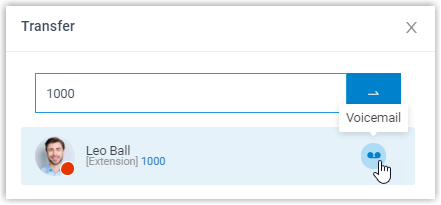
In the panel that opens, enter an extension number to search for the user.
-
In the matching results, click the voicemail icon
 for that user.
The call is delivered to the extension’s voicemail, where the caller can leave the user a message.
Question about this page?
Ask the AI assistant. It starts from this page, then searches the rest of the docs.
Ask Cloud Voice AI
Answers are AI-generated from the docs and may contain mistakes. Verify with the linked pages.