
Cloud Voice 84.22.0.134-beta1
- Release date: March 30, 2026
- Release version: V23.3-Beta
This is the first beta build of the V23.3 release. To try the changes below, check for updates in your phone system’s admin portal and upgrade.
New features
Section titled “New features”AI Receptionist
Section titled “AI Receptionist”Cloud Voice now includes an AI Receptionist: a virtual agent that stays available around the clock. It answers incoming calls, greets callers, responds to their questions from a knowledge base you define, and routes each call to the right destination. By handling routine, repetitive interactions on its own, it lightens your team’s workload while giving callers a consistent experience.
Several related changes ship alongside it.
Add-on minutes. Two subscriptions are available under Plan > Add-on Subscription to grow your pool of AI Receptionist minutes.

| Subscription | What it provides |
|---|---|
| AI Receptionist (One-Time Capacity) | A one-time block of AI Receptionist minutes for the phone system. Buy more once the block runs out. |
| AI Receptionist (Monthly Quota Pack) | Each pack adds 200 AI Receptionist minutes per month; subscribe to one or more packs as needed. |
Every phone system starts with 60 free one-time AI Receptionist minutes, and you can add more as your needs grow.
- To subscribe to either service, contact your service provider.
- You can buy one-time capacity, subscribe to one or more monthly packs, or combine both. When both are active, minutes are drawn from the monthly pack first.
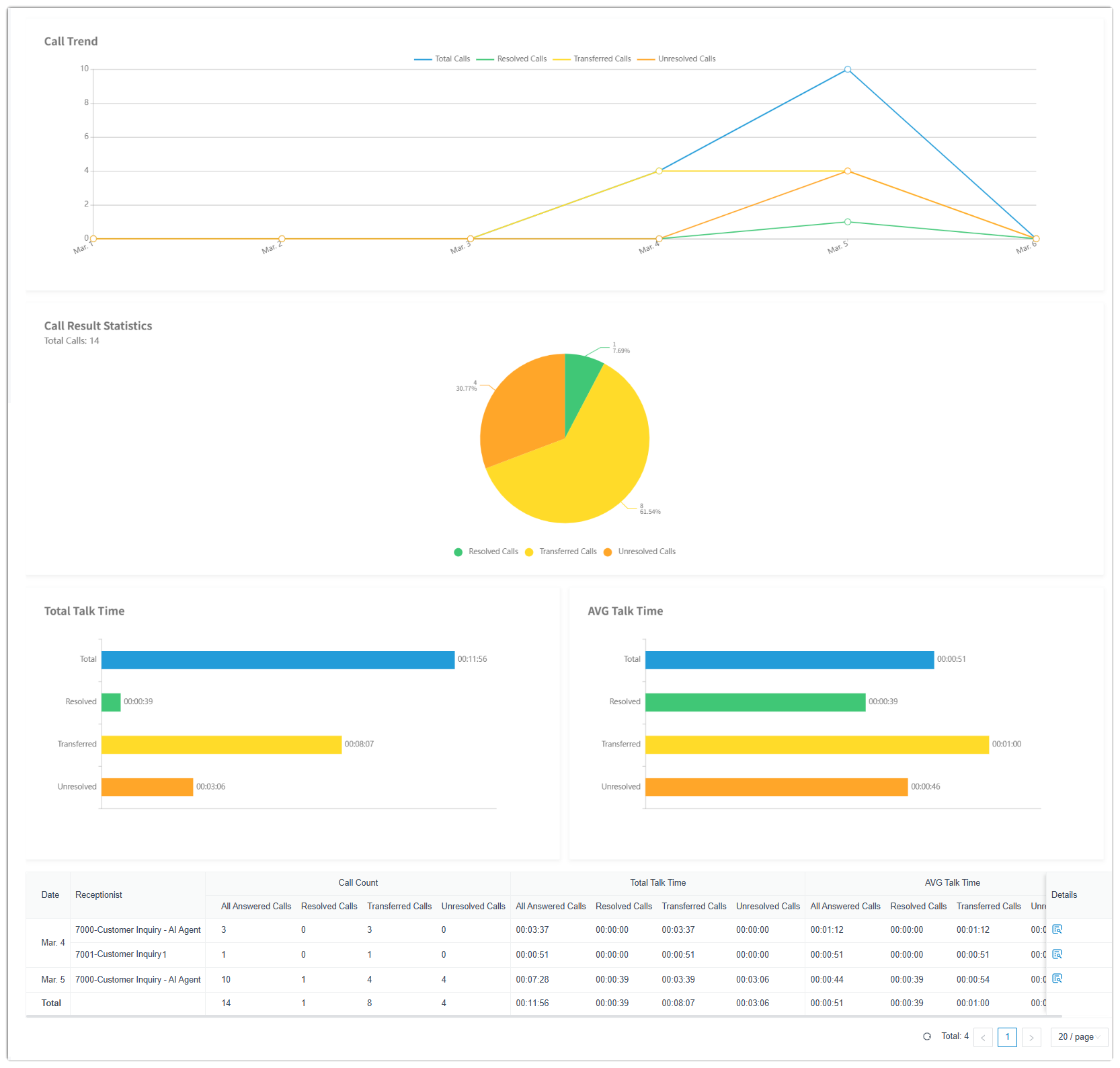
Call report. A new AI Receptionist Call Activity report (Reports and Recordings > Call Reports > Default Reports > AI Reports) gives you an overview of call activity and statistics for AI Receptionist calls.
Event notifications. New events are available under System > Event Notification > Event Type.
| Event | Trigger |
|---|---|
| AI Receptionist Call Line Abnormal | The AI Receptionist’s call line is abnormal and cannot receive calls. |
| AI Receptionist Call Line Restored | The AI Receptionist’s call line has recovered and can receive calls normally again. |
| Your AI Receptionist Usage is Reaching the Capacity Limit | The utilization rate (used minutes divided by total minutes) of either the one-time capacity or the monthly pack reaches a configured threshold. |
| AI Receptionist Limit Reached | All AI Receptionist minutes, across both the one-time capacity and the monthly pack, have been used. |
Custom call reports
Section titled “Custom call reports”You can now build Custom Reports around your own business needs. Choose a dataset, either a built-in custom report or one of the default call reports, then pick the metrics, dimensions, and filters that define exactly what the report shows.
The following related changes are included.
-
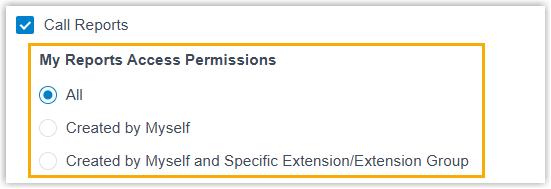
My Reports. A new My Reports page (Reports and Recordings > Call Reports) is where you create and manage custom reports and pin the default reports you use most for quick access.
-
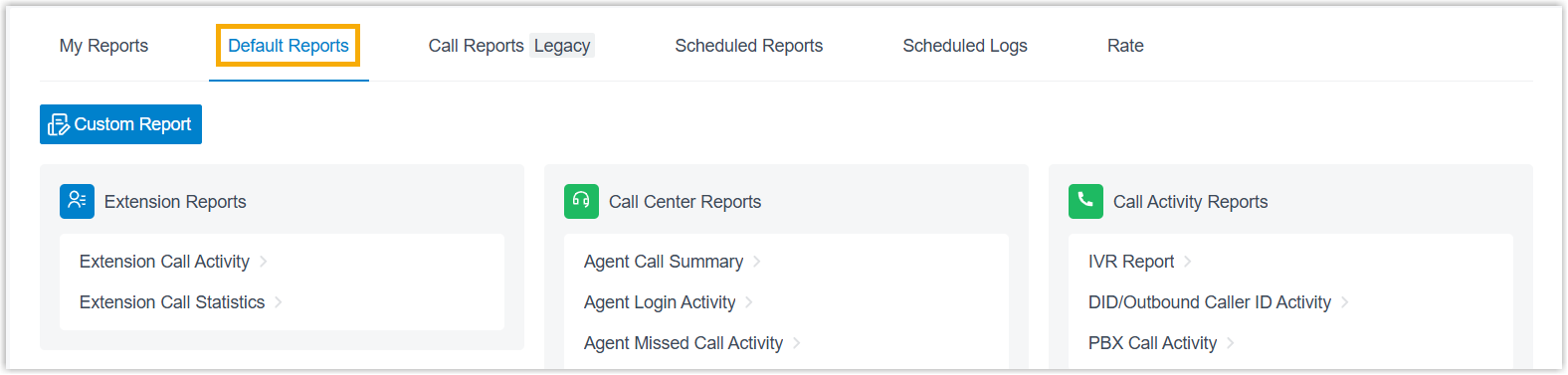
Default Reports. The phone system’s built-in reports have been reorganized and grouped under a Default Reports page.
-
New custom reports (Reports and Recordings > Call Reports > My Reports):
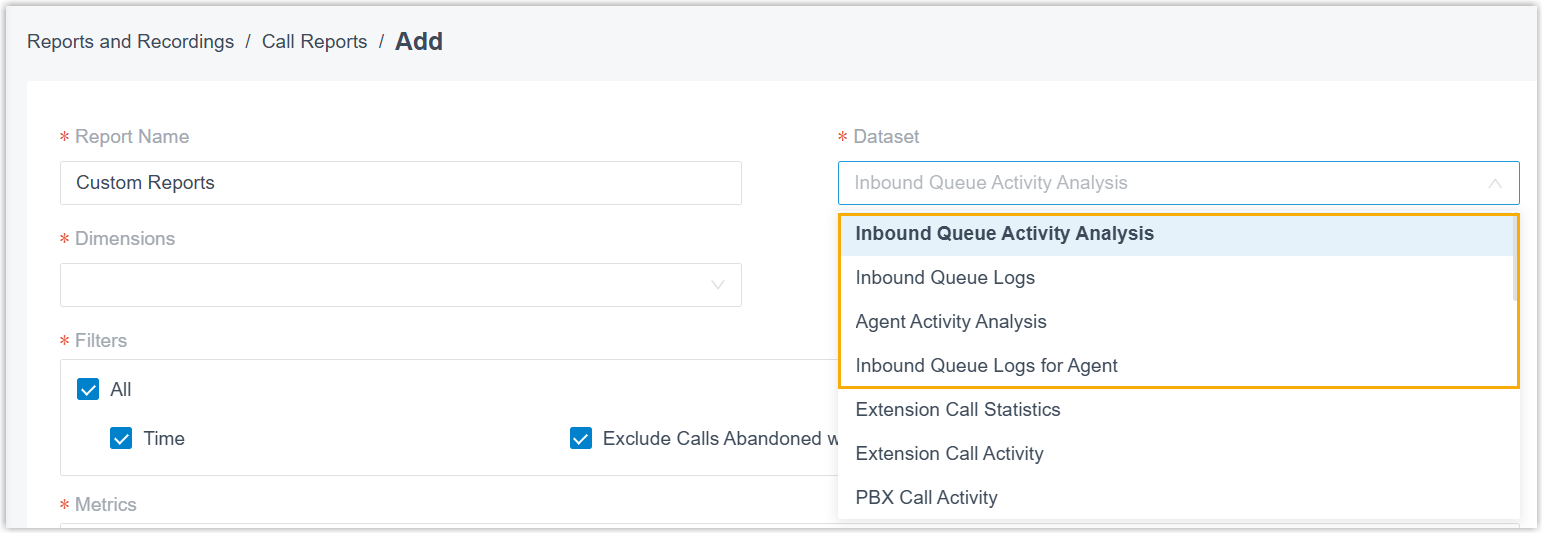
Report What it shows Inbound Queue Activity Analysis Granular insight into queue activity during queue call handling. Inbound Queue Logs A quick overview of each inbound queue’s call activity over a selected period. Agent Activity Analysis Granular insight into agent activity during queue call handling. Inbound Queue Logs for Agent A quick overview of each agent’s call activity over a selected period. -
Improved default reports (Reports and Recordings > Call Reports > Default Reports):
Report Change Extension Call Statistics / Extension Call Activity New Abandoned metric, calls the caller abandoned before reaching the extension, not counting calls the extension handled as a member of a queue or ring group. Extension Call Accounting Details New PIN Code filter (narrow data to specific PIN codes) and PIN Code metric (the PIN used when calling through a restricted outbound route). DID/Outbound Caller ID Activity New DID (Direct Inward Dialing, the external number a caller dials to reach an extension) and DOD (Direct Outward Dialing, the external number shown as the caller ID on outbound calls) filters for narrowing data to specific DID and DOD numbers. Agent Missed Call Activity New Queue metric showing which queue received the call. Agent Performance Now supports filtering on more than one queue. -
Quick actions from a report. You can now act on a report directly from its view:
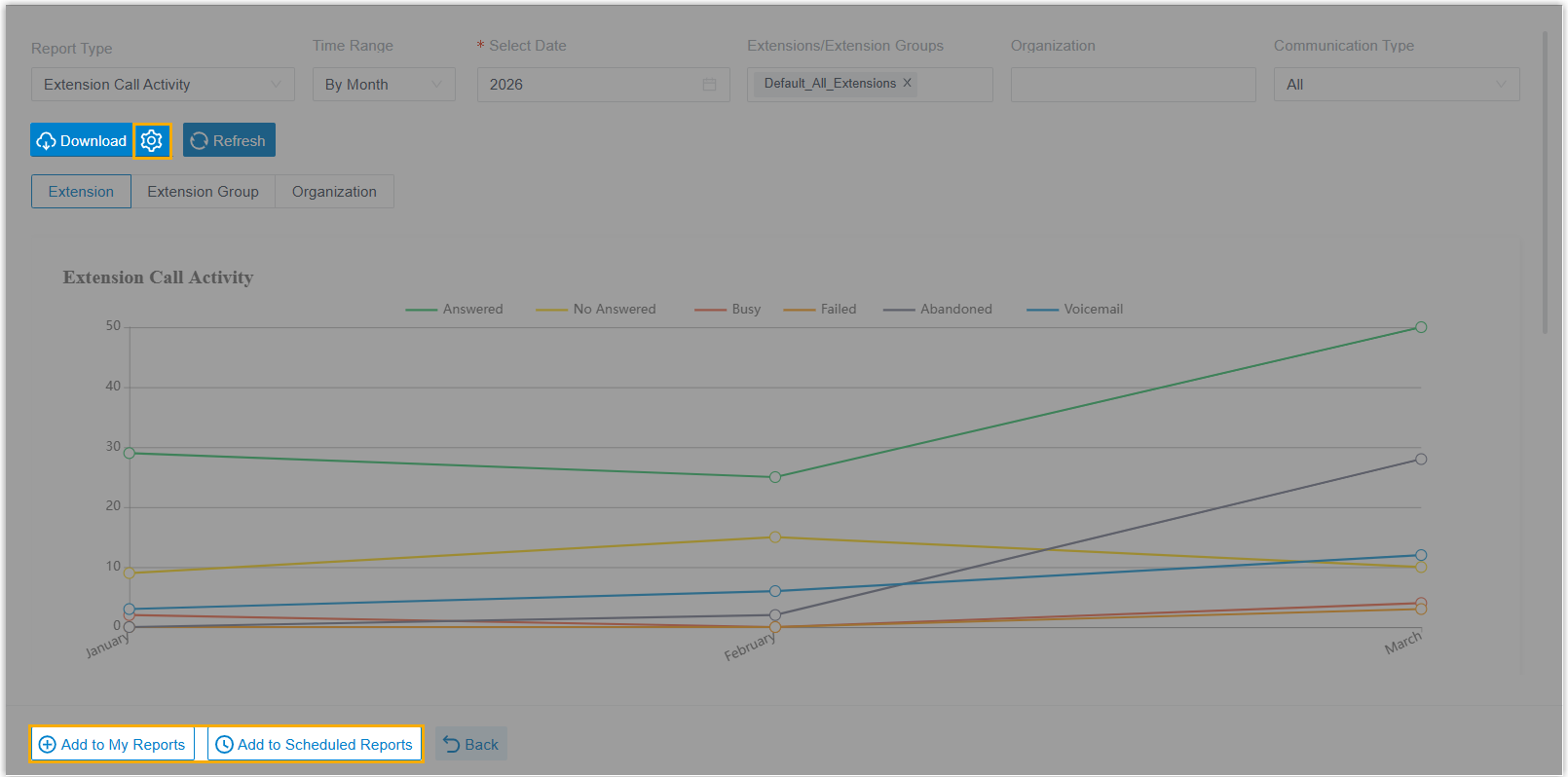
- Customize download settings: the settings icon beside Download opens per-report download options.
- Add to My Reports: pin a frequently used report for quick access.
- Add to Scheduled Reports: schedule the report to be emailed automatically.
-
Custom data display. You can now tailor how report data appears:
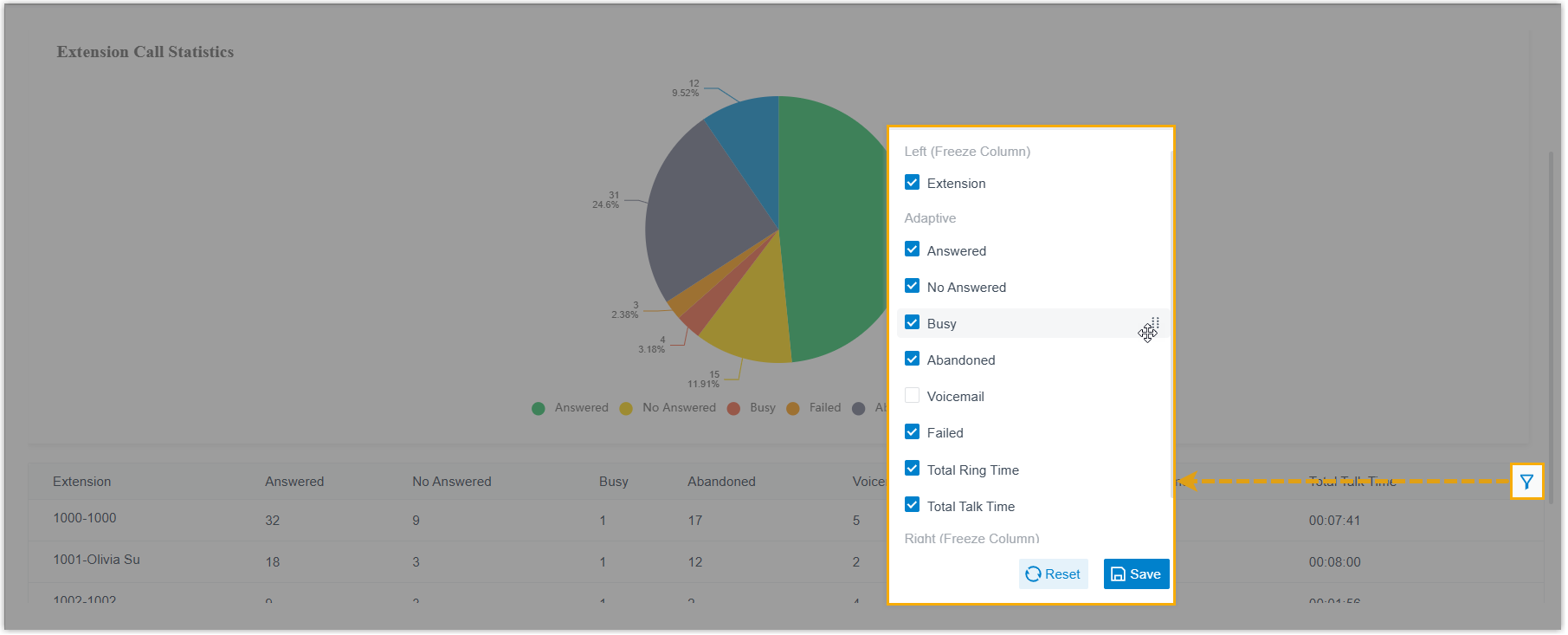
- Use the drag handle beside a field to reorder its position in the report data.
- Drag a field to Left (Freeze Column) or Right (Freeze Column) to pin it in place.
-
Scheduled reports. The scheduled report settings (Reports and Recordings > Call Reports > Scheduled Reports > Add Report > Scheduled Info) gained new options:
Setting Change File Format Reports can now be downloaded in HTML. Duration Format You can now choose the display format for all duration-related fields. Include Details You can now choose whether to include call details in the download, and how those details are laid out. The scheduled log list (Reports and Recordings > Call Reports > Scheduled Logs) now shows the delivery status of each scheduled report.

-
APIs. A new
myreport/listinterface returns the custom reports and the default reports pinned to My Reports. Thecall_report/list,call_report/detail, andcall_report/downloadinterfaces gained parameters for querying custom reports (my_report_id), the AI Receptionist Call Activity report (atypevalue ofaireceptionistcallactivityplusai_receptionist_id_list), Extension Call Accounting Details (pin_list), and DID/Outbound Caller ID Activity (did_num_listanddod_num_list).call_report/downloadalso addeddetail_type,format, andduration_formatfor download settings, andcall_schedule_report/listnow returns astatusfield for scheduled-report delivery.
Improvements and bug fixes
Section titled “Improvements and bug fixes”Extension
Section titled “Extension”-
You can now set the maximum number of Cloud Voice App clients that may be logged in to an extension at the same time (Extension and Trunk > Extension > User > Extension Information).

-
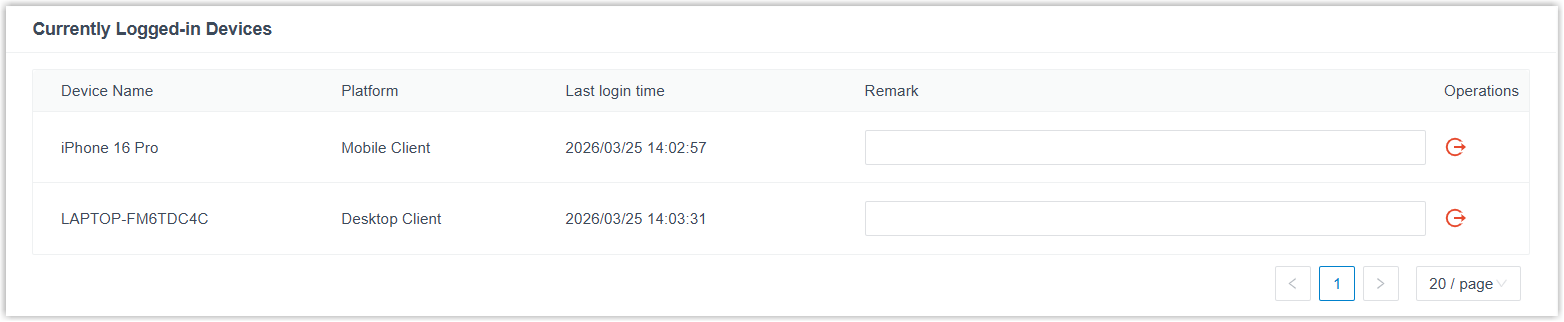
You can now view every Cloud Voice App client logged in to an extension and manage the associated devices, adding remarks or remotely logging the extension out of a specific device (Extension and Trunk > Extension > Cloud Voice App > Currently Logged-in Devices).
-
You can now update extension information by importing a file (Extension and Trunk > Extension > Import). If an extension number already exists in the system, its settings are updated automatically from the file.
New shared-trunk settings are now visible on the portal.
-
SIP Registration Timer: defines the number of registration attempts and the default registration validity period for a register trunk (Extension and Trunk > Trunk > (Shared Trunk) Register Trunk > Basic). SIP (Session Initiation Protocol) is the signaling protocol that phones and carriers use to set up and end calls.

-
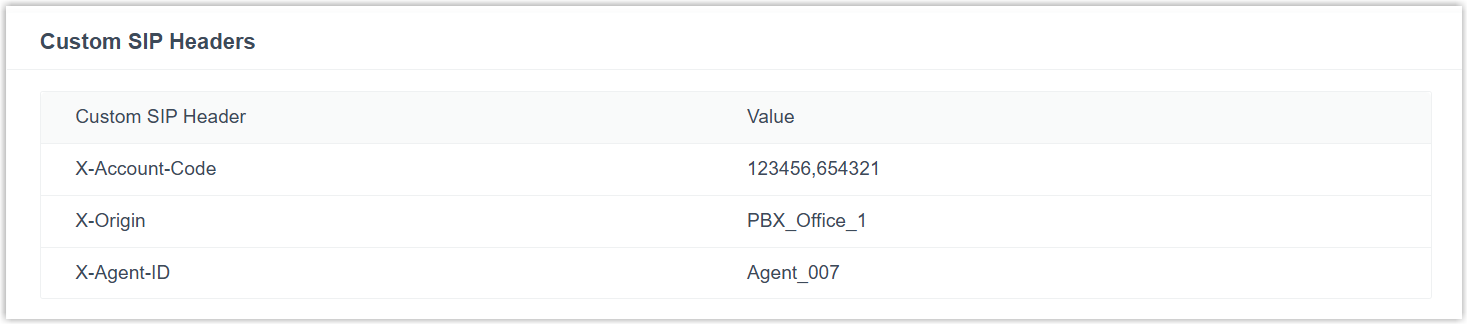
Custom SIP Headers: defines the custom SIP headers and values included in the SIP INVITE messages for calls sent through the trunk (Extension and Trunk > Trunk > Shared Trunk > SIP Headers).
Contacts
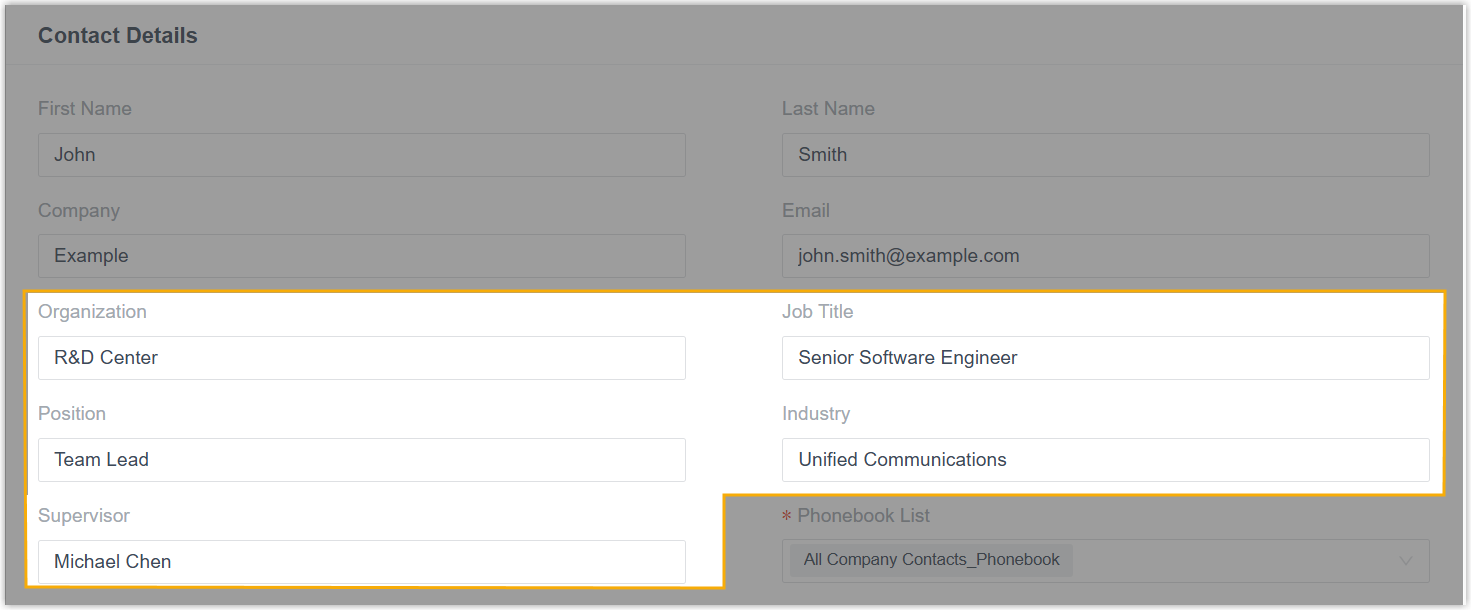
Section titled “Contacts”Company contact records now hold more detail, with new fields for Organization, Job Title, Position, Industry, and Supervisor (Contacts > Company Contacts).
Auto provisioning
Section titled “Auto provisioning”Fixed two Resource Repository issues:
- Uploading an IP phone firmware failed with a “Failed to upload” error and never completed.
- After firmware was uploaded for a model variant with a suffix (for example,
X5U-V2), the base model (for example,X5U) no longer appeared in the Model drop-down list for later firmware uploads.
Time conditions
Section titled “Time conditions”The maximum number of custom business hours and time periods you can add has increased from 10 to 20 across these features.
| Feature | Details |
|---|---|
| Inbound Route | With Time Condition enabled and Time-based Routing Mode set to Based on Custom Business Hours or Based on Custom Time Periods, you can add up to 20 time setting entries, each with up to 20 time periods. |
| Business hours and holidays | When configuring business hours for a time zone, you can add up to 20 time periods in Business Hours and up to 20 in Break Hours per time setting entry. |
| Call Flow Designer | When a Business Hours component’s Time-based mode is Based on Custom Business Hours, you can add up to 20 time periods in Business Hours and up to 20 in Break Hours. |
| IVR | With Time Condition enabled for an IVR Key Press Event and Time-based Mode set to Based on Custom Business Hours or Based on Custom Time Periods, you can add up to 20 time setting entries, each with up to 20 time periods. |
Inbound route
Section titled “Inbound route”Fixed an issue where, on an inbound route using Based on Custom Time Periods routing, dialing the feature code for a specific time period did not switch to the matching destination even though the other feature codes worked normally.
Call Flow Designer
Section titled “Call Flow Designer”Fixed an issue where the HTTP Request component could not retrieve the complete data from an HTTP response.
Speed dial
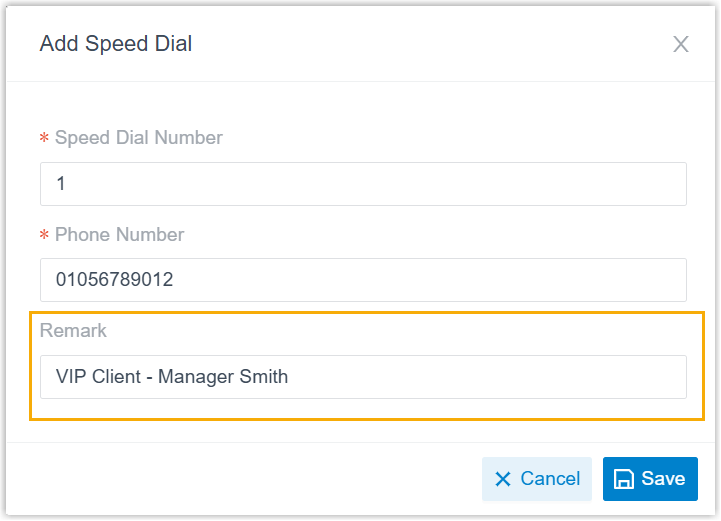
Section titled “Speed dial”You can now add a remark to a speed dial number (Call Features > Speed Dial). When a user dials the number, the remark appears alongside the phone number, making the entry easier to recognize.
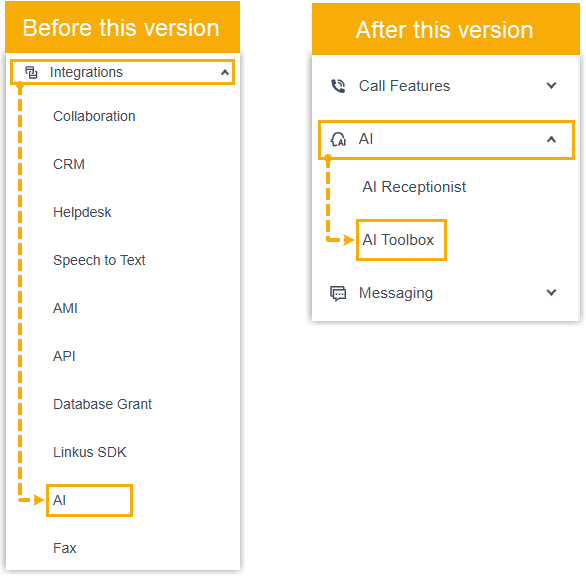
The built-in AI features, Text-to-Speech, Call Transcription, and Voicemail Transcription, have moved from Integrations > AI to AI > AI Toolbox.
AI transcription
Section titled “AI transcription”-
Two add-on subscriptions now expand your pool of AI Transcription minutes (Plan > Add-on Subscription).

Subscription What it provides AI Transcription (One-Time Capacity) Formerly the Transcription service, a one-time block of AI transcription minutes. Buy more once the block runs out. AI Transcription (Monthly Quota Pack) Each pack adds 500 AI transcription minutes per month; subscribe to one or more packs as needed. Every phone system includes free one-time AI Transcription minutes, 120 on the Enterprise plan or 240 on the Ultimate plan, and you can add more as needed.
- To subscribe to either service, contact your service provider.
- You can buy one-time capacity, subscribe to one or more monthly packs, or combine both. When both are active, minutes are drawn from the monthly pack first.
-
Improved AI transcription event notifications (System > Event Notification > Event Type > Reminder).
Event Change Your AI Transcription Usage is Reaching the Capacity Limit You can now set capacity alert thresholds separately for one-time capacity and monthly packs. The alert fires when the utilization rate of either reaches its configured threshold. AI Transcription Limit Reached Fires when all AI transcription minutes, across both the one-time capacity and the monthly pack, have been used. 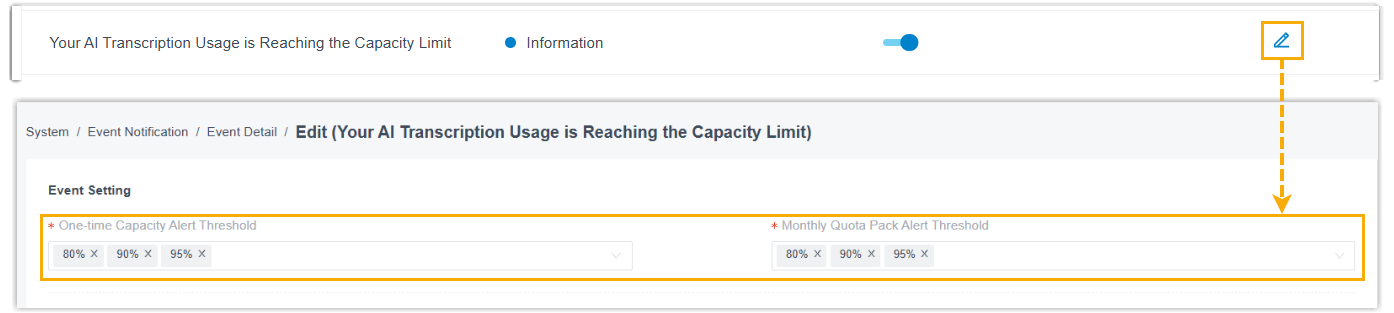
Email template
Section titled “Email template”Fixed an issue where editing the Scheduled CDR (Call Detail Record, the log of a completed call) email template and setting the display text for the CDR download link caused the phone system to prepend http:// to the URL, producing a duplicate prefix that broke the link.
Event notification
Section titled “Event notification”Two new events are available under System > Event Notification > Event Type > System.
| Event | Trigger |
|---|---|
| Concurrent Calls Overload | Concurrent calls have reached the phone system’s limit. |
| Lost Connectivity to Shared Trunk | A shared trunk has lost connectivity unexpectedly. |
SIP settings
Section titled “SIP settings”You can now customize SDP (Session Description Protocol) session parameters, the session name (the s= line) and the <username> portion of the session originator (the o= line), to meet specific carrier or device requirements (PBX Settings > SIP Settings > Session > Session Parameter Configuration). SDP is the part of a SIP message that describes the media for a call.

Microsoft Entra ID (Azure Active Directory) integration
Section titled “Microsoft Entra ID (Azure Active Directory) integration”-
The integration process is simpler. You can now start it directly from the phone system: sign in with a Microsoft account to grant consent, and the phone system automatically creates the application it needs in Microsoft Entra ID, no manual configuration required.
-
User synchronization has been improved:
-
A new User Avatar Synchronization option syncs user avatars from Microsoft to the matching phone system extensions when enabled.
-
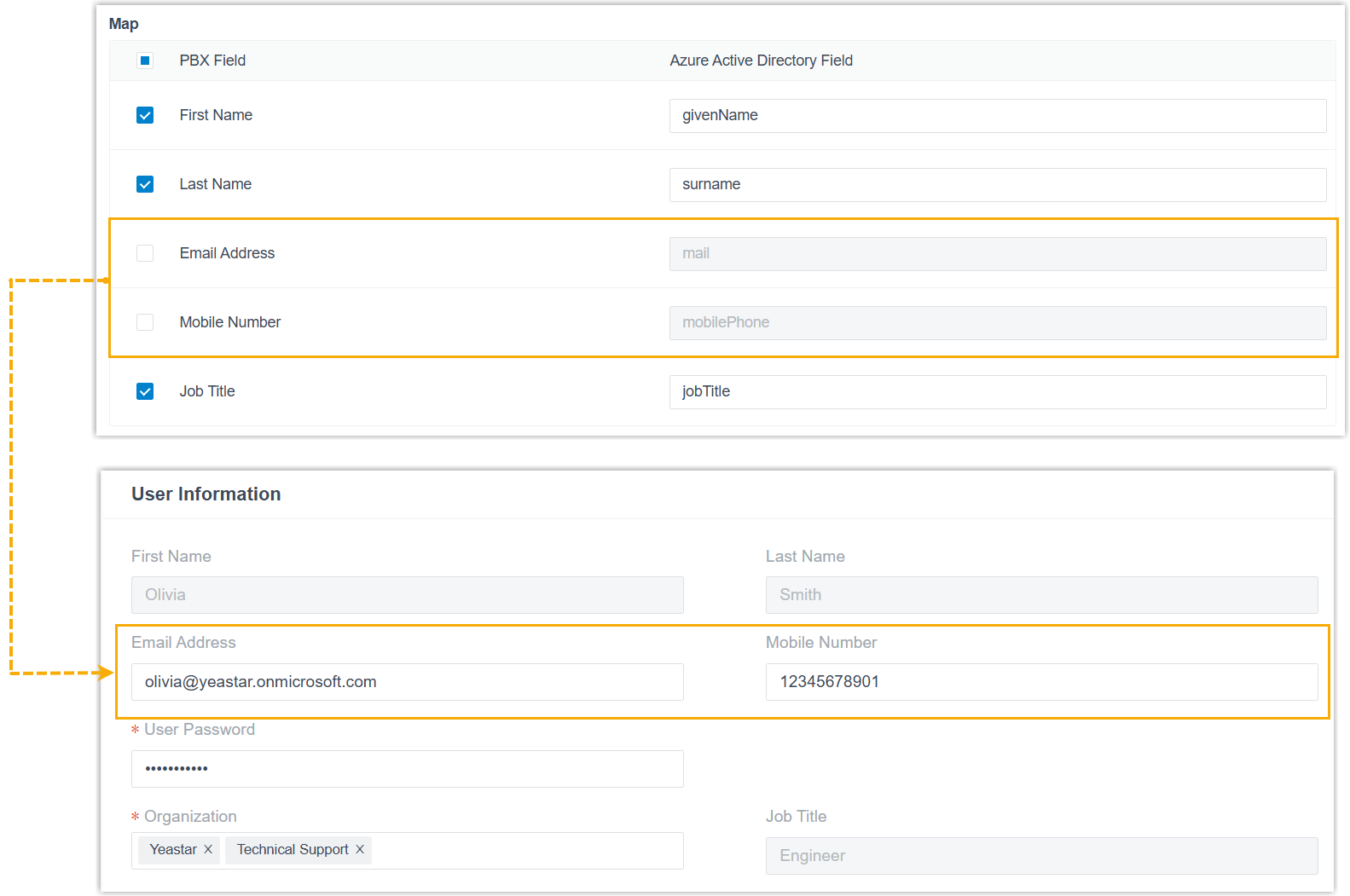
You can now edit the extension information of synced users. Disable the mapping for specific fields (or all of them) and those fields stop syncing, so you can edit them directly on the phone system.
-
-
Contact synchronization has been improved: with the simplified integration method, Outlook contact synchronization is set up entirely on the phone system, with no extra permission handling in Microsoft.
-
Interface improvements by feature:
Feature Change System Added an ai_receptionistvalue to themenuparameter ofsystem/get_menuoptionsfor querying existing AI receptionists, andsystem/capacitycan now return the total and used one-time or monthly AI transcription and AI receptionist minutes.Extension Added a max_clientsparameter toextension/get,extension/query,extension/create, andextension/updatefor querying or setting the maximum number of app clients that can log in to an extension at once.Contacts Added organization,job_title,position,industry, andsupervisorparameters to the Contacts interfaces (exceptcompany_contact/delete).Trunk Added registration_attempts,default_registration_time, andcustom_sip_headerstotrunk/getandtrunk/queryfor querying shared-trunk settings.Inbound Route Added an ai_receptionistvalue to the destination parameters of the Inbound Route interfaces (exceptinbound_route/delete).IVR Added an ai_receptionistvalue to the destination parameters ofivr/get,ivr/query,ivr/create, andivr/update.Recording Added a filerequest parameter torecording/playtoextensionso you can specify a recording by its file name when playing it to an extension. -
The (30011) Call State Changed event now includes an
internalobject in themembersarray, returning information about internal calls.
Fixed an issue where CDRs could not be downloaded in CSV or XLS format.
Question about this page?
Ask the AI assistant. It starts from this page, then searches the rest of the docs.
Ask Cloud Voice AI
Answers are AI-generated from the docs and may contain mistakes. Verify with the linked pages.