
Check Wake-up Call Logs
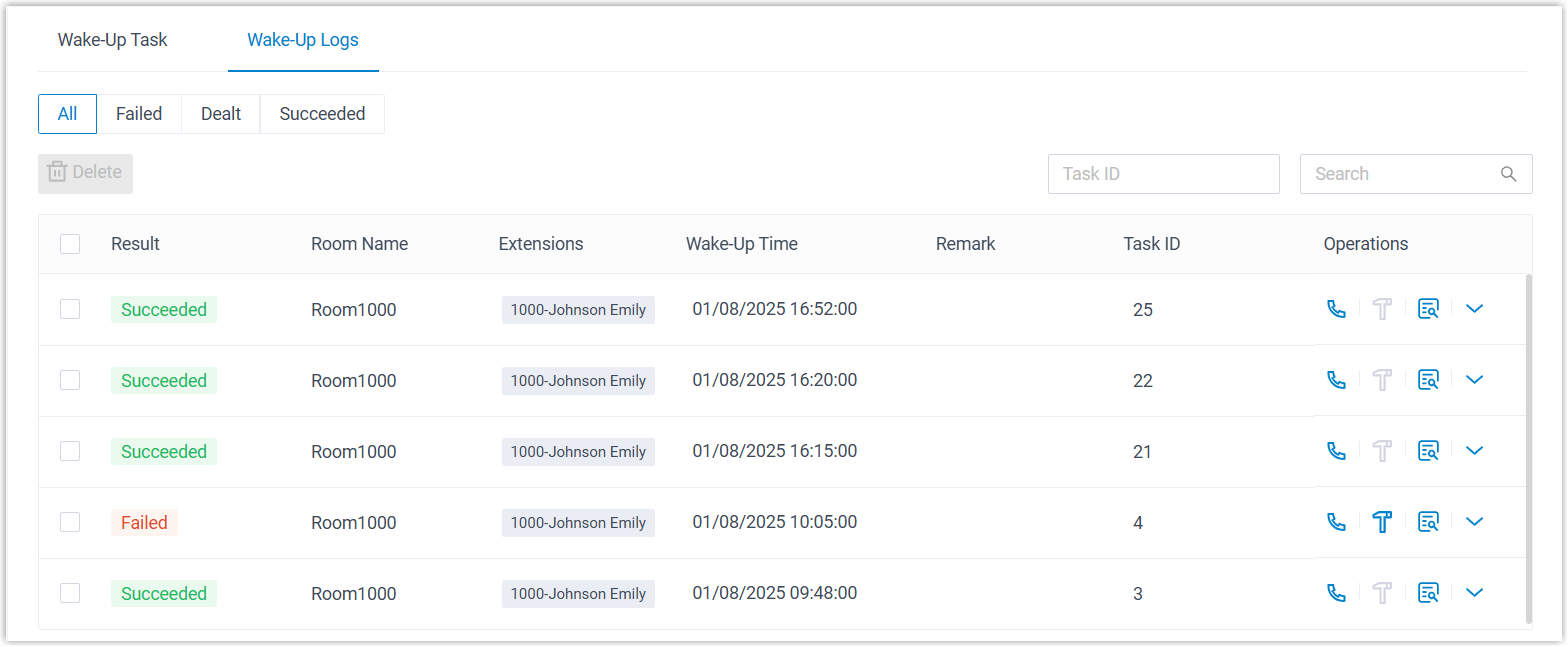
Every wake-up call the system places is recorded, whether it succeeds or fails. These records give the front desk a clear history to confirm that guests were reached on time and to follow up on any call that did not go through. Check them at the start of a shift, or any time a guest reports a missed wake-up call.
Storage limit
Section titled “Storage limit”The system keeps up to 100,000 wake-up call records. Once that ceiling is reached, the oldest entries are removed automatically to make room for new ones.
Open the wake-up logs
Section titled “Open the wake-up logs”- Sign in to the Cloud Voice App (Desktop or Web).
- Go to Hotel Management > Wake-up Service > Wake-Up Logs.
The page lists every wake-up call, so you can see at a glance which tasks completed and which ran into trouble.
Follow up on a failed call
Section titled “Follow up on a failed call”When a wake-up call fails, you can investigate it directly from the list:
- Select
 next to the failed entry to see the reason the call did not connect, then take whatever action the situation calls for.
 - Once you have handled it, select
 to flag the task as resolved.
Question about this page?
Ask the AI assistant. It starts from this page, then searches the rest of the docs.
Ask Cloud Voice AI
Answers are AI-generated from the docs and may contain mistakes. Verify with the linked pages.