Queue Calls Management
Overview
In this section, you'll learn how to manage various call-related tasks in the IZT Cloud Voice system, including picking up, redirecting, transferring, parking calls, switching call recording status, monitoring, hanging up, and placing calls to an agent. Each task is detailed in its respective tab.
Pick up a Call
If a call is ringing and has not been answered for a long time, in order to save the callers’ waiting time, you can pick up the ringing call. This topic describes how to pick up a ringing call.
Requirements
- To pick up agents' incoming calls, make sure that you have been granted the Allow for picking up or hanging up agents' calls permission by the system administrator.
Procedure
- In the IZT Cloud Voice Web Client, go to Call Center Console > Queue Panel.
- On the Waiting Calls panel, hover your mouse over a call that is in Ringing status.
- Right-click the incoming call, and select Pick Up.
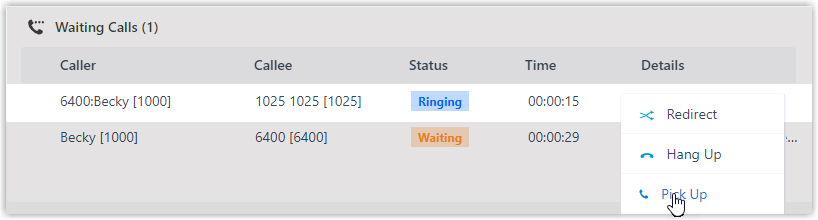
- Answer the call.